

Supplier Missed a Deadline — Here's the Jira App That Proves It Wasn't You
When I worked as a marketer at a company that manufactures dental units, I collaborated with other departments, and that's where I ran into one problem in the purchasing department. When I started working on AI Apps Builder, I could clearly see a way to solve it.
Here's the situation: a purchasing manager orders materials from suppliers, tracks each order as a Jira task, and each task has an SLA. The problem is that most of the communication with suppliers or logistics companies happens over email, not in Jira. So when a supplier ships late, the SLA still shows as breached, and there's nothing in the task proving it wasn't the manager's fault. And when someone asks "why is this late," and the manager has to go dig through email instead of just pointing at the task.
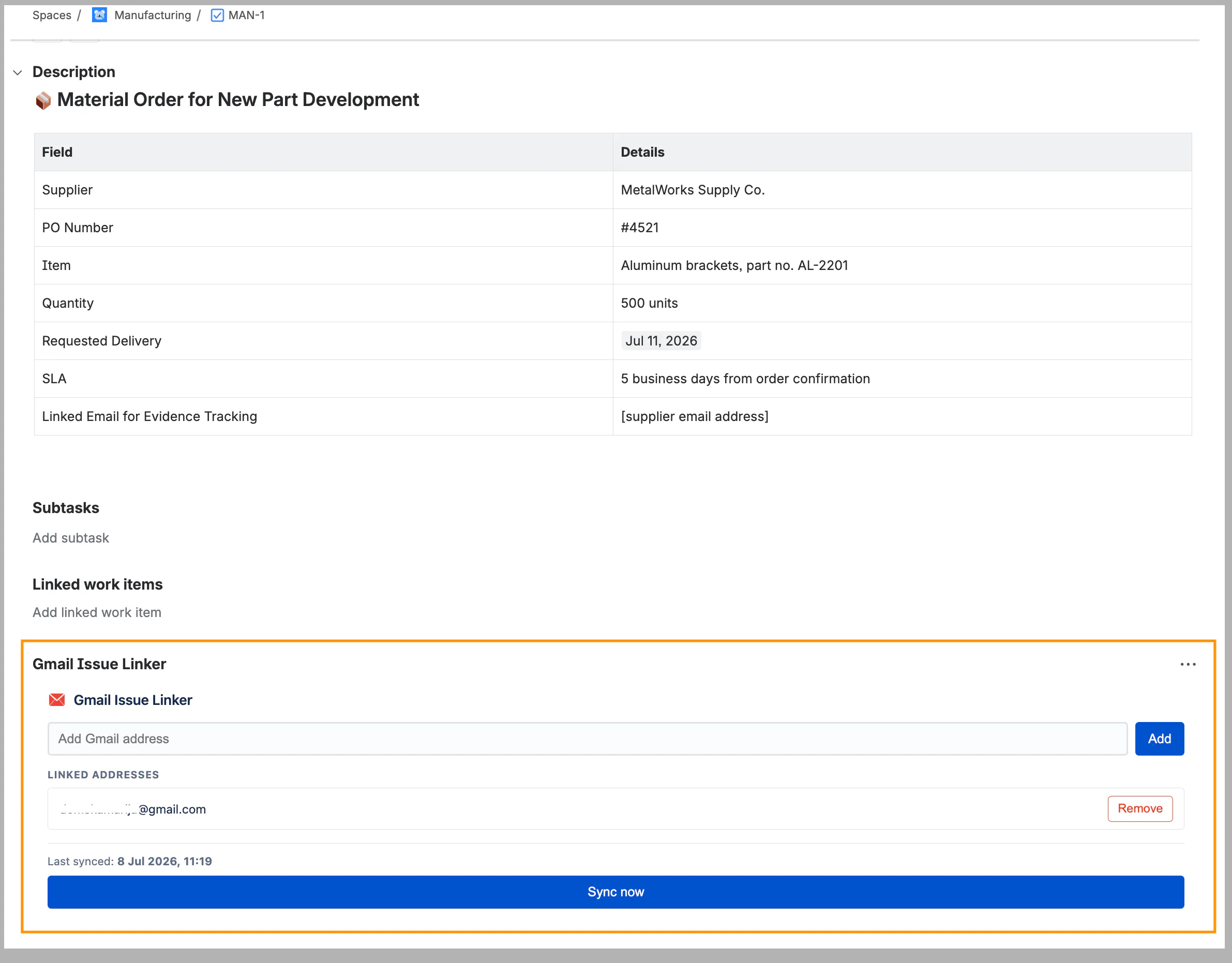
I saw this happening and figured there was a way to fix it, so now, working on AI Apps Builder, I built a custom app called Gmail Issue Linker — no code, just a prompt:
Build an Issue Panel app for Jira with Gmail integration.
The panel should let a user link one or more Gmail email addresses to a Jira issue.
Once linked, the app should:
Fetch all email messages exchanged with those addresses
Post each new email as a comment on the issue (sender, date, subject, message body)
Automatically sync once per day via a scheduled trigger, adding any new emails as comments
Also let the user manually trigger a sync from the panel (a "Sync now" button), for cases when they need up-to-date evidence immediately
Let the user unlink an email address from the issue at any time
Avoid adding duplicate comments for emails already synced
The panel should show:
A field to add/remove linked email addresses
A list of currently linked addresses
A status indicator showing when emails were last synced (date/time of last sync)
A "Sync now" button for on-demand sync.
What my custom Jira app does:
Link one or more Gmail addresses (the supplier, a logistics contact, whoever the manager is waiting on) to a Jira issue.
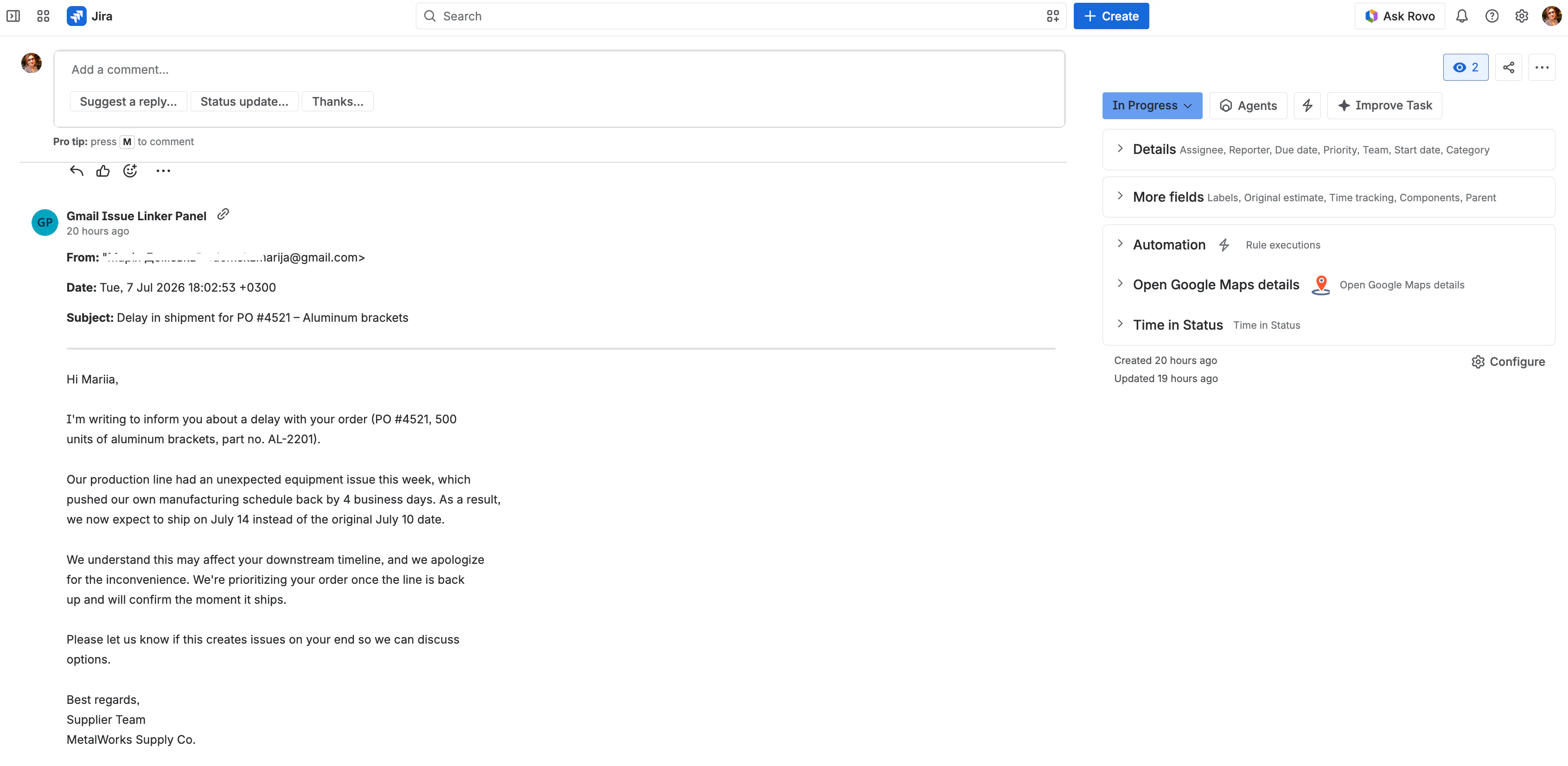
The app automatically pulls emails to/from those addresses and posts them as comments on the issue — sender, date, subject, full message.
Syncing runs once a day on a schedule, plus there's a manual "Sync now" button for when you need proof immediately.
I tested it against a real scenario: a supplier sent an email about a shipment delay. I hit "Sync now," and the email showed up as a comment on the task within seconds — sender, date, subject, full message, no copy-pasting.
The prompt I used described the issue panel, said it should connect to Gmail via OAuth, and listed the specific behaviors I wanted (fetch emails, post as comments, sync daily + on demand, no duplicates, ability to unlink). AI Apps Builder generated the whole thing: the panel, the Gmail OAuth admin page, the scheduled trigger, and the resolver logic connecting it all.
This isn't just a procurement thing either; the same pattern would work for an HR manager tracking candidate emails, someone waiting on a vendor for an event, or any task where the proof of what happened lives in someone's inbox instead of the task itself. And if your team uses Slack instead of email, AI Apps Builder supports that integration too, so the same panel works there.
If you're checking out AI Apps Builder here on Product Hunt, an upvote helps us a lot 🙌 — and if you want to try building something like this yourself, install AI Apps Builder and describe the app you need. No coding required.
Replies
Be the first to reply
Have a question or a thought to share? Add a comment above to start the conversation.