

How to Built a Jira Agent That Chases Down Missing Worklog Notes From One Prompt
Hey Product Hunt 👋
We're the team behind AI Apps Builder for Jira — a no-code platform that lets you create custom Forge apps, integrations, AI agents, and skills by describing what you need in plain language.
Today I want to show you something specific: how I built a real, working Jira agent from a single prompt. No code. No developer. No Forge setup.
The problem we wanted to solve
Many Jira teams have this issue. Tickets close, time gets logged, and nobody writes down what was actually done. Sprint retros turn into reconstruction exercises. The PM spends hours chasing context that should already be in the ticket.
I wanted an agent that handles the follow-up automatically.
The prompt
Here's exactly what I typed into AI Apps Builder:
"Create a Rovo agent that automatically finds completed Jira tasks that have logged time but without a worklog description, then posts a polite @mention to the assignee and reporter, asking them to add a short note on what was done."
We also gave it parameters in plain language:
→ Never guess about issue or project keys — ask when uncertain
→ After each batch run, produce a summary table: Issue Key | Action Taken | Result
→ Never delete issues
→ Require confirmation before bulk-updating more than 100 issues.
How the AI agent works
When asked to find completed issues with logged time but no worklog comments in a specific project, the agent came back with a structured list of every closed ticket missing a worklog description:
Issue Key | Summary | Undescribed Logs |
|---|---|---|
MD-184 | Create a LinkedIn post: security and complaints | 1 |
MD-185 | Create a page for documentation | 1 |
MD-181 | Create an article for Atlassian Community | 1 |
MD-190 | Add block in documentation: AAB supports 31 modules | 1 |
MD-191 | Create a LinkedIn post: AAB supports 31 Jira modules | 1 |
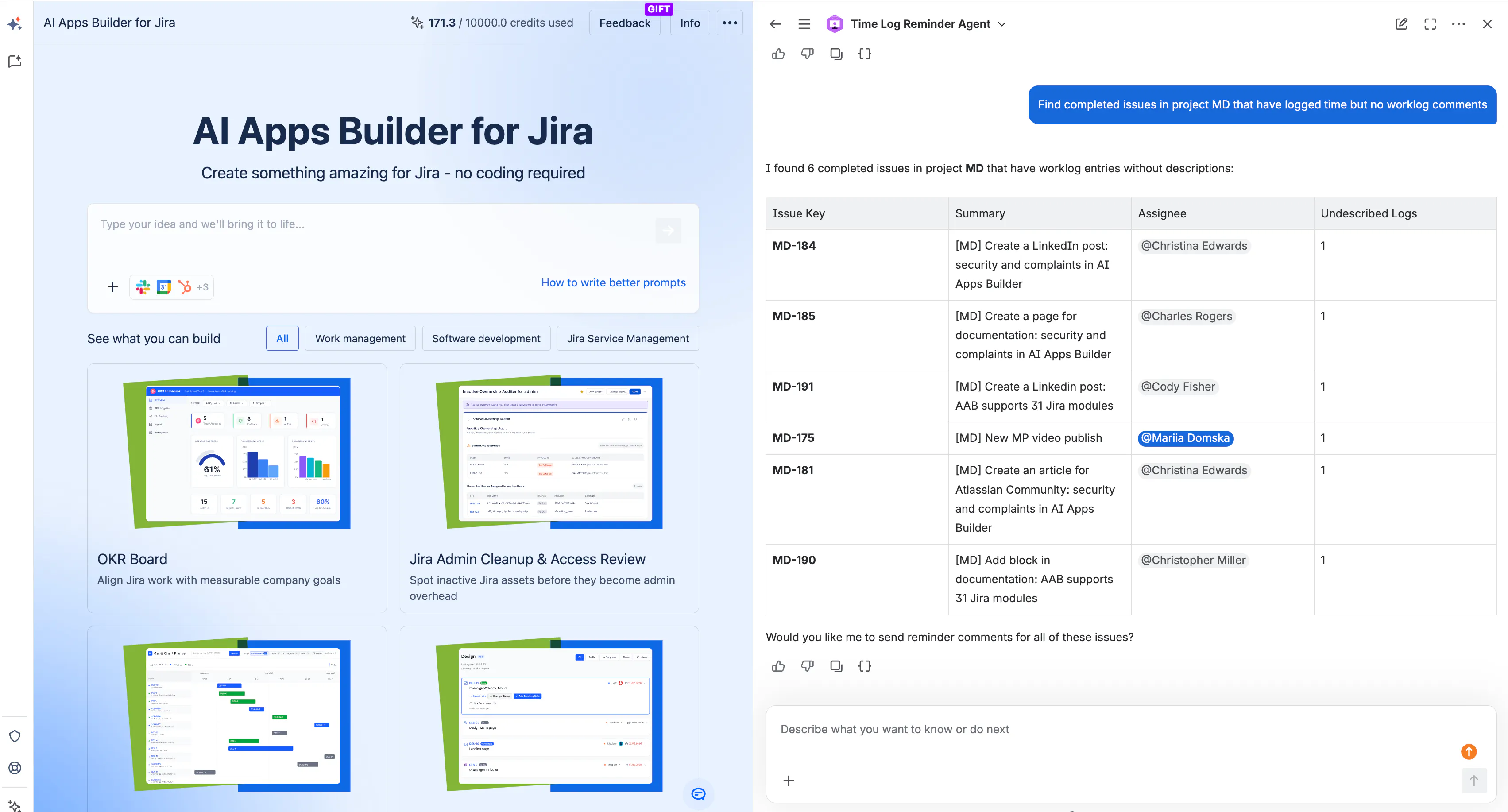
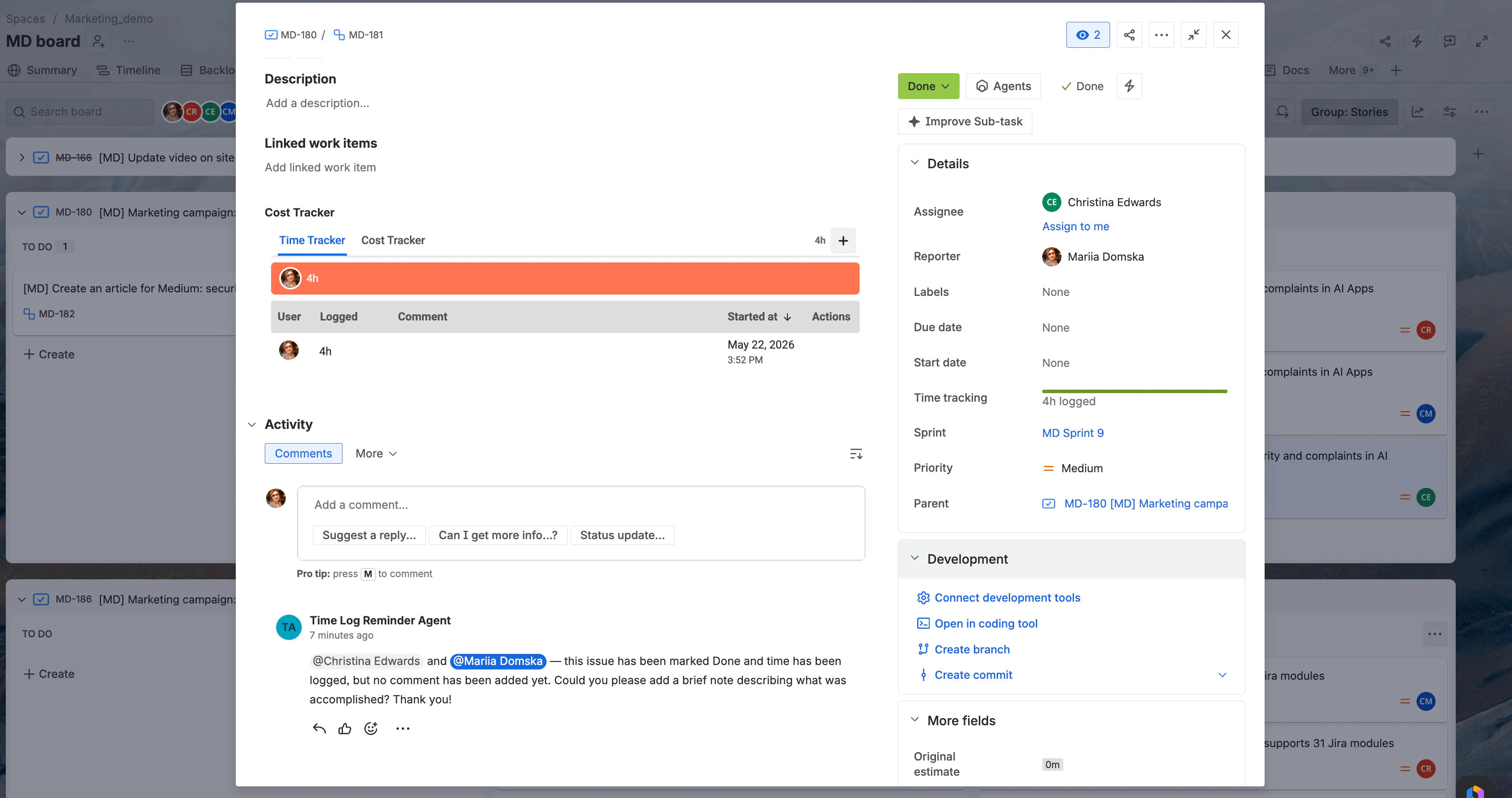
When said to send reminder comments for all of these, the agent posted a polite @mention to the assignee and reporter on every issue — asking them to add a brief worklog description. One prompt to build it.
Real value of the AI agent
For a team of 10 closing 60 tickets per week, ~40% missing worklog notes:
→ ~24 tickets closed silently every week → every one now gets an automatic nudge
→ PM spending ~2 hrs/week chasing context → replaced by a clean summary report
→ ~78 hours recovered per year — nearly two full working weeks
But the less obvious wins matter more long term:
Sprint accuracy — without notes, your velocity data tells you how long things took, not what was done or why. Future estimates become guesswork.
Institutional memory — when a developer leaves or a feature needs revisiting, the ticket is often the only record. One sentence saves the next person two hours.
Compliance — for teams under SOC2, ISO, or client SLAs, documented work completion isn't optional. The agent turns a manual compliance task into a background process.
How to build your own app or agent with AI Apps Builder
Describe your idea in plain language
AI suggests a solution and plans the specification — you can edit and download it as a PDF before anything gets built
Approve, and the AI generates the Forge code
Preview the app
Deploy to your Jira Cloud instance.
Under 30 minutes. No developer. No Forge environment to configure.
One thing worth mentioning for security-conscious teams
AI Apps Builder doesn't require AI to be enabled at the Jira instance level. Unlike Rovo Studio, it works outside the instance — and there's a web version that requires zero installation in Jira. For teams with strict IT or compliance policies, this matters.
What else can you build with AI Apps Builder
The same approach works for any workflow problem with a clear pattern:
→ Sprint hygiene agent — flags issues with missing story points before the sprint start
→ SLA monitoring — alerts assignees when tickets approach breach thresholds
→ Onboarding agent — creates Confluence pages and assigns starter tasks automatically
→ Compliance tracking — audits configuration changes and logs them to a dedicated project.
Install AI Apps Builder and get started with 100 free credits: https://marketplace.atlassian.com/apps/1238421
You’ll get 100 free credits to start, which is enough to build at least five working Jira apps.
AI Apps Builder for Jira | Build custom Jira apps with AI — no coding needed | Product Hunt
Replies
Be the first to reply
Have a question or a thought to share? Add a comment above to start the conversation.