

AI Apps Builder for Jira now supports third-party integrations. Here’s what that means for you
Hey Product Hunt 👋
We’re the team behind AI Apps Builder for Jira. It’s a no-code platform where you describe a Jira app in plain language and get a working Atlassian Forge app in return.
Today, we’re releasing the feature our users have requested most: third-party integrations. Here’s exactly what changed and what you can build now.
Jira problem that Forge apps solve
Jira offers good built-in integrations for Slack, Teams, Confluence, and common developer tools. But as soon as you need something more specific, like pulling action items from Notion into Jira sub-tasks, or triggering a series of actions when an issue moves to Done, the built-in connectors can’t help.
Before, you had to write Forge code yourself or wait for a developer to do it.
AI Apps Builder supports third-party APIs
AI Apps Builder now generates Forge apps that connect to external services, and it sets up authentication for you automatically.
Three integration types supported:
Public APIs — no auth required
API key — for tools like Notion, HubSpot
OAuth 2.0 — for Gmail, Google Drive, Google Calendar
Supported out of the box: Slack, Gmail, Google Drive, Google Calendar, HubSpot, Notion, and other service with a public or authenticated API.
What gets generated automatically
When your app needs to connect to an external service, two things are created automatically:
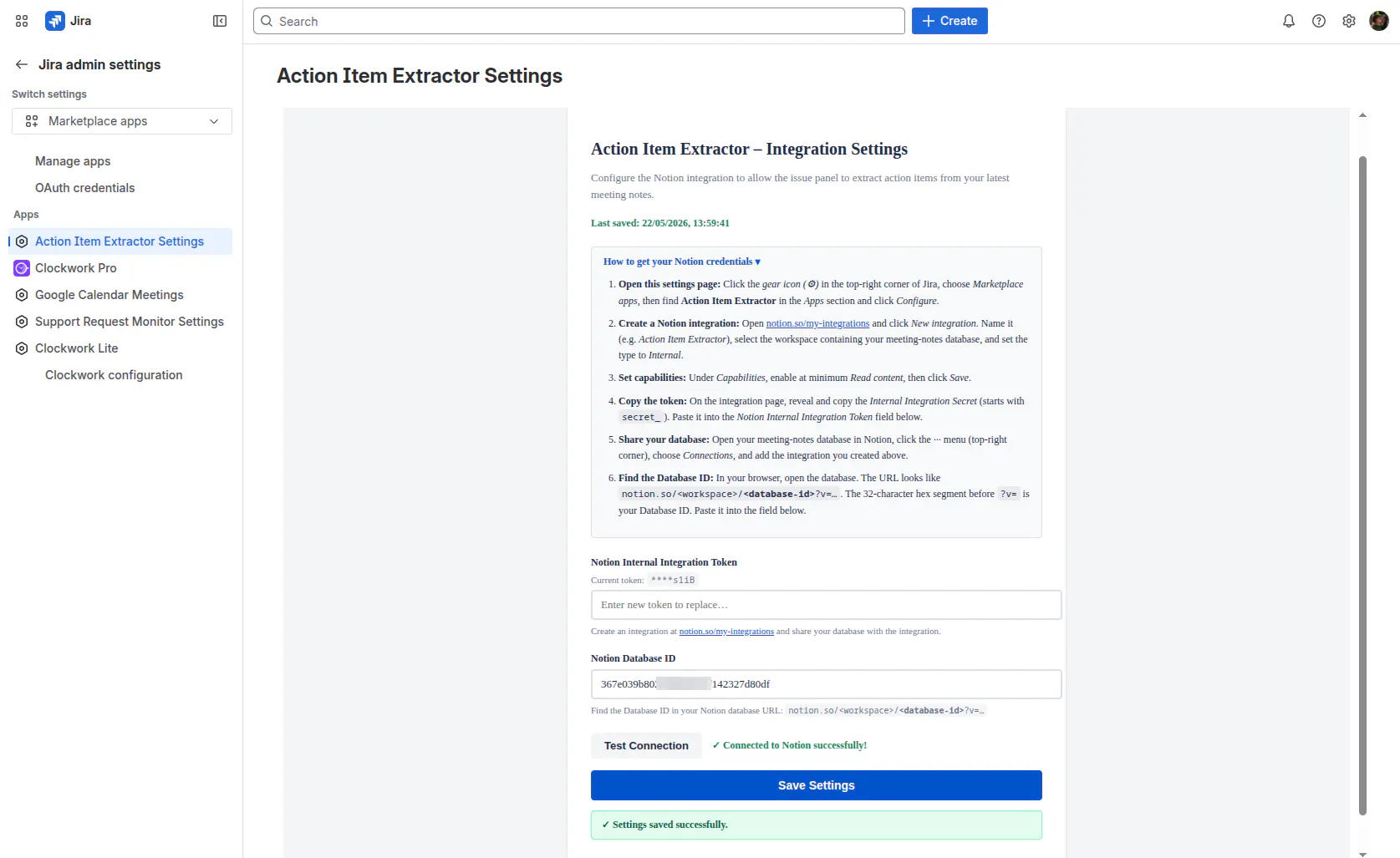
An admin settings page inside Jira, which includes step-by-step setup instructions for the external service, credential fields, a test connection button, and resource configuration. The builder creates this page for you.
The app itself, deployed to whichever Jira surface you choose: issue panel, global page, dashboard gadget, admin page, or any of the 31 supported modules.
All API calls run within Atlassian Cloud. Your credentials and data always stay inside Atlassian’s infrastructure.
Two real apps we built to test this
Use case: Support Ticket Generator
Prompt:
Build a service that monitors my Gmail for support requests and drafts Jira tickets for them.
After five clarifying questions about where the app lives, how to identify emails, which project to use, and OAuth 2.0 for Gmail, the builder generated:
A full admin settings page with Google OAuth setup instructions, Client ID/Secret fields, and a Callback URL
A live global page in Jira that shows the Gmail connection status, a Sync Now button, and a table of recently created issues.


Use case: Action Item Extractor
Prompt:
Extract all Action Items from my latest Notion meeting notes and create Jira sub-tasks for them.
After four questions and four answers, the builder generated:
An admin settings page with a six-step Notion integration guide, a masked token field, and Database ID input.
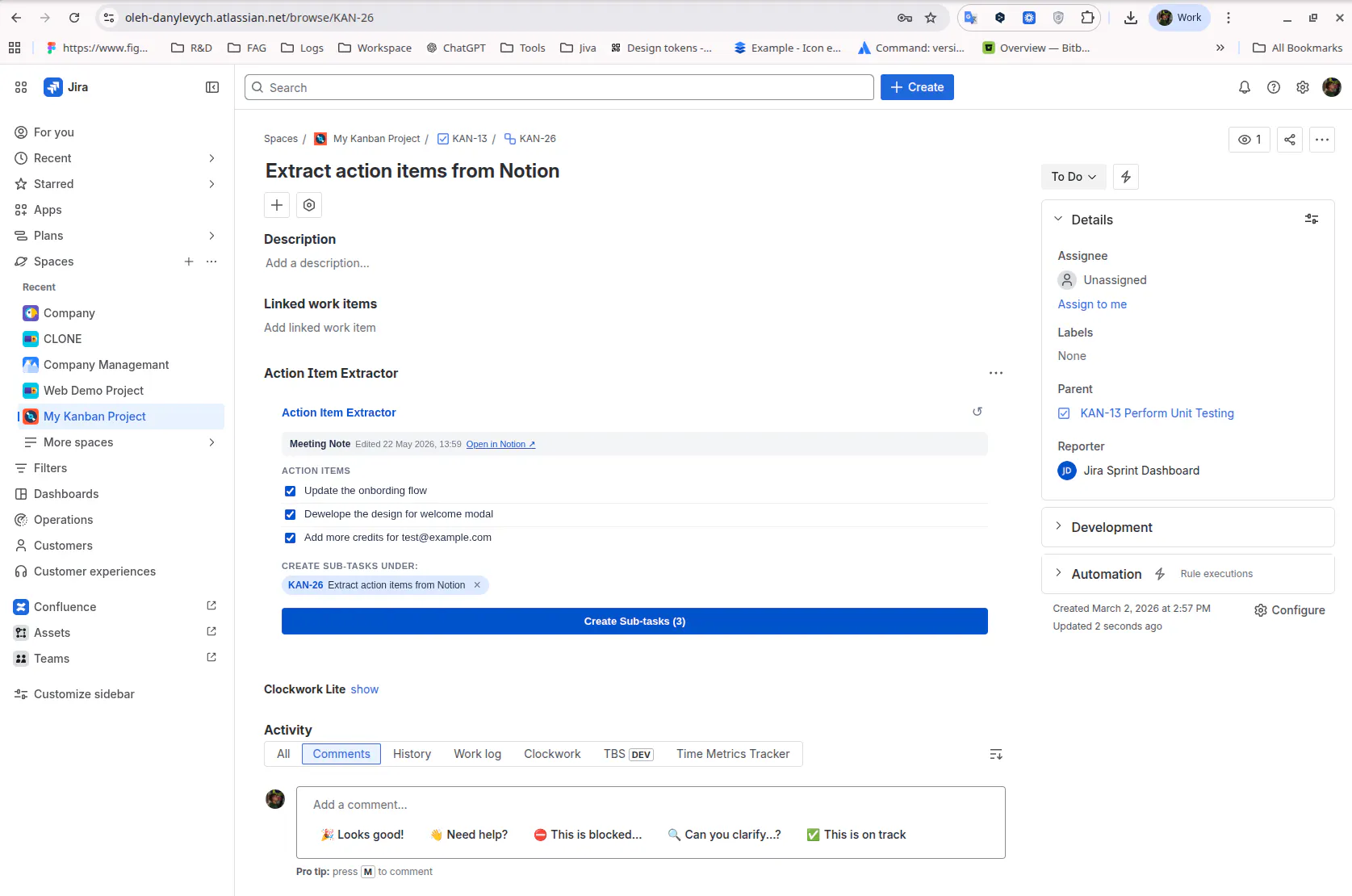
An issue panel inside Jira that pulls the latest meeting note, displays extracted action items as a checklist, and creates all sub-tasks with one button click.
The security model: this is the question we get most often
The AI generates code. That’s it. The AI never connects to Jira, never reads your data, and never interacts with the external services your app uses. Once deployed, the Forge app runs entirely inside Atlassian Cloud with standard Forge permissions.
The AI generates the code, Atlassian Forge runs it, and your data stays within Atlassian’s infrastructure at every step.
Who AI Apps Builder is for
Jira admins who need custom integrations without filing a dev ticket.
Product managers who want Jira connected to the tools their team already uses.
Solutions consultants building client workflows across multiple tools.
Team leads who are tired of manually copying and pasting between Slack and Jira.
→ Install AI Apps Builder for Jira
You start with 100 free credits, which is enough to build at least five working Forge apps. Begin with one integration your team already needs. Describe it and see what the builder creates.
We’re happy to answer any questions below about specific integrations, the security model, supported modules, or anything else.
Replies
Be the first to reply
Have a question or a thought to share? Add a comment above to start the conversation.