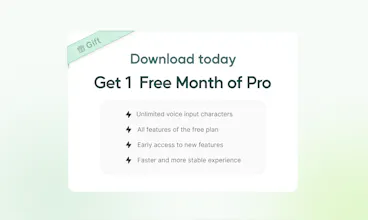
Voiskey starts from what you meant, not just what you said. Speak a rough thought and it comes back shaped for where it's going and who's reading it: casual with a friend, composed with a colleague, technical with an AI. It arrives 5x faster than typing, cleaned up and ready to send, while you still sound like you. Voiskey is now available on iOS, macOS, Android, and Windows, in over 100 languages. It's free to start. Join during launch and get a free month of Pro.
@attacomsian Great question, Atta! Voiskey has a free tier to get started, and Pro unlocks unlimited dictation + full personalization at $29.99/month or $129.99/year. We're also offering a free month trial right now if you want to try Pro features first!
@attacomsian Free plan to start, 2,000 words a week. Pro unlocks unlimited dictation, translation, and Ask AI. Every new account also gets one month of Pro free, so there's no reason not to try the full version first.
@ll_wen There's no manual dial for that yet. What Voiskey does instead is detect where you're writing and match the register to that — so a note app gets something different from an email. If you find a case where it's over- or under-polishing, we'd genuinely love to hear it.
@ll_wen Great question, Daniel! Right now Voiskey automatically adjusts tone and formatting based on the app you're typing in, so it's not manually adjustable yet. But a lighter/customizable cleanup level is something we're actively working on — really appreciate you raising it, feedback like this helps shape what we build next 🙏
@ll_wen It’s true that we can’t yet let users manually select a lighter level of refinement. Right now, Voiskey automatically adjusts the intensity based on the scenario you’re using it in. However, this is definitely something we’re considering for the future. Thanks for the suggestion — feedback like this helps us improve.
Report
I'd try it for a quick post-meeting Slack recap, if it keeps the shorthand I'd normally use
@carlvert We got you, Carlvert — Voiskey adapts to the app you're in, so in Slack it keeps things short and casual, not overly formal. Should fit right in with your usual shorthand. Give it a shot on your next recap!
@carlvert That's actually a good test case for Context Awareness — it picks up that you're in Slack and keeps the register casual. Whether it holds your specific shorthand is worth finding out firsthand. Give it a go after your next meeting!!
@carlvert That’s a perfect use case 🙌 The goal is to keep your natural shorthand and the way you normally communicate, while cleaning up the messy parts so you can get that post-meeting recap out without rewriting e
Report
how does it know what tone to use, do you pick it manually or does it guess based on the app you're in?
@boyuan_deng1 Automatic — it picks up where you're typing and matches the register to that. The idea is you shouldn't have to think about tone at all, just say what you mean and it handles the rest.
@boyuan_deng1 It's automatic — Voiskey detects the app you're in and adjusts tone / format accordingly, no manual picking needed. Manual control over that is something we're looking into for the future~~~
@boyuan_deng1 It adapts based on the context and the app you’re using! So a quick chat can stay casual, while an email or work doc can come out more polished. You can also customize the style when you want more control :)
Report
If preferences sync across devices, what stays local and what goes to the cloud??
@eren_mindful Good question. Processing happens in the cloud — your audio is encrypted, used, then deleted from our servers. The text output stays on your device. Training is off by default, and even if you opt in, it's AI-only, never seen by a person.
@eren_mindful Great question! We do support syncing preferences across devices. We’re also putting together clearer documentation on exactly what’s stored locally vs. synced, since we want to be transparent about how your data is handled. Happy to share more details as we roll that out!
Report
Can you teach Voiskey your preferred writing style over time so the rewritten text becomes more consistent with how you normally communicate?
@lonny_shatzel Personal Dictionary is the main tool for that right now — your names, terms, and phrases get stored and learned from corrections, so your vocabulary stays consistent over time. The style adaptation piece is something we're actively thinking about! I believe that's something an Expression Intelligence should realize for people!
@lonny_shatzel Yes, rather than applying one generic 'clean up' pass, it adapts to phrasing, tone, and habits you use most, so the more you dictate and correct, the more the rewrites sound like you rather than a generic AI voice. It's less of a one-time setup and more of an ongoing learning process the longer you use it.
Report
Regarding the "technical with an AI" format, how does it differ in its choice of phrasing compared to writing to a colleague, is it formatting alone, or vocabulary? Additionally, Congratulations @jenny_liu9@chloe_dong & team @Voiskey 🎊
@aymi_malik Both, honestly. With an AI prompt the structure tends to get more explicit — context up front, instruction clear, less assumed. With a colleague you can be looser because they fill in gaps. Context Awareness picks that up from the app and adjusts accordingly, not just the formatting but how the sentence is built.
StartupBase
How much does it cost?
Voiskey
@attacomsian Great question, Atta! Voiskey has a free tier to get started, and Pro unlocks unlimited dictation + full personalization at $29.99/month or $129.99/year. We're also offering a free month trial right now if you want to try Pro features first!
Voiskey
@attacomsian Free plan to start, 2,000 words a week. Pro unlocks unlimited dictation, translation, and Ask AI. Every new account also gets one month of Pro free, so there's no reason not to try the full version first.
BiRead
Can I choose a lighter level of cleanup when I want the text closer to what I actually said?
Voiskey
@ll_wen There's no manual dial for that yet. What Voiskey does instead is detect where you're writing and match the register to that — so a note app gets something different from an email. If you find a case where it's over- or under-polishing, we'd genuinely love to hear it.
Voiskey
@ll_wen Great question, Daniel! Right now Voiskey automatically adjusts tone and formatting based on the app you're typing in, so it's not manually adjustable yet. But a lighter/customizable cleanup level is something we're actively working on — really appreciate you raising it, feedback like this helps shape what we build next 🙏
Voiskey
@ll_wen It’s true that we can’t yet let users manually select a lighter level of refinement. Right now, Voiskey automatically adjusts the intensity based on the scenario you’re using it in. However, this is definitely something we’re considering for the future. Thanks for the suggestion — feedback like this helps us improve.
I'd try it for a quick post-meeting Slack recap, if it keeps the shorthand I'd normally use
Voiskey
@carlvert We got you, Carlvert — Voiskey adapts to the app you're in, so in Slack it keeps things short and casual, not overly formal. Should fit right in with your usual shorthand. Give it a shot on your next recap!
Voiskey
@carlvert That's actually a good test case for Context Awareness — it picks up that you're in Slack and keeps the register casual. Whether it holds your specific shorthand is worth finding out firsthand. Give it a go after your next meeting!!
Voiskey
@carlvert That’s a perfect use case 🙌 The goal is to keep your natural shorthand and the way you normally communicate, while cleaning up the messy parts so you can get that post-meeting recap out without rewriting e
how does it know what tone to use, do you pick it manually or does it guess based on the app you're in?
Voiskey
@boyuan_deng1 Automatic — it picks up where you're typing and matches the register to that. The idea is you shouldn't have to think about tone at all, just say what you mean and it handles the rest.
Voiskey
@boyuan_deng1 It's automatic — Voiskey detects the app you're in and adjusts tone / format accordingly, no manual picking needed. Manual control over that is something we're looking into for the future~~~
Voiskey
@boyuan_deng1 It adapts based on the context and the app you’re using! So a quick chat can stay casual, while an email or work doc can come out more polished. You can also customize the style when you want more control :)
If preferences sync across devices, what stays local and what goes to the cloud??
Voiskey
@eren_mindful Good question. Processing happens in the cloud — your audio is encrypted, used, then deleted from our servers. The text output stays on your device. Training is off by default, and even if you opt in, it's AI-only, never seen by a person.
Voiskey
@eren_mindful Great question! We do support syncing preferences across devices. We’re also putting together clearer documentation on exactly what’s stored locally vs. synced, since we want to be transparent about how your data is handled. Happy to share more details as we roll that out!
Can you teach Voiskey your preferred writing style over time so the rewritten text becomes more consistent with how you normally communicate?
Voiskey
@lonny_shatzel Personal Dictionary is the main tool for that right now — your names, terms, and phrases get stored and learned from corrections, so your vocabulary stays consistent over time. The style adaptation piece is something we're actively thinking about! I believe that's something an Expression Intelligence should realize for people!
Voiskey
@lonny_shatzel Yes, rather than applying one generic 'clean up' pass, it adapts to phrasing, tone, and habits you use most, so the more you dictate and correct, the more the rewrites sound like you rather than a generic AI voice. It's less of a one-time setup and more of an ongoing learning process the longer you use it.
Regarding the "technical with an AI" format, how does it differ in its choice of phrasing compared to writing to a colleague, is it formatting alone, or vocabulary?
Additionally, Congratulations @jenny_liu9 @chloe_dong & team @Voiskey 🎊
Voiskey
@aymi_malik Both, honestly. With an AI prompt the structure tends to get more explicit — context up front, instruction clear, less assumed. With a colleague you can be looser because they fill in gaps. Context Awareness picks that up from the app and adjusts accordingly, not just the formatting but how the sentence is built.
And thank you so much!