
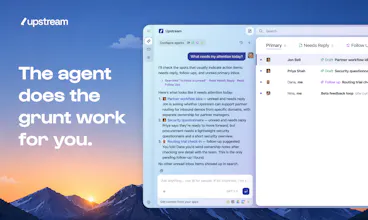
Finally, an inbox you'll look forward to. Agents sort your messages, draft your replies, and clear the grunt work behind the scenes, all in a client so well-crafted that email feels light, fast, fun.



Free
Launch Team / Built With


Context.devAPI to scrape anything for AI, 20,000+ developers trust us.
Promoted


Perfai Security
This looks great, but I'm just concerned about privacy... especially when dealing with internal emails containing confidential information. I have safeguards matching the sensitivity of the information, but having an AI agent reading and classifying my emails may be a risk factor. Anything you can suggest here?
Overall, great product nonetheless!
Upstream
Upstream
@qutub_syed curious if that answered your question!?
The right test for this category is not whether the draft sounds polished; it's whether the system makes handoff and review legible. For a small shop, knowing what the agent touched and what still needs a human is the difference between leverage and another inbox to supervise.
Upstream
@krekeltronics The agents work for you and nothing gets sent without your approval. Every conversation with an AI drafted reply is clearly marked.
What are the biggest challenges that you are facing with message handoff/review?
Upstream
Yes 100% @krekeltronics! It's one of the things that initially disappointed us about the way email clients have integrated AI, simply as an extra layer on top of the inbox. We wanted to do things differently by building an inbox where agents work alongside humans
The human-agent inbox idea is interesting because email is full of half-finished work, not just messages. The key question for me is trust: when Upstream drafts replies or tracks open loops, does it explain why something matters and what context it used from connected tools before a human acts?
Upstream
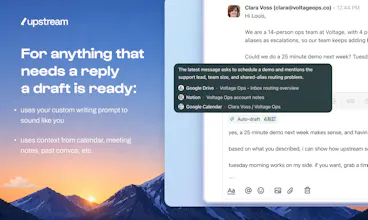
@rahulbhavsar great question. Every time Upstream creates a reply or follow up you are able to see why it did so and the context it used from various tools.
Upstream
Haha an image is worth a thousand words I guess. @rahulbhavsar did you have specific use cases in mind in which it's super important for you that the agent explains why he did this or that action?
@jontiret Yes. Three use cases come to mind: customer follow-ups, sales/prospecting replies, and internal commitments pulled from meeting notes or email threads. In each case, I’d want to know what context the agent used, why it thinks the action matters now, and whether anything is customer-facing before sending.
Upstream
@rahulbhavsar do you think our UI above would help answer those questions? Where it shows which sources the agent pulled from to draft the response? Would you add anything?
Great idea! How do you keep the agent activity from burying the messages I actually need to read myself?
Upstream
@suzychase Agents surface messages that need a reply, messages that need a follow up, and move the spammy emails to the side. That being said, all of your messages are still available for you to read and triage as you see fit.
Upstream
@suzychase I'm curious what you're most worried about? Specific messages you're thinking of maybe?
@louislecat Great question. I think my concern is less about the technology and more about losing authenticity. For example, if AI starts generating large volumes of networking messages, founder outreach, podcast pitches, or partnership requests, it can become difficult to tell who's genuinely interested versus who's running an automated workflow.
Upstream
@suzychase yeah makes sense. The only way we can start fighting that back is by not doing that ourselves 😉 Upstream is meant first and foremost for personal emails so definitely not something we want to enable!
Curious about two things - how does Upstream actually learn to sound like me? does it analyse my existing email history or is there a setup process where i train it manually? and when the agent hits an email its genuinely unsure about what happen, does it flag it, skip it or takes its best guess ?
Upstream
@pradyumna6 Great questions! Yes, we learn from your existing email history to build a writing profile, including how you naturally write to different people.
When the agent isn’t sure, it’ll often make that uncertainty obvious rather than pretending it knows everything. Sometimes that means making its best guess, sometimes leaving placeholders for you.
Would love for you to give it a try and let us know what you think. I’m especially curious how often you end up tweaking the drafts versus sending them almost as-is.
Is there an iOS app? Or is it just desktop for now?
Upstream
@clairelabarre Yep we have an iOS app, check it out and let us know what you think 🙂
Upstream
@clairelabarre @amperisk The app is gorgeous! you worked so hard to make it happen! 🔥
@amperisk @skwph Well done!
@amperisk Love it!
Upstream
Curious to get your feedback on the iOS app @clairelabarre :)
@jontiret Love it! let's grab coffee or have a quick call!
Upstream
@clairelabarre thank you!!
Looks real good !!! Can’t wait to try it
Again well done this is awesome
Quick question do the agents pull context from tools like Notion or Drive, or just from my inbox? Thanks
Upstream
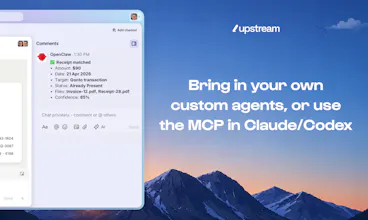
@chraynaud Thanks so much! Agents can pull context from the other services you use like Calendar, Drive, Notion, and Granola. This context improves auto drafts and you can also use it when chatting with our AI.
Upstream
Upstream
@chraynaud thanks a lot! Please leave some feedback after you try it :)
Upstream
@chraynaud @patryk_jeziorowski Feedbacks are the key to make upstream better 🔥