Undash is a simple Chrome plugin that automatically removes long em dashes (—) from AI-generated text when you paste it anywhere: websites, social media, emails, and more. No setup needed. Just install, enable, and paste clean text instantly.
undash: Make AI Text Feel Human
✨ What It Does
AI writing is great but those long em dashes (—) kind of give it away. undash is a tiny Chrome extension that quietly replaces them with spaces as you type, paste, or right-click. No setup, no clutter. Just cleaner, more natural-looking text.
💚 Why You’ll Love It
• Works Instantly: Removes em dashes as you type or paste
• Right-Click Magic: Clean selected text with a right-click
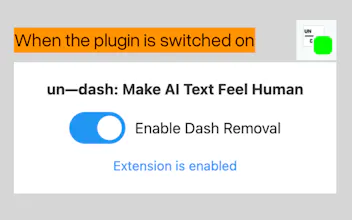
• Quick Toggle: Green badge = on, red = off
• No Lag, No Bloat: Lightweight and fast
• Private by Design: Everything happens locally
• Works Everywhere: LinkedIn, Gmail, Twitter, Linkedin, Facebook, etc
🛠 How to Use It
1. Click the extension icon to turn it on/off
2. Once it’s on, it just works, type or paste like normal
3. Want to clean something specific? Select text and right-click
4. Green badge = good to go
🎯 Who It’s For
• Writers cleaning up AI output
• Students using AI for notes or drafts
• Marketers polishing content
• Anyone who wants text to feel more… human
🔒 No Creepy Stuff
• No data collection
• No tracking
• No login
• Everything runs in your browser
💬 Need Help?
Ping us at hola@outdoinc.com with any issues (screenshots help!).
🚀 Always Getting Better
We’re constantly making Undash smarter and more compatible. Got feedback? We’re listening.
Report
@nirmalnd I have been manually fixing em dashes for months, particularly when I copy and paste AI-generated drafts into Google Docs. Ahhh, this really seems like one of those “why wasn't this available sooner?” tools :)
Does it also detect odd curly quotes or extra spaces while it's at it?
If you can share some examples on hola@outdoinc.com, I will try to add support for these in the upcoming versions.
Report
Love this idea! It's a great way to make AI-generated text feel more natural. Does Undash work on all websites, or are there specific platforms it has trouble with?
I have personally tested this on LinkedIn, Gmail, Twitter, Linkedin, Facebook, and few more places and v1.1 is already uploaded (awaiting for Google to release it).
You can give it a try and if it doesn't work, please follow these troubleshooting steps if the extension isn't working as expected:
1. Toggle the extension OFF and ON
2. Check that the badge is green (active)
3. Refresh the browser tab
4. Restart Chrome if needed
5. After paste, click space or try right click and undash the text
6. Make sure at the time of copying the plugin is enabled
If you are still facing the issue, can please share some screenshots/video recording to understand the issue better, so I can get look at fixing those. Please send it on hola@outdoinc.com
Report
Product suggestion: In the next version, include GPT-words replacement. That would be even more impressive.
Hi Michael, thanks for trying it out and sharing your suggestion.
Please share more detailed explanation with examples if you can and when you can so I can work on the updates in the upcoming versions, you can send it to hola@outdoinc.com
I did not know that people are annoyed by them. But it sounds like a new action idea for RewriteBar. :)
Report
Haha, great idea to come up with this! Skipping em dashes cannot be missed in all of my prompts :)
Report
Well I have been craving a simple tool like this for a while and now that you guys have created it and in such a simple way to use I really like this. Just removing these simple em dashes make text feel more human. Thank you



undash
@nirmalnd I have been manually fixing em dashes for months, particularly when I copy and paste AI-generated drafts into Google Docs. Ahhh, this really seems like one of those “why wasn't this available sooner?” tools :)
Does it also detect odd curly quotes or extra spaces while it's at it?
undash
@hamza_afzal_butt
Hi Hamza, thanks for trying out the extension. :)
If you can share some examples on hola@outdoinc.com, I will try to add support for these in the upcoming versions.
Love this idea! It's a great way to make AI-generated text feel more natural. Does Undash work on all websites, or are there specific platforms it has trouble with?
undash
@evgenii_zaitsev1
Hi,
Thanks for your comment.
I have personally tested this on LinkedIn, Gmail, Twitter, Linkedin, Facebook, and few more places and v1.1 is already uploaded (awaiting for Google to release it).
You can give it a try and if it doesn't work, please follow these troubleshooting steps if the extension isn't working as expected:
1. Toggle the extension OFF and ON
2. Check that the badge is green (active)
3. Refresh the browser tab
4. Restart Chrome if needed
5. After paste, click space or try right click and undash the text
6. Make sure at the time of copying the plugin is enabled
If you are still facing the issue, can please share some screenshots/video recording to understand the issue better, so I can get look at fixing those. Please send it on hola@outdoinc.com
Product suggestion: In the next version, include GPT-words replacement. That would be even more impressive.
undash
@michael_vavilov
Hi Michael, thanks for trying it out and sharing your suggestion.
Please share more detailed explanation with examples if you can and when you can so I can work on the updates in the upcoming versions, you can send it to hola@outdoinc.com
@nirmalnd
Avoid words:
- leverage
- In today’s fast-paced world
- Let’s take a closer look
- Optimize workflows
- Delve
- "Think of X as Y"
undash
@michael_vavilov
Great, thanks for this.
RewriteBar
I did not know that people are annoyed by them. But it sounds like a new action idea for RewriteBar. :)
Haha, great idea to come up with this! Skipping em dashes cannot be missed in all of my prompts :)
Well I have been craving a simple tool like this for a while and now that you guys have created it and in such a simple way to use I really like this. Just removing these simple em dashes make text feel more human. Thank you
undash
If the extension isn't working as expected, it will be mostly because it is not loaded correctly or in time for it to handle your clipboard.
Try the below steps:
1. Toggle the extension OFF and ON
2. Check that the badge is green (active)
3. Refresh the browser tab
4. Restart Chrome if needed
5. After paste, click space or try right click and undash the text
6. Make sure at the time of copying the plugin is enabled