
TextJam
The multi-player AI editor, for everyone who writes.
169 followers
The multi-player AI editor, for everyone who writes.
169 followers
TextJam is an AI editor with novel twists on how humans co-write with AI (and each other). From typing in pen and pencil, to inline prompting, to gestures that resize text, TextJam is a bold new take on what a word processor can be.





TextJam
Hey Product Hunt! 👋
I'm Pete, and I'm excited to share TextJam with you today!
If you've ever tried to "AI chat" your way to a refined and polished piece of writing, you're probably familiar with the copy paste dance between apps – and the way AI tends to take over and change too much, or require a massive amount of prompting to get it right. It can leave you wondering if you're actually saving time.
TextJam is a bold new take on what a word processor can be, with novel tools that let writers communicate their intent to AI precisely and quickly – so you can do you finest work, faster. It's also a fully multi-player editor (think Google Docs for the AI era), where users can jam in real-time with each other and all the top AI models.
TextJam supports leading AI models from OpenAI, Anthropic, Google, Meta, xAI, DeepSeek, and more, all for one monthly subscription. There's a free trial waiting for you at: https://textjam.com
The philosophy behind TextJam is simple: AI should amplify human creativity, not replace it. Now that software can think too, it's time to take a fresh look at how we interact with our apps. Our vision: human-centered power tools that let us create at the speed of thought. Would love to hear what you think! 🚀
TextJam Features:
🖋️ Write in "pen" and "pencil" - Use the pen tool to lock in phrases you love, pencil for drafts the AI can refine. The AI seamlessly blends both while matching your voice.
✨ Resize text with gestures - Need to expand a paragraph or make it shorter and punchier? Use multi-touch gestures like pinching on your trackpad (or arrow keys) to intelligently resize your writing.
📝 Inline prompts - Place prompts and suggestions directly in your document to precisely direct AI behavior. Collaborators can see and edit these prompts, so multiple users can guide the AI together.
🤝 Real-time collaboration - Work with AI and human teammates simultaneously in the same document
💬 Group chat with AI - Each document has its own chat channel where where contributors can share ideas, and get AI suggestions shaped by the whole team's thinking.
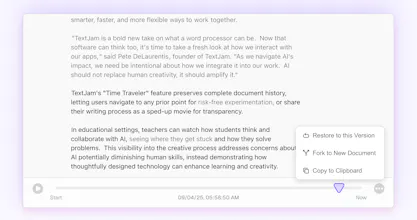
⏰ Time Traveler - Complete document history lets users play back the writing process like a sped-up movie, or jump to any prior point in time – so they can fearlessly take creative risks, and revert back easily. It's also helpful for educators who need transparency into students' creative process with AI.
@petedelaurentis Congratulations on launching TextJam!
I checked out the site and really liked the landing page.
If you're looking for more exposure, you're welcome to list it on bestofweb .site would be happy to feature it.
@petedelaurentis Congrats on the launch! The inline prompts sound super powerful for guiding AI together as a team. Curious — when multiple people add prompts in the same doc, how does TextJam decide which one the AI follows first?
TextJam
@anastasiiazhur Thanks Anastasiia! Great question. The inline prompts apply locally to the text preceding them, so multiple prompts can be running and streaming results into your doc at the same time.
Users can click the checkmark next to the prompt to run it, or use generate button (magic wand icon in toolbar or Cmd+G). Users can also each use different AI’s. So with multiple users, you could theoretically have Claude and ChatGPT and Grok all working on different parts of your doc at the same time. You’ll see the model icon appear in the margins next to the text it’s working on.
If you select the whole document and press generate, it’ll run all the inline prompts at once, taking them all into account.
@petedelaurentis thanks for creating this excellent tool. Already inspiring me. Looking forward to discovering how it can help my creative writing and my art talks, with every use of TextJam.
TextJam
@ann_delaurentis Your welcome, and thank you! Excited to hear what your experience is like using TextJam in the art world.
@petedelaurentis looks awesome.
TextJam
@matthew_o_riordan Thanks Matthew. Really appreciate your team at Ably's support during our launch - things went very smoothly. For any startups looking for world class infrastructure to power multi-player features, Ably is fantastic: https://ably.com
Nice! A little expensive for me, but it can be really useful. Bug caught - the delete account function did not work.
TextJam
@alexey_sokoloff Thanks for flagging Alexey – the delete function has been fixed. We'll reach out via email to make sure it works for you.
Just played with TextJam, feels like the first AI writing tool that actually gets collaboration. The pen/pencil thing is weirdly intuitive, and resizing text with gestures is a wild touch.
kluster.ai
This is really cool! I have been in the copy/past boat between AI Chats and document platforms. Will try it out!
Nice product. Can it be used on an iPad? I like writing on my iPad. By the way, this logo looks like a guitar pick—haha!
TextJam
@zidream Yes indeed, it is a guitar pick! With lines of text :) We want our logo to evoke "jam session", and a spirit of fearless creative experimentation.
To answer your question – TextJam currently works well on iPad sizes 11-13 inches. If you have an iPad with a nice keyboard, it is a fantastic experience. We've found the onscreen keyboard can work well in a pinch too, especially when used with TextJam's dictation features.
We're working on also bringing a great experience to smaller devices, including smaller tablets and mobile phones. If you have a chance to try it on your iPad, we'd love to hear about your experience.
灵感盒子
This sounds incredibly innovative! The idea of transforming AI from a mere tool for completions and summaries into an active co-writing partner is truly fascinating. TextJam’s approach—especially with features like inline prompting and multi-touch gestures—feels like a glimpse into the future of collaborative writing. It’s no longer about just assisting, but truly creating together. This could redefine how we think about AI in creative and professional workflows.
TextJam
@ransixi Thanks Ran - really appreciate your thoughts on TextJam, and am excited to see what you create!
Agnes AI
Been craving more control when working with AI writing tools—TextJam’s way of letting you tell the AI exactly what to keep or change is such a game changer. Really curious how the pen and pencil modes feel in action!
TextJam
@cruise_chen Thanks Cruise! Excited to hear about your experience.