
Skim
Free, open-source AI email client for Windows
237 followers
Free, open-source AI email client for Windows
237 followers
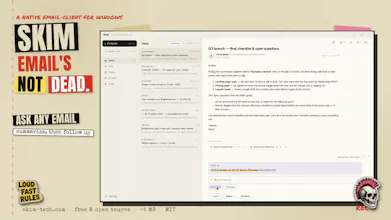
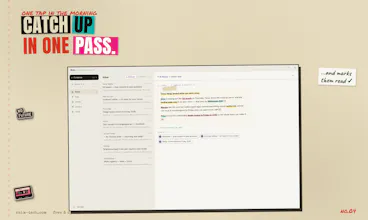
Skim is a free, open-source (MIT) email client for Windows. ✂️ Minimal on purpose: no calendar, no rules engine, no bloat. Fewer buttons, less cognitive load. ⚡ Native Rust core (Tauri 2): ~5 MB installer, sub-second cold start, instant full-text search. 🔒 Local-first, offline-ready, zero telemetry. ✦ AI on your terms: bring your own Anthropic or OpenRouter key and Skim drafts replies in your voice and answers questions across your whole mailbox.




I will take a look because anything has the be better than MS Outlook these days! Does it handle multiple email accounts?
@siridley Hey, my thoughts exactly 😄
No multi-account support rn. I thought it wasn't needed, but just yesterday I found myself in a situation where I actually did!
Soooo I'll probably add multi-account support in the next release or so. There are usually 2-3 releases a day btw 😄
@siridley Just added multi-account feature in new 1.0.4 release! 🎉
Hey Nikita, congrats!
Any plans to release a Mac version?
@luis_parker thanks! I don't use Mac, but there's no obstacles to have such version. It would require new building pipeline and some settings. I invite you to contribute 😄
Honestly the local-first angle is super appealing, and a tiny Rust installer sounds great. One thing that would seal the deal for me though, kind of a small ask, is per-account send aliases so I can manage work and personal replies without juggling separate logins. Would fit nicely with the minimal vibe too.
@lyaszkvraknr2o hey, looks like a solid feature! Tbh, I don't use aliases myself, so I'd love to understand the workflow. I'd super appreciate if you'll share more details in Github issue that I created for your request:
https://github.com/nikserg/skim/issues/7
A few things that'd help me nail the use case (feel free to add comment in Github issue):
What's your setup, one email provider (e.g. a Gmail with a couple of addresses attached), or genuinely separate ones like a work domain + a personal Gmail?
Do work and personal mail land in the same inbox for you, or would you rather keep them separate but just share one "send" experience?
What's missing in the current multi-account switcher for your case, is it the extra login, mixing the inboxes, or specifically picking who the reply comes from?
When you reply, should the app auto-pick the right "From" based on which address the original email was sent to?
Love the minimal take, especially the Rust core keeping things snappy. One thing that would make it stickier for me: a quick "snooze until later today" or "remind me tomorrow" option right in the inbox. Most of my email backlog isn't urgent, it just needs to come back at the right moment, and that small loop would make Skim feel genuinely complete without adding much weight.
@sevda9qob Ouch, that's a hard one — a highly debatable topic. As for now, I'm closer to not implementing snooze than to implementing it.
However, there's a "canonical" thread about snooze, where my argumentation against the feature lives:
https://github.com/nikserg/skim/issues/8
But. But! Please do argue.
Love that you kept the scope tight enough to ship a 5MB native Rust client that still feels full-featured. Bringing your own AI key is a smart move, treats the model layer like infrastructure instead of locking people in.
@satd7og my thoughts exactly 😄
Tried it on my old laptop and yeah, the cold start is genuinely instant which is wild for an email client. Love that the AI stuff is opt-in instead of shoved in my face.
@sinemimirc3hz glad you liked it! Skim is dinosaur-laptop-friendly 🦖
Honestly the 5 MB installer is kind of wild for an email client, opened it up and was reading mail before my coffee was ready. The bring your own AI key approach feels right too, no weird data stuff happening behind the scenes.
@kevserauj4 glad you liked it! 🫶