
PostDecks
Preview a post on every platform, then get client sign-off
6 followers
Preview a post on every platform, then get client sign-off
6 followers
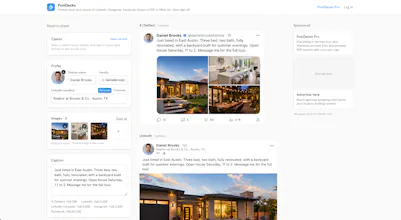
PostDecks shows exactly how a post will look on Facebook, Instagram, X, LinkedIn, Stories and Carousels, with each platform's real cropping and caption limits. Then get it signed off: send clients a link to approve or comment on, with no login or dashboard for them, or export a PDF proof sheet and PNGs. The previewer runs in your browser, so your images stay private. A free account adds approval links, email alerts when a client responds, branded exports, and unlimited saved clients.




"Can you show us how it'll look on LinkedIn and Facebook?"
If you run social for clients, you've had that message.
A caption with raw images in an email doesn't show them how the post will actually look, and not everyone wants to log into a scheduler just to approve a post.
So I built PostDecks.
Upload your images and caption once, and see exactly how the post will look across X, LinkedIn, Instagram and Facebook.
Then send the client a link to approve or comment on, with nothing for them to log into. Or export a PDF or PNGs for sign-off.
The preview and export are 100% client-side, so your images aren't uploaded just to preview a post. Nothing leaves your browser unless you choose to create a share link.
Stack: Next.js, React, TypeScript, Tailwind, html2canvas-pro and jsPDF for the export, Supabase and Stripe for Pro, all on Vercel. Built with Claude Code.
Building it out for creators next, Instagram profile grid coming soon.
How does the approval link actually work if the client doesn't need an account, like is there any verification step or could anyone with the link just leave comments?
@avcarnecde70934 no account and no verification. anyone with the link can view it and leave feedback, they just type a name. the privacy comes from the link itself, a random id that isn't indexed or listed anywhere, so only whoever you send it to has it. names aren't verified, the whole point is your client approves without signing up for anything or remembering a password, so it's more trust-based than locked down.
good enough for sending a client a proof. might add an optional passcode or single-approver lock down the line for anyone who wants more. would you use it?
The no-login approval link is such a smart move - clients actually respond when there's no friction. Love that the previewer runs locally too, keeps everything private without making me think about it.
@tugay865925 thanks! the account step is where non-technical clients drop off, so killing the login was the main idea
The fact that previews actually run in-browser and keep images local is such a thoughtful call. Most tools like this upload your assets just to mock up a post, so respecting that privacy from the ground up feels like real craft.
@veysel981611 thanks, keeping the images in the browser was the first decision I made. good for privacy, good for me (no extra storage costs)
Plan an Instagram feed, then send the grid for sign-off
A post is only half of what a client is judging. The other half is what the profile looks like once that post lands in it, and a single preview cannot show you that. The new grid planner does: drop your images in, drag them into the order you will post, and read the profile as a whole before anything goes out.
New: the Instagram grid planner
Upload your images and drag them into place on the three-wide profile grid, newest top left, the way Instagram actually fills a profile.
Drag works with a thumb: hold a tile for a moment on a phone and it lifts, so swiping still scrolls the page.
Leave empty slots for posts you have not made yet, so you can plan around a gap instead of imagining it.
Your plan is still there tomorrow. It is kept in your own browser and never uploaded, with no account and no signup.
Download the finished grid as a PNG.
New in Pro
Save as many grids as you have clients, one per account, each with its own profile picture, bio and follower counts.
Grids live on your account rather than in one browser, so a new laptop opens the same work, and on Agency so does the rest of your team.
Turn any grid into a client link. They open it, approve it or leave a comment, and never make an account.
The link follows the grid: save a change and the client sees the current plan, not the version you sent on Tuesday.
Your logo and colour carry across, the same as your other client links.
Where it stops
The planner does not connect to your Instagram account, schedule anything, or publish anything. It plans and it previews, and you post the way you post today.
Client approval links are free
Everything that was PostDecks Pro is free from today. Sending a client a link to approve, grouping a campaign into one deck, your logo on what they see, saved clients and saved grids no longer cost anything, and two of those no longer need an account either.
Free with an account
Share a post as a link your client approves or comments on, with no login for them. You get an email when they reply. This was $8 a month.
Group a week of posts into one deck, approved post by post.
Put your logo and colour on the pages your clients open.
Keep your saved clients on every device, and a saved Instagram grid for each client, each with its own approval link.
Free with no account at all
Your logo and name on PDF exports. That was always done in your browser, so it no longer asks you to sign in.
Save up to 20 clients in this browser, where it used to be one.
One step, at the moment you need it
Press Share and the tool asks where your client's reply should go. Enter your email, click the link we send, and your post is still on screen with its link ready. There is no password and no card.
The same goes for the grid planner: sign in from the planner itself and the grid you were arranging is still there to save.
Why it is free
Getting a client to say yes is what PostDecks is for, so it should not sit behind a checkout. The ads beside the tool pay for it instead, and they are the only thing PostDecks charges for.
The no-login approval link is such a smart move — clients actually use it instead of ghosting you on feedback.
@nurtenztelwxgi thanks! always a struggle to get non-technical clients to use anything they have to log into.