
Autonomous access control security for Vibe-coded apps. Our platform finds and fixes live vulnerabilities in your vibe-apps built on Replit, Lovable, Claude Code, Cursor, and other AI-coding tools. 1-prompt makes your app production-ready in minutes without requiring security expertise.




Free
Launch Team / Built With


Floot MCPBuild and ship web and mobile apps inside Claude or ChatGPT
Promoted


Congrats on the launch! The re-check on every update is the part that matters most, since a lot of these tools only catch access-control gaps once and then go stale. Does that re-scan run automatically after each deploy, or do you have to trigger it?
@irahimiam spot-on! Both modes exist, but automatic is the whole point. You can fire a run manually anytime (one prompt / paste-URL), but the real setup wires it into your pipeline so it runs automatically on a scheduled basis or with each deploy... GitHub Actions steps (or our CI/CD API / deploy webhook) can trigger the scan, wait, and fail the build on any new Critical. Each run diffs against your last clean baseline, so you only hear about what changed, not the same list again. Set it once and every future deploy can re-test itself.
@irahimiam
Thank you! And you nailed it. A scan from last month means nothing after today's deploy. Vibe-coded apps change fast, so stale results are a real problem.
You can trigger a re-scan anytime with one click, and we support scheduled scans so your app gets checked regularly without you thinking about it. Hooking scans into your deploy pipeline is on the roadmap too, so every push gets tested automatically.
Since we only need your app URL, re-scans are zero setup. Same coverage every time: UI, API, data, and roles.
Try it free at perfai.ai and get a full pentest-style report with every scan. We're giving away 50% discount codes for the launch. If you need extra credits or help onboarding your app, just reach out. Happy to help!
@qutub_syed That's exactly the setup I was hoping to hear baseline diffing so you only see what changed is a nice touch. Congrats again on the launch.
This is the right problem to aim at. The scary part of AI-built apps is not the rough edge in the UI; it is the invisible permission model across pages, APIs, and data. A useful security pass has to prove what each role cannot do, not just what the happy path can do.
@krekeltronics You just described the problem we're trying to solve. Happy path testing tells you the app works. Security is making sure every role can't do the things it shouldn't.
That's exactly what the Security Agent does. It builds the full role × data × action map, then systematically tries to make each role do what it shouldn't, whether that's reading another tenant's data, escalating privileges, or calling an API the UI never exposes.
That invisible permission model across pages, APIs, and data is exactly the surface we're testing. Every issue comes with a reproducible proof, so you can see exactly how it was found.
You clearly get the problem. I'd be curious to see what it finds on one of your apps. Give it a try, it's free at perfai.ai
@krekeltronics
This is exactly how we think about it. Thank you for putting it so well.
Proving what each role cannot do is the whole game. Our agents build a map of your app's roles, data, and actions, then test every combination. Not just "can an admin do admin things" but "can a viewer reach the admin's data through some side door." That's hundreds or thousands of permission checks per app, across UI, API, and data layers.
The happy path always works. It's the paths nobody meant to create that leak data. And in AI-built apps, nobody reviewed the permission model, so those paths are everywhere. We find dozens of critical issues in a typical scan.
Try it free at perfai.ai and get a full pentest-style report showing exactly what each role could reach. We're giving away 50% discount codes for the launch too. Need extra credits or help onboarding your app? Just reach out. Happy to help!
The “paste your app URL” workflow is appealing because it removes a lot of the friction around security testing. I’m wondering how you decide which vulnerabilities to prioritize first—do you rank them by severity, exploitability, or something else?
@amjad_shaik Great question... The short version is we rank findings by proven impact, not theoretical severity.
Every finding is exploit verified before it reaches you, so the list starts with what's actually exploitable.
From there we weigh things like blast radius, which roles or tenants are affected and how much data is exposed, along with CVSS severity and estimated bug bounty value. A confirmed cross tenant data leak will always rank above a low risk theoretical finding.
Every issue includes the severity, OWASP category, CVSS score, CWE, reproduction steps, and the evidence behind it.. we want you to see proof, not probability.
Give it a shot, it's free.. perfai.ai, and you'll see the ranked report for your own app.
@atefa7med Thanks for the detailed explanation. I like the idea of ranking exploit-verified findings over theoretical risk. That feels much more useful for teams that need to decide what to fix first.
@amjad_shaik
Thanks! Removing friction was the whole point. Security testing shouldn't need a setup project.
On prioritization: we rank by severity first, with critical issues at the top. But severity isn't just a label. It reflects real impact, like whether the flaw actively leaks data, what kind of data is exposed, and how easy it is to reach. An open door to customer records ranks way above a minor gap in a low-value page.
Active data leaks get flagged loudest, since those are already hurting you. Each finding also maps to standards like OWASP and CWE, so your team knows exactly what it is and why it matters.
The report groups everything so you fix the scary stuff first instead of drowning in a flat list of alerts.
Try it free at perfai.ai and get a full pentest-style report. We're giving away 50% discount codes for the launch too. Need extra credits or help onboarding your app? Just reach out. Happy to help!
Congrats. How does Perfai distinguishes between intentional permissions and actual access control vulnerabilities?
Great question @iamanantgupta
We start by learning what access is intended. Perfai Security reads the app's UI and role structure to find the base for who's meant to see what before building a permission map from it. Then we replay the same API calls as different users, roles, and tenants and compare what actually comes back.
The distinction is in the response. We only flag it when a user actually receives unauthorized data they were never meant to see. If the endpoint returns their own data, an error, or empty results, that's intended behavior and we leave it alone. We go a step further by excluding resources that are shared by design.
Above all of this, we surface permission anomalies such as cases where the app's real behavior contradicts its own intended access model (a user who should be blocked isn't, or an authorized user is wrongly denied). That's how we separate deliberate permissions from genuine broken-access-control, IDOR, and privilege-escalation issues.
@iamanantgupta
Thank you! This is one of the hardest problems in access control testing, so great question.
Here's how we approach it. Our agents first learn your app's intended permission model by exploring what each role sees in the UI. If a page, button, or data field never appears for a role, but the API still serves it, that's a strong signal of an unintended gap. The UI is basically your app telling us what you meant to allow.
We also weigh the data itself. A viewer role reading a public blog post looks intentional. A viewer role pulling another user's private records through a direct API call almost never is.
And for edge cases, you can mark a finding as intended behavior, and we won't flag it again in future scans. Your feedback tunes the results to your app.
Try it free at perfai.ai and get a full pentest-style report. We're giving away 50% discount codes for the launch too. Need extra credits or help onboarding your app? Just reach out. Happy to help!
Do you think you can add a GitHub Actions integration to automatically trigger scans after each deployment??
@ankur_jeswani Appreciate the comment! This integration already works today. Drop in a GitHub Actions step (our CI/CD API is built for it): it triggers a scan, waits, and fails the build on new Criticals with a dedicated CI service-account role, job-id idempotency so retries don't double-scan, and auto-created GitHub issues for findings. It's a copy-paste snippet from our docs right now; one-click Marketplace Action is next. Happy to send you the snippet
@ankur_jeswani
Testing after every deploy is exactly where this should go, since apps change fast and stale results lose value.
The good news is our setup makes this easy to build. Since a test only needs your app URL, a GitHub Action just has to hit our API after deploy. No agents, no repo access needed.
In the meantime, you can trigger re-tests in one click, and we do drift detection, so when your app changes, we catch new gaps that the last test couldn't see.
I'd love your input on how you'd want the Action to work (fail the build on criticals? just report?). DM me and let's shape it together.
Try it free at perfai.ai and get a full pentest-style report. We're giving away 50% discount codes for the launch too. Need extra credits or help onboarding your app? Just reach out. Happy to help!
Congrats on the launch. How much time does it typically take to generate report? I am guessing it may vary based on the complexity of the app?
Thank you@zerotox You can get the first results in minutes, but yes it scales with complexity and may take up to 1 hour based on the load. The work is proportional to your access-control matrix (roles × data objects × actions), so a small app is minutes and a large multi-role one takes a bit longer. But we're talking minutes-to-hours vs. the weeks a manual pentest of the same surface would need. And because it's that fast, you can re-run the whole thing on every deploy.
@zerotox
Thank you!
You guessed right, it depends on the app. The agents explore every page, API, and role combination, so a small app finishes in under an hour, while a large app with many roles and data types can take a few hours.
The good news: it's fully hands-off. Paste your URL, and the agents do the rest, including signing up their own test accounts. You can watch the live activity log while it runs, and the full pentest-style report lands when it's done. Re-tests after app updates are faster too, and drift detection flags what changed.
Try it free at perfai.ai. We're giving away 50% discount codes for the launch too. Need extra credits or help onboarding your app? Just reach out. Happy to help!
Great idea! Quick question: how do we ensure this fix doesn't break anything or cause a regression in the application?
@maaz_b_tariq_shaikh
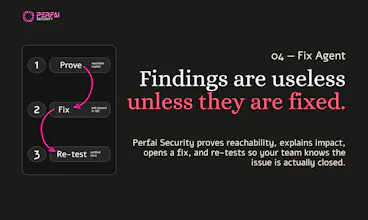
Great question! This is exactly why we keep a human in the loop. Perfai suggests the fix, but your team reviews and applies it. Access control changes can break real user flows if applied blindly, so we never push changes to your app ourselves.
Each finding comes with proof of how we exploited it, so your developer knows exactly what to fix and why. After you apply the fix, just re-run the test. Perfai verifies the issue is gone and that your other permission checks still pass. Our drift detection also keeps testing as your app changes, so if a fix causes a new gap later, you'll catch it fast.
Try it free at perfai.ai. Use code PHLAUNCH50 for 50% off any paid plan. Full pentest-style report included. Need extra credits or onboarding help? Just message me!