Launched this week

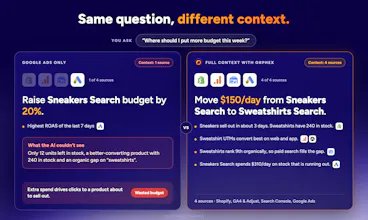
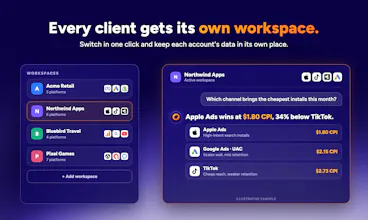
Orphex is the unified MCP gateway for digital marketing teams, handling auth and integrations for 65+ platforms, from Google Ads to Shopify, to give your AI true cross-channel context. Move your AI beyond QA: empower it to analyze integrated performance and take every action a human marketer can. Reallocate budgets, pause unprofitable creatives, or adjust products from a single prompt. Every change is logged and protected by safety guardrails. Start free, 30% off the first month.





Free
Launch Team / Built With


Customer.ioAutomate Messaging Everywhere — Startups Get 12 Months Free
Promoted
Congrats on the launch!
With Black Friday approaching, performance marketing teams often need to make rapid budget allocation decisions across Meta, Google Ads, and TikTok while dealing with fluctuating ROAS, attribution discrepancies, and sudden changes in conversion rates.
Can Orphex MCP proactively monitor campaign performance across all these channels during high-volume periods like Black Friday, identify where additional budget would generate the highest incremental revenue, and recommend or execute budget reallocations in real time while respecting predefined spending limits and approval rules?
@ulas_gulhan thanks! Yes. Since Orphex works through your AI assistant, you can set up a scheduled task (e.g. every morning, or every few hours on Black Friday) that checks Meta, Google Ads and TikTok, flags ROAS drops and conversion changes, and proposes where budget should shift.
Any change still arrives as a preview and only happens after approval, within the limits you set (who approves, second approver, budget caps, protected campaigns).
Being able to add our own KPI definitions and playbooks is cool. Every team measures things a bit differently, so this will help.
gotta share this with my marketer friends
Congrats on the launch! If a campaign’s reported conversions suddenly drop, how does Orphex distinguish a genuine performance issue from a tracking problem or a website checkout issue before recommending changes to the ads?
@fatih_eren_saribuga Great question. That’s exactly the trap Orphex is built to avoid. Its diagnosis method separates measurement from performance before anything is recommended:
Split the drop. Spend, conversions per spend and value per conversion, then the funnel: CTR, CPC and conversion rate. Conversions collapsing while impressions and clicks hold steady is treated as a measurement break until shown otherwise, not as an ad problem.
Check tracking at the source. For example, each Google conversion action’s status and when it last received data, Meta’s tracking specs on the ad, and your GTM container (paused tags, consent settings, live version vs. draft). A “tracking is broken” verdict has to rest on that evidence, never on a falling count alone.
Compare against the store. If the platform’s conversions fall but your Shopify orders don’t, it’s attribution or tracking. If orders fall too, while clicks and traffic still arrive, look at the site or checkout.
Rule out the quieter causes. A changed attribution window or conversion value setting, conversions still arriving for recent days, edits made in the platform’s own UI, or ads stuck in review.
Only when all of that is clean does it call the drop a performance issue. Even then, it starts with a read-only diagnosis; any budget or bid change goes through preview and your approval.
Congrats on the launch. 65+ sources, one context is the obvious win.
How do guardrails work in practice — hard spend caps per prompt, dry-run/preview before changes go live, or a human approval step above a threshold?
@ebru_sevik Thank you! All three, set as workspace policy rather than per prompt, so they hold no matter what the assistant is asked:
Preview first. Every change comes back as a preview showing the before and after values. Nothing goes live until it’s confirmed.
Human approval. You can require a recorded approval for every change, or only when a change is bigger than a % threshold you set. You can also require a second approver and limit which roles can approve.
Spend brakes. You can set a max % change per action/prompt, a daily cap on budget increases, a monthly spend envelope with an early warning, daily action quotas, and a budget ceiling for anything. You can also lock campaigns by name so they’re never touched.
Anything over a limit is refused before it reaches the ad platform, and the assistant tells you which rule blocked it.
Big congratulations on the launch! Being able to converse with your performance data in natural language feels like magic. Does Orphex store any sensitive ad spend figures locally or in your cloud?
@berrinkarakas Thank you! Orphex MCP doesn’t store your performance or spend data, neither on your machine nor in our cloud. When you ask a question, Orphex fetches the numbers live from the ad platform through its official API, hands them to your AI assistant for that answer, and keeps no copy. Every answer reflects what the platform reports at that moment.
Access goes through each platform’s official OAuth, scoped to your workspace, and you can revoke it anytime from the platform’s own settings.
Congrats on the launch! Mine would be: “Is my measurement set up right for what I’m trying to answer?” Right data going to each platform, attribution windows that fit the analysis, that kind of thing. Does Orphex check that, or does it assume the setup is correct?
Thanks @gorkem_oktay , great question! Orphex doesn’t assume anything it reads your actual setup: which conversion goals each account counts and bids on, attribution windows, and configuration settings that explain weird anomalies (like '(not set)' values or missing cost data).
This means your AI assistant flags mismatches before you rely on a metric. You can also ask it to audit your measurement setup end-to-end. Where the platform supports API updates, Orphex MCP will propose exact fixes which are only applied with your explicit approval. While it won't touch the tracking code on your site, it pinpoint exactly where your setup fails your business questions.