
Mina - Meeting Assistant
Your AI Teammate now responds and executes during your calls
1.4K followers
Your AI Teammate now responds and executes during your calls
1.4K followers
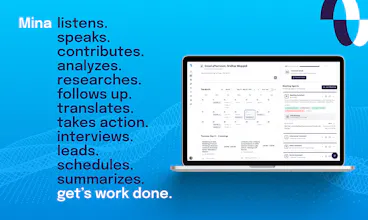
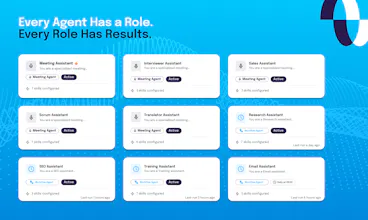
Mina is an AI meeting assistant that actively participates in meetings, responds in real time, pulls context from your tools, and helps move work forward while the conversation is still happening. Unlike traditional meeting tools, Mina can speak during calls, use skills, generate outputs, and support sales calls, interviews, standups, customer conversations, and team workflows before, during, and after meetings.





very interesting.. I was thinking how does one invoke her? By saying, "Hey Mina, can you please..." and so on? What if there is real human named Mina also on call? Is it possible to change her default 'name'? or change the way we address this AI?
@ashishkingdom Yes - we handle this exception by checking the context to whom the question might be, but that said, you can definitely change the name to whatever you want. It's a nickname, and it's super easy to configure. How you invoke it depends on the kind of assistant you have in your meeting. If it is a reactive assistant, yes, you need to invoke it by calling its name, "Hey Mina", "Hey Veda". If it is a proactive one, it's always listening in. Based on the context, it either invokes the tools (assuming it's configured that way) or even participates in or drives the conversation.
@sridharmuppidi wow! superb!
@ashishkingdom Thanks Ashish!
@hemanth_kumar63 It does that right now. It depends upon what kind of assistant you have taken along and what their personality is. But yeah, it can be set up to be proactive. So think of this way: a Mina, who is a lawyer's assistant. It can ensure that certain compliance matters are proactively addressed in the meeting. Or maybe, if it is a sales assistant, and assuming you are talking to a client and potentially collecting requirements, it is trying to make sense of them. It is potentially drafting sort of like a spec in front of you, while asking questions you may have missed - this can be done by configuring your assistant and its relevant skills quite easily.
@hemanth_kumar63 Hi Hemanth, Mina can do this right now! For example, if you create a proactive Mina agent, it will ask questions to get all the information necessary. If your Mina agent is reactive, meaning it moreso responds when addressed, it'll prompt for clarity if needed. So it really depends what the agent you create is intended for if that makes sense!
The proactive mode sounds powerful but also slightly dangerous 😅 How does it seek permissions before execution?
@krutiparekh16 I agree, it is awesome! - BTW, it doesn't do anything unless it's been set up to do things, and yes, the primary prompt will have to have guardrails.
@veera_satya_bhaskar_koppisetty Thank you! The current Scrum master's skills are designed to just go to a generic Excel sheet, but you can ask your skill creator to create a brand new skill to go to, say, whatever your program management tool you use Jira, Linear, or anything else.
Really cool. Congratulations @sridharmuppidi
Is it possible to add a tool during the meeting or we have to relaunch Mina if we have to ask her to connect to a new tool?
@bahubali_shete2 Unfortunately, you do need to re-launch as most of the tool integrations or skills need to be set up before the meeting. We expect some of this to change with Mina 2.0.
Really interesting take on AI meeting assistants. I like that Mina goes beyond note-taking and actually helps drive the conversation with role-based support. How does Mina learn and adapt to a team's workflow over time without requiring a lot of manual setup?
@shahriardgm Great question. At this point, yes, it does need to be properly set up - our experience has been that it doesn't take more than 10-15 minutes to get it to work for your needs. Eventually, we would open up Mina to other assistants, such as openclaw or Hermes - that way they can orchestrate the meeting assistant on demand. Mina 2.0 will also introduce our own multi-purpose agent(Chief of Staff), along with workspaces.
My first thought was that people may misuse it, like getting help for passing an interview without real experience. On which side Mina will be in this case?
@nikitaeverywhere So, because it's an active participant in a meeting, unlike a shadow apps that listens in to the conversation and gives you feedback in the background, the chances of it being used to cheat are almost non-existent. We have been using it for interviews for a few weeks, but the best way to use it is not completely leaving Mina alone with a potential hire, but actually having somebody else in the room, a human. Let Mina be the specialist interviewer, while the human is also listening in to see how the person answers and reacts to those questions.