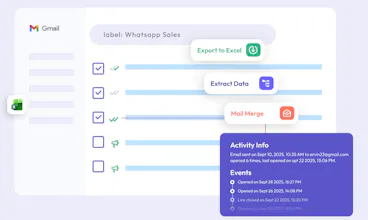
Tired of manually copying data from emails? MailTwig brings AI-powered automation straight into Gmail. ✅ Export Gmail Data – Instantly export To, From, CC, BCC, Subject, Labels, Attachments & Dates to Excel or CSV. ✅ AI Data Extraction – Automatically pull emails, phone numbers, company names, invoices & tracking numbers from conversations. ✅ Personalized Mail Merge – Send tailored campaigns with custom fields, templates, scheduling & tracking—all from one dashboard. Try MailTwig today!
👋 Hi Product Hunters!
I'm Geetanjali, and I am incredibly excited to introduce Mailtwig today,an AI-powered Gmail productivity suite built for anyone who spends hours managing emails manually.
We built MailTwig after repeatedly facing the same problems:
Exporting Gmail data to Excel was tedious.
Extracting emails, phone numbers, invoices, or tracking IDs meant endless copy-pasting.
Sending personalized outreach required juggling multiple tools.
With MailTwig, you can:
📤 Export Gmail metadata (To, From, CC, BCC, Subject, Labels, Attachments, Dates) to Excel or CSV with one click.
🤖 Extract structured data from email conversations using AI.
📧 Send personalized mail merge campaigns with templates, scheduling, and tracking.
Whether you're in sales, recruiting, operations, customer support, or simply manage a busy inbox, MailTwig helps you save hours every week.
I'd love to hear your feedback, feature requests, or questions. Thanks for checking out MailTwig and supporting our launch! 🚀
Report
The CSV export pulled every attachment and label in one shot, which saved me a whole afternoon of manual cleanup. The mail merge tracking is surprisingly detailed for a Gmail add-on.
Report
No reviews yetBe the first to leave a review for Mailtwig
The CSV export pulled every attachment and label in one shot, which saved me a whole afternoon of manual cleanup. The mail merge tracking is surprisingly detailed for a Gmail add-on.