Leadforms

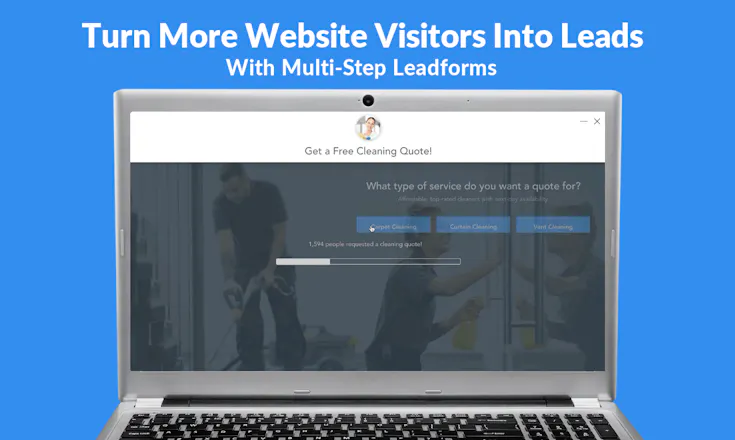
Turn more website visitors into leads with multi-step forms.

5 followers

Leadforms helps you turn more website visitors into leads. * Add to ANY website (Wordpress, Unbounce, Leadpages, & more!) * No coding required! * Used by SEO & PPC marketers to capture more leads! * Integrate with your CRM * Installed on over 1,300+ sites!
Leadforms gallery image
Launch Team
Anima Playground
AI with an Eye for Design
Promoted

What do you think? …

Porush Puri
Hi @john_porrini! First of all, kudos for creating a great product! Went through the website and saw all the features you are offering, and i am pretty impressed by all of them, really loved it - specially the one with exit intent technology. Tried some demos (auto dealer leadform, SaaS demo) and it is seamless! Congratulations!
Porush Puri
@john_porrini would love to cover this product on my StartUps101 Instagram Page and Podcast, which would expose this to startups and business based in India! Looking forward to your reply!
John Porrini
@porush_puri Thanks so much for the comments. I really appreciate it. I'm definitely interested. Feel free to shoot some more info to my email, which is john@getleadforms.com
Ken Wallace
Looks nice! Some questions... Does this have webhook support (meaning, can it push a new form submit to a webhook)? Does this integrate with Zapier? Does this integrate with Airtable?
John Porrini
@boaticus Thanks Ken! Webhook Support - Yes, Leadforms has Webhook support built in. We can integrate with nearly any software that supports webhooks. We've setup a few integrations into custom CRM systems through webhooks. Zapier - It doesn't support Zapier just yet. But we've been getting a ton of requests for this. So it's near the top of the roadmap. Airtable - Does not integrate with Airtable yet. This could be cool though. I'll add it to my list. thanks for the ideas!
Francoo
@boaticus interested in that
Kate Marie
Hi @john_porrini! I love LeadForms. It has been working well for me and my clients! Since it has been added to our websites, we’ve generated more qualified leads! Great product.
John Porrini
@katem Great to hear. Thanks so much!
Andy Black
I'd like to endorse Leadforms and give John Porrini a shoutout. We've been using Leadforms on landing pages for our Google Ads clients and there's been a noticeable increase in conversions. Not only that, each enquiry/lead has more data attached than a straight "Contact Us" form fill. This is proving very insightful for our clients. Leadforms is excellent, and John is continually making it even better.
John Porrini
@andyblack10 Hi Andy! Thanks so much. I REALLY appreciate all of the support. Your feedback has been such a HUGE part of making this even better.
Tom Medema
Pretty much any site needs a form so it's great to see some no-code movement here. I gave some feedback on your landing page here: https://app.usebubbles.com/e9e9f... -- let me know if it's useful. In my opinion you could focus on a lot more on getting the person to try the product and signup (perhaps with your own leadform), and the amount of text/features on the page can be reduced. The large amount of text makes it seem like a complicated product to me. It would be better to let the product speak for itself and move details to a CRM system or FAQ or dedicated pages for SEO.
John Porrini
@tom4 - Wow! Thanks!! I wasn't expecting that type of feedback. That was very useful and I'll definitely take all of this into account when I go to update this page (which happens all of the time). One thing that really stands out to me is how you said that the amount of text and features makes the product seem complicated to you. I never once considered that, but I completely get it. Very eye opening. Thanks again, I really appreciate the time that you took out of your day to do that.
John Porrini
Hey fellow Product Hunters! 👋 First, thanks so much for visiting this post. My name is John Porrini and I'm the founder of Leadforms. I originally built Leadforms to scratch my own itch so to speak... It all started for me a couple of years ago when I was generating leads for a local plumbing company. At the time, I was looking for a way to increase conversions from my SEO and PPC traffic, so I could drive more (and better) leads for my clients. While doing some super covert competitive intel, I noticed that the big players like HomeAdvisor were driving traffic straight into a multi-step form. This really got me thinking… I asked myself: “What if I added a multi-step form that could appear across any page and shoot the contact details right to my client’s email and phone?” Seems like a no brainer way to increase conversion rates, right? Great in theory… but actually implementing this… not so easy. Long story short, I decided to build the tool. About 15 months ago, I hired a talented developer and we got to work. Within a couple of months, the first version of Leadforms was live on my site and it was driving in qualified leads across all pages. It worked so well that I decided to make it available publicly. As of today, Leadforms has been installed on over 1,300+ websites and generates thousands of leads per week for businesses of all types. And now I spend my days building Leadforms for customers — which is relaxing in a weird sort of way... So, what is Leadforms? At its core, Leadforms is a multi-step form plugin that can be added to any website, without a developer. But it’s actually WAY more than that. I like to think of Leadforms as a complete lead capture system that’s built to engage, qualify, and convert visitors into leads. Okay let’s dive a bit deeper here: THE PROBLEM ❓ Turning website visitors into leads is hard. And driving qualified leads is even harder. Many people agree that multi-step forms are great for increasing leads, but building high converting multi-step forms is actually challenging and costly (trust me on that one). THE SOLUTION ✅ I built Leadforms — lead capture software that has everything you need to turn website visitors into leads. After testing against hundreds of thousands of sessions, Leadforms crushes traditional single-step forms. The best part? Whether you’re looking to add a Leadform to one site, or deploy Leadforms across 1000’s of sites, I’ve made this process ridiculously easy. “DONE FOR YOU” SERVICE 👌 I don’t know about you, but I hate learning how to use new software just to use the software. So, rather than forcing you to spend your precious time figuring out how to change the color of a button, I always offer free setup for every user. Is this scaleable? Nope. In fact, at times I’ve been so loaded up with requests that I’ve found myself building Leadforms for customers in strange places — but I wouldn’t have it any other way. I have a philosophy that a great SaaS product isn’t just about the bits and pieces of code behind it. It’s also the service that matters. THE ROADMAP 🎯 I’m constantly working to make Leadforms the best multi-step lead capture software on the planet. We just released a Google Sheets integration. In February, we’ll be releasing A/B Testing v1.0. I’m very hands-on with all of my users, which gives every user the opportunity to shape the product. I NEED YOU 🙏 I can't wait to hear what you have to say about Leadforms. You can learn more about Leadforms on my site, which is linked in this post. If you’re even remotely interested, then please sign-up to take Leadforms for a test drive. I'll be by your side, every step of the way. Let me know if you have any feedback or questions in the comments - I'll be joining the conversation!
Ken Savage
Nice product John. Congrats on the launch. Is there a way to use on certain features and not others? I’d like to be as unobtrusive as possible for new visitors to my site but more so later as they come back. Also do visitors see the same features throughout their visits?
John Porrini
@kensavage -- Thanks Ken! Yes, every feature is pretty much configurable through a dashboard. For example, we can easily configure things like: - Timed pop-up vs Not using timed-popup - Turn on/off exit intent technology - Hide/show the little widget in the bottom right hand corner (which can be placed anywhere BTW) - We can configure the pop-up settings right down to the device level... because I know that sometimes it's not great to be showing pop-ups to people on mobile. - Social proof and be turned on or off - Then other configurable options include things like colors, background image, even the form styling. It's pretty flexible. Yes, right now visitors will see the same features throughout their visits. I do have plans to build out a remarektingish type feature that would essentially allow you to show different Leadforms with different messages to people based on the pages that they already visited. It's in the pipeline, I just haven't had many people request this feature yet.
123
Next
Last