
Keepresso
Keep your Mac awake, on your terms. Free and open source
140 followers
Keep your Mac awake, on your terms. Free and open source
140 followers
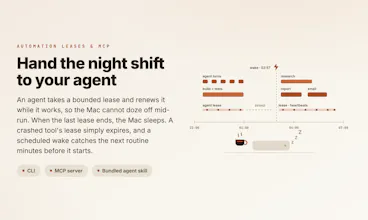
Your Mac sleeps mid-agent-run, mid-download, mid-render. Keepresso keeps it awake exactly when it should, then lets it rest: agent-aware triggers, automation leases, closed-display mode, a headless-Mac toolkit. Free, open source, macOS 14+.




Free
Launch Team / Built With


Framer AI AgentsDesign and publish professional sites with AI
Promoted
Hey Product Hunt 👋
I'm Gyorgy, the maker of Keepresso.
This started with a small, recurring annoyance. My Mac kept dozing off at the worst possible moment, mid-download, mid-render, and increasingly mid-agent-run while I was away from the keyboard. The old fix was caffeinate in a terminal, or an app that just holds the Mac awake forever. Neither is smart. Both are all or nothing.
And the moment I wanted more than that, the picture got messy. Most of the keep-awake tools I found were old and no longer maintained, closed source, or paid, and none of them did the whole job. To cover smart triggers, a headless virtual display, and the rest of the Mac optimizations, I would have needed four or five separate apps stitched together. I wanted one small, well-built system that handles it all.
What I really wanted was simple to say and surprisingly hard to find. I wanted to close my laptop in the middle of any work, keep it running even on battery with no cable attached, and have the screen stay off inside the closed lid so nothing sat there lit in my bag. And I wanted it to be smart about the other direction too, so that once the job actually finished, the Mac was allowed to sleep instead of burning power all night.
So I built the tool I wanted, one that keeps the Mac awake only when it actually should be, then lets it rest.
It began as a plain app with a manual on and off switch. Then I kept adding the thing I needed next, and the thing after that, until it quietly turned into the productivity app I think a lot of us Mac users always wanted: smart triggers, closed-display mode, gaming and streaming fixes, a headless-Mac toolkit, and sensible sleep behavior, all in one calm menu-bar app.
A few things I'm proud of:
- A real trigger engine. Stay awake while a download is running, a meeting is using the camera or mic, a build is pegging the CPU, an external drive is mounted, you are on a specific Wi-Fi or VPN, or your calendar says so. Combine conditions with any or all. It uses real macOS power assertions, no fake mouse jiggles, no faked keystrokes.
- Stay-active mode, done honestly. Tell Teams and Slack presence, remote-desktop sessions, and corporate idle-logout that you are here, so they stop marking you away. It uses the documented macOS user-activity API system-wide, not fake mouse jiggles or keystrokes, and only steps in after you have been idle a few seconds, so it never moves the pointer while you are actually working. Off by default.
- Closed-display mode that works on battery. No external monitor, no power cord required, unlike Apple's built-in clamshell. Shut the lid and Keepresso puts the display to sleep so nothing sits lit inside it, the Mac stays locked by your usual security settings, and downloads, builds, and agents keep running underneath.
- A headless-Mac toolkit for anyone running a Mac mini or Studio as a build server, agent host, or home server, including an experimental HiDPI virtual display so Screen Sharing looks crisp instead of a fuzzy 1080p.
- Gaming mode that pauses AWDL to stop the Wi-Fi stutter during cloud and streaming sessions.
- Shortcuts, a URL scheme, a CLI, widgets, 15 languages, and it lives quietly in the menu bar with no Dock icon.
It is native Swift and SwiftUI, free, open source (GPL-3.0), signed and notarized, macOS 14+. No trackers, no cookies, no license fee, for individuals and businesses alike.
Install is one line:
(or grab the .DMG from Github Releases).
I would love your feedback, feature requests, and the situations where your Mac dozes off when it should not. I will be here all day answering everything ☕
@gyorgysh brewed it right away on my mac. Easy to use and looks good - nice little tool! Now I can burn more tokens on @Claude by Anthropic haha.
@juhas Haha sounds like a plan, burning tokens overnight is as good a reason as any to not let the Mac rest. Thanks for brewing it!
the stay-active mode for Teams/Slack presence is the feature I'd actually worry about, not technically but organizationally. it's honest in that it uses the real activity API rather than jiggling the mouse, but from an employer's perspective it's still software whose whole purpose is to make you look present when you're not at the keyboard. any thought to how that lands with corporate IT policies, or is the assumption that this is squarely a personal-machine feature and not something people would run on a managed work laptop
@galdayan Hey Gal. Most managed corporate laptops today run detection well beyond a simple active/away state on Slack or Teams, so relying on this to game presence on a monitored device would likely run into other checks anyway.
The feature is really aimed at everyday cases: keeping Discord or Slack from flipping you to away during a long call or while reading something without touching the mouse, keeping a remote desktop session alive, or stopping apps that log you out after inactivity. Same idea applies to things like screen-share tools or dashboards that assume no input means nobody's watching.
Appreciate you raising it though, good signal that it needs clearer framing.
honest question - what's the actual gap versus just running `caffeinate -s` in a launchd script or using Amphetamine, which already covers most of this (timed sessions, closed-display mode)? is the differentiator really the "agent-run" trigger detection, ie it can tell when a coding agent or long job is actually still working vs just idle, or is that more of a manual toggle too?
@omri_ben_shoham1 Hey Omri! Fair question, and for the basics you're right. If timed sessions and closed-display are all you need, caffeinate -s in a launchd script or Amphetamine both do the job. I'm not going to pretend otherwise.
What sets it apart is that it's built on newer macOS foundations, open source, and genuinely flexible: triggers or manual timers deciding when to run and when not to. Closed-display mode works on battery too, so you can unplug, close the lid, and it keeps going, with a setting to allow sleep below a battery percentage you pick. It also lets the screen turn off when the lid closes, where a lot of tools keep the display running, which isn't a healthy way to handle it.
On the agent side: it can detect an app or process running, but not yet that an agent finished and went idle. You actually gave me a great feature idea there, and a clear direction to take the app to make agentic coding smoother. So expect something on this soon 🚀
Beyond that it's the things caffeinate doesn't touch: HiDPI screen sharing on a headless Mac with no dummy plug, the AWDL gaming and streaming lag fix, keeping Teams and Slack status active, a real CLI and Shortcuts control, macOS Widgets. Open source and notarized, so you can check exactly what it does.
If any of that sounds useful, give it a try. Perfectly fine if your existing tools already cover your workflow.
@omri_ben_shoham1 Update: Omri, your comment gave me the idea to develop this further, not just instance (pid/app) detection for AI agents, but actually checking multiple factors, so it's smarter than ever at keeping the Mac awake only while agents are running, on top of your other triggers. Already available in the public 1.14.0 version. Hope it's more tailored to your workflow now and helps your productivity.
Nice to see this free and open source — a keep-awake tool is one of those small things you only miss the moment you don’t have it. Question: can it stay awake automatically only while a specific app is running (say a download or a call), instead of toggling it on and off manually?
@andrei_rebrov1 Hey Andrei. Yes, that's exactly what the trigger engine handles. On first launch there's a "Meetings & calls" option you can tap to set it up, and it keeps the Mac awake only while a camera or mic is actually in use, so it covers Zoom, Teams, FaceTime, even a call in a browser tab, in one rule. It reads the system's "device in use" state, so no camera or mic permission is needed and you never get a prompt.
Downloads work the same way as a trigger: point it at a folder and it stays awake while a download is in progress, or use the network throughput rule. You can mix and match all of it under Preferences > Triggers.
Thank you! Let me know how it goes. Any issues, feature requests, or suggestions, I'd be happy to hear it. Cheers.
@gyorgysh Ah, that covers exactly what I had in mind — really well thought out. Thanks!
Been using this and honestly love it 🙌, and one small feature I'd request: I'd love a quick "stop in 15 min" option so the Mac sleeps on its own afterward and I don't have to remember to toggle it off.
@otatechie Update: Ato, implemented your suggestion. You can find "Stop in" the quick stop shortcuts in version 1.14.0. The best part is it's customizable to your specific needs in Preferences > General, where you can enter your own values for your workflow. Cheers.
Closed-display mode on battery is useful, but keeping a compiling Mac awake inside a bag sounds brutal for heat. Do you watch thermal pressure and drop the power assertion before macOS throttles? A finished build is not worth cooking the battery.
@wybaby168 For lighter loads like a quick compile or an agent running, macOS fan control handles it fine and it'll sleep again within minutes once done. For heavier loads, or if you're about to bag it and go, worth turning the feature off first, or use "only while brewing" so it only stays awake while a trigger condition is actually met. No thermal pressure monitoring built in yet, fair callout though, might add something around this angle.
Fair answer. ‘Only while brewing’ lowers the risk, but a thermal cutoff would make closed-display mode much safer. Thanks for taking the concern seriously.
@wybaby168 Update: Yu, Implemented your suggestion. Lid closed keep awake mode now has thermal protection settings built in. You can optionally boost fan speed to keep temperatures down, and if the machine doesn't recover after that, keep awake will pause and let it sleep instead of continuing to run hot. Also added the ability to monitor actual temperature values directly, rather than relying on macOS's throttled status, so you get more precise control over when protection kicks in.
I'd been running Amphetamine for years, but it hasn't seen an update in 2+ years, so I started looking for something actively maintained. Keepresso looks like exactly what I needed — native menu-bar app, smart triggers instead of just a blanket "stay awake" toggle, timed sessions, and a closed-display mode for when I want to run things lid-closed. The headless-Mac toolkit is a nice bonus if you're using a Mac as a mini server/build box.
Being free and open source is a big plus too — means it won't just quietly stop getting updates the way Amphetamine did.
Will report back after some real-world use, but first impressions are solid.
@mike_castellano Thanks Mike, tried to make it as useful as I could. Looking forward to hearing how it goes, feedback and suggestions always welcome. Cheers 🙌