
iArt.ai
Turn ideas & designs into stunning video/animation.
400 followers
Turn ideas & designs into stunning video/animation.
400 followers
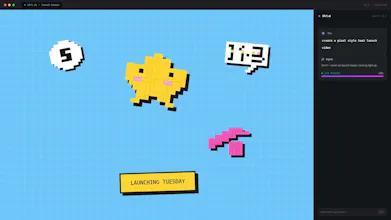
A faster agent delivers promos/shorts, explainers, kinetic type and PRO motion graphics with audio. Ditch AE/PR/CapCut. Chat to refine and ship impact.


Alconost Localization Lab
Love the batch render. question - when you say "mention assets in chat to keep on-brand," is that uploading a brand guide or referencing already-uploaded assets?
PageOn.ai
@dioiv Thanks , we support both uploading and reusing ~ may I ask what would you create for batch render : )
Congrats on the launch! The "no timeline" approach is a genuine UX bet, most people bounce from traditional editors before they even start. Curious: how does the agent handle brand consistency when you're iterating across a series (same font, same color palette, same logo position)? That's usually where prompt-driven tools start to drift.
PageOn.ai
@keirodev Thanks !
we got a brand button for it .
it's kind like skill.md , but for brand , we're still on the way to enrich it. : )
@yunfei Thank for your reply. Looking forward to seeing it mature, it's the kind of feature that turns a "cool demo tool" into a "production workflow." Will give it a try :)
Looks cool!! Congrats. I personally am not hugely familiar with this landscape but I do use CapCut for Reels, marketing, etc. Could you explain the difference between your product and the AI generator within CapCut? Full disclosure I haven't used that feature in CapCut but am just curious about what's different
iArt.ai
@millwiller Hey Will! Thanks so much for the great question 🙌
Both are great tools, maybe just built for different workflows.
CapCut’s AI features are add-ons to its powerful, timeline-based editor — they give you tons of manual control, but still require hands-on tweaks to pacing, graphics, and transitions after the initial generate.
iArt, by contrast, is fully AI-native. We built it for creators who want results fast, without the learning curve. For non-professional users especially, the AI’s ability to interpret your request and deliver a polished video quickly is often more practical than endless manual controls. You just chat with the agent to refine anything you need — no timeline, no keyframes, no tedious edits required.
@lizzy_leeeee Got it, thanks! Makes total sense. I could also imagine the same user switching between the two depending on the type of content they are looking to create.
Bold claim to ditch AE/PR lol. As someone who tests AI workflows daily, I’m curious to see how 'PRO motion graphics' compares to manual refinement. Is the 'Chat to refine' loop fast enough for a professional workflow, or is it better suited to rapid prototyping?
iArt.ai
@diana_nadim2 Hi Diana! Thanks a lot for your great questions.
We’d like to view professional motion graphics in a balanced way. Our product is mainly built for general users, especially those who struggle with ideation or lack professional editing skills. Our AI agent helps them easily create decent visual results.
As our founder mentioned, iArt is fully prompt-driven, replacing the traditional manual canvas with simple chat. We also offer "Choose Element" and "Capture Frame" tools for precise and quick editing. That said, the experience can vary a bit depending on your network speed and patience. 🤣
And the system works well for both formal production and rapid prototyping. We actually create all our social media content across platforms with iArt. Beyond regular "+ New Project" feature, our "Batch Render" is quite practical: you can pick a preferred version from the batch to remix or polish further, or ask the AI to generate entirely new takes.
We really hope you can try out our product and share your feedback with us!
The framing around 'ditching AE/CapCut' is sharp positioning — anyone who's tried to produce motion graphics professionally knows the learning curve is brutal. What I'm curious about: for creators who do short-form content (reels, product demos, explainers), how much creative control do you have over pacing and transitions? Does the AI interpret your brief or do you still guide it shot-by-shot?
iArt.ai
@theshumba Hi Melusi! Thanks for loving our positioning.
For short videos, you can set overall pacing, transitions and style directly via text. No need to guide frame by frame — just tell the AI your requirements and it will adjust accordingly.
If you have super specific ideas and want the AI to follow your instructions strictly without creative tweaks, simply state it clearly, and it will fully comply.
Occasionally preview loading issues are caused by cache. Just press Ctrl + Shift + R to hard refresh, and you’ll see the latest updates.
You can also ask the AI about its creation logic anytime in the chat panel. It will explain details from both artistic and technical perspectives. Enjoy using it!
The "with audio" part is what caught my eye — most AI video tools nail the visuals but leave you to score it yourself afterward. As a music producer, does the agent generate and sync the audio to the motion, or pull from a library? The kinetic-type + motion-graphics angle for promos looks genuinely fast to ship with.
iArt.ai
@lennoxbeflying Hey Ziang! Thanks for the thoughtful question 🙌
For voiceover: Turn on the voice feature in setup, pick a voice/accent, and and specify tone or pace in your prompt. The agent generates voiceover synced to your visuals. You can also adjust the script and even the timing of specific lines later in the process (a hard refresh Ctrl + Shift + R may be needed to see updates).
For BGM: You can pick tracks from our built-in music library and adjust the volume after video generation. We’re working on new audio features, so stay tuned 🎬.
APIPark
If I tell the agent something highly abstract like "make the transition more kinetic but keep the overall style corporate," how well does it interpret that nuance without messing up the layout?
iArt.ai
@frey_loong Hey Frey! Great question 🙌
Our agent is built to balance creative direction with layout integrity. It interprets abstract prompts by referencing your selected brand profile and existing video style, so it can add kinetic energy without straying from your corporate look or messing up the layout.
If you’re struggling to put your ideas into words, feel free to put the AI to work overtime 😆 and ask it to create several design concepts for you to choose from. This is a fun way to align on design directions and lock the elements you don’t want changed before moving on.
The latest prompt you sent can be interrupted or retracted at any time, so you can tweak your ideas freely. If the result still isn’t quite right, you can always refine it further in chat — the agent will adjust transitions while keeping the original layout intact.