
iArt.ai
Turn ideas & designs into stunning video/animation.
400 followers
Turn ideas & designs into stunning video/animation.
400 followers
A faster agent delivers promos/shorts, explainers, kinetic type and PRO motion graphics with audio. Ditch AE/PR/CapCut. Chat to refine and ship impact.


Launch Team / Built With


Framer AI AgentsDesign and publish professional sites with AI
Promoted
the PRO motion graphics claim is the one worth stress testing. motion graphics that actually look professional require precise timing, easing curves, and compositional decisions that most AI video tools either ignore or handle generically. curious what the actual output looks like on something like a product launch promo versus a kinetic type animation and whether the results are production-ready or starting points that still need significant refinement
@ansari_adin Hi Ansari, you hit the nail on the head — this is exactly the question we obsess over.
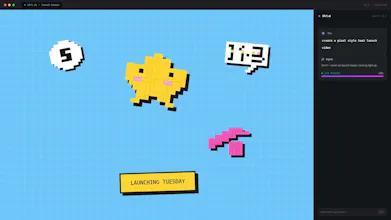
Sometimes it feels like the quality really starts with the prompt. If you set clear structure, tone, and context upfront, the first output is usually already production-ready for most use cases — just quick tweaks like font size or element positioning are often all you need. To give you a sense of what it can do, here's another launch video in a different visual style — it was made in under 15 minutes.
That said, AI still has its “lottery moments”, so we don’t claim perfection. Sometimes the first pass needs more refinement, but the chat loop lets you adjust those fine details without rebuilding from scratch. Even if you do want to start fresh, whether you ask the agent to redo it right in the same thread or duplicate the project to iterate freely, the heavy lifting is all on the AI — you just get to call the shots. Whether it’s a product launch promo or kinetic type animation, we’ve built the agent to handle both, and we’re constantly refining how it interprets those professional-level details.
Thanks for calling this out — it’s why we test rigorously every day! 🎬
Generating temporally coherent animation from static design assets is genuinely hard. Frame-to-frame consistency breaks down fast, especially with crisp edges like logos or UI elements. We've experimented with a few text-to-video pipelines and that's always where things fall apart. What's your approach to maintaining consistency across frames when the source asset has hard edges or precise typography?
@anand_thakkar1 we are still on the way, quite hard actually, we tried a looot of ways to upgrade the agent. I think the key is about letting the agent focus on the brand or style guidiance. component libs also helps !
Cool stuff!
Does the interface keep a chat history log? It’d be great to be able to jump back to an earlier version if a subsequent prompt goes off the rails, given I often have to command Z a bunch of times.. :)
@yulesenmiao Thanks for the love! 🙌 You’re going to love this: our tool inherently keeps your project status and history intact. No matter when you re-open a project, you'll always see the exact full chat history right where you left off. You can freely experiment without losing your train of thought.
Dope!
If I write a highly detailed, scene-by-scene prompt, does the agent actually follow all the instructions, or does it tend to simplify things to fit standard structures?
@alstonzhuang Thanks! It’s a great question, and to give you an honest technical answer: our Agent is designed to follow complex, detailed instructions, and in the vast majority of cases, it sticks strictly to the details you provide. In fact, the richer and more specific your prompt is, the better the final cinematic output will be.
However, because multi-scene long prompts can sometimes cause the AI to occasionally skip an edge-case detail, here is an insider pro-tip to make the Agent execute your scene-by-scene script flawlessly:
Structure your input with clear sections, such as:
- Duration (e.g., scene lengths)
- Global Rules (e.g., visual style, tone)
- Visuals + Script (the exact scene-by-scene action)
- Voiceover / Dialogue Lines (you can even specify the pacing here—just remember to select your preferred voice from our list first!)
When formatted this way, the Agent handles the complexity beautifully without trying to simplify your creative vision.
💡 Here’s the shortcut: If you don't want to format all of this manually, you'll love the "Enhance prompt" magic wand button right next to the enter key in our chat bar.
We’d love for you to drop your most detailed script in and push our Agent to its limits!
Does iArt rely on a set of pre-made templates that it fills, or is the layout generated entirely dynamically based on the prompt's context?
@summer_tao Great question! iArt is primarily powered by dynamic generation, but we also support templates. Even better, you can explore and remix any community-created layouts from our showcase!
We are currently fast-tracking the development of a brand-new batch of premium templates to give you even more design flexibility. Stay tuned for the upcoming updates!
How does the Brand Kit feature actually work? Can I upload my brand's custom TTF fonts and hex colors so the agent strictly restricts generations to them?
@eexlkuang_se Spot on! As you can see in our Brand Kit setup, we've built specific slots for Logo, Colors, Fonts, and Images.
You can absolutely input your custom hex codes and upload your brand's TTF fonts. The agent takes these inputs as hard constraints to restrict layouts and styling, so you get brand-compliant generations every single time. Give it a spin and let us know how it works for you!
How does the system handle complex typography in non-Latin scripts like Chinese or Arabic?
@syozz Great question, Ethan! For non-Latin scripts, Chinese is supported with stable rendering.
Regarding Arabic, we want to be precise: we recently audited past projects from our Arabic user base with no major text rendering issues found.
However, we are always pushing for deeper optimization when it comes to script-specific typography (like advanced line-breaking or perfect font pairing). So while the core formatting works reliably, quality might vary on some unique layout edge cases.
We highly recommend running a quick test with your own text! If you spot any layout bugs, please let us know—user examples are exactly what help us prioritize and polish these localized features.