Launching today

Harness by Autonomous
Every coding agent, every machine, one command center.
70 followers
Every coding agent, every machine, one command center.
70 followers
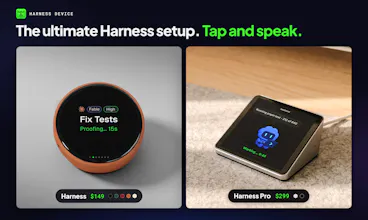
Harness is the open-source command center for coding agents. Claude Code at work, Codex at home, Hermes in the cloud: every agent on every machine, side by side. Use the native desktop app, hn in your terminal, or the iOS and Android app to answer agents by voice. End-to-end encrypted. Then go beyond code with 49 harnesses for CAD, circuits, robots, games and music. Free on Mac and Linux.




I was confused at first but I extracted this "onboarding" from the main page without adding the harness and my agent almost bought a key (cute)
@christianruink Thanks, Christian, and sorry for the confusion. That's on us, not you. Love that your agent almost bought a key though 😄.
Quick version:
Harness runs the agents you already have, with your own accounts. So install the agent CLI first (Claude Code, Codex…).
⌘N, pick your agent and a folder, type the task, hit New Harness.
The pane opens with that agent running. If it isn't signed in yet, it shows the agent's own login right there.
Sign in once and you're set.
Where did it first feel confusing? We're fixing onboarding this week and your answer helps a lot.
the agents asking something and just sitting there is the real pain, i lose more time to that than to bad code. how do you handle priority when 3 agents on diff machines all block at once? and is there a way to mark some actions as needs a human no matter what, like pushing to main or touching prod config
@hitensethiya Exactly the pain we built it for. When several agents block at once, the waiting ones jump to the top, most urgent first, across every machine. You can answer from your desktop, terminal, or phone.
For "always needs a human" actions, Harness uses each agent's own permission rules. Keep pushes to main or prod config on "ask" in Claude Code or Codex, and Harness brings that approval to whichever screen you're on. Nothing gets auto-approved unless you turn it on.
Agents carrying on after the desktop app closes is a useful detail. I'd want to check in from the phone without worrying about keeping a window open on another machine.
@oleksii_sekundant Exactly that. Close the app and your agents keep working on their own machines. The iOS and Android app shows the same agents, so you can check in, answer with a tap, or say the next task, with no window left open anywhere.