
Launched this week

Filect
Organize Your Files With AI
132 followers
Organize Your Files With AI
132 followers
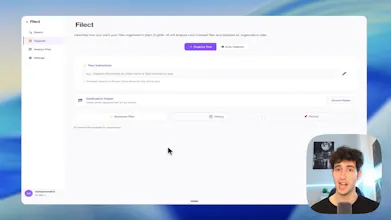
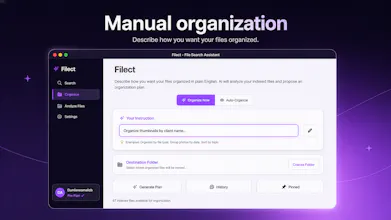
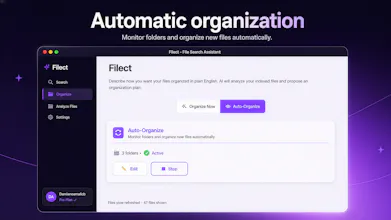
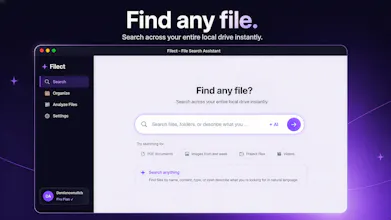
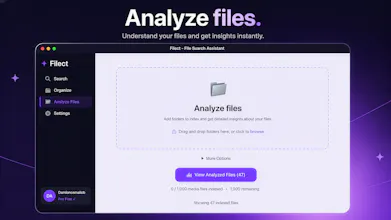
Filect automatically organizes your files into clean folder structures using AI. You can run it on autopilot or set custom rules, either way, your Desktop, Downloads, and Documents stay clean without lifting a finger. It can also find any specific file instantly. Just describe it in plain English "that invoice I made for client X last Tuesday" and Filect finds it in seconds. Built for creators, coders, designers, video editors, drowning in files. Mac and Windows. Free 10-day trial.

Filect
RiteKit Company Logo API
@damianos_mallcb The automatic organization + semantic search combo is smart—that's the friction point most tools miss. The fact that it works without forcing users into a rigid setup first will probably matter a lot for adoption. Curious if you're handling cross-device sync or if it's local-only for now.
Filect
@osakasaul Thank you very much. Yeah, that's why I designed it that way.
No, we currently don't have a cross-device sync because that would mean the tags of the analysis of the user's files would have to be uploaded to the cloud, which wouldn't be good for their privacy.
But this could be a feature that I add in the future, always with the users consent first.
What's the undo story? Can I see exactly what Filect plans to do before it touches anything?
Filect
@iamryan Yes, you have the option to preview the exact plan, before Filect does anything, when you are in the manual organization section.
Which means you have full control over what happens.
Also there is an undo option, in the history section where you can undo all the changes that Filect made.
"Desktop, Downloads, and Documents" are the three folders it mentions — what about project folders buried deeper in your drive? A lot of the real chaos for video editors lives in nested client folders, not just the top-level directories.
Filect
@sounak_bhattacharya You can select any folder that you have in your PC. These are just the main ones that people use, but in that section you can literally select any custom folder you want.
So you should have no problem selecting project folders buried deeper in your drive.
The autopilot vs custom rules split is the right shape. For someone burned by "AI moved my files and now I can't find them" — does Filect keep an audit log or undo trail you can roll back? That's the trust-builder for letting it run unattended.
Filect
@tijogaucher Yes, it does keep an audit log, and you can undo and revert back to the previous version of your files.
Curious how it handles files it's unsure about does it ask you or just make a best guess? The biggest fear with AI file organizers is it quietly moving something somewhere you can't find it.
Filect
@imad_elkhafiIf it is unsure, It makes the best guess. If you're using the manual organization section, you do have the option to preview the changes before it applies them. Plus you also have the option to give feedback after it proposes the moves it wants to do ,where you can tell it what changes you want it to make.
Congrats on the launch, Damianos. Japan-based founder here.
One Japan-specific thought: for file organization tools here, the blocker may not be “can AI sort files?” but whether it can handle messy Japanese file realities safely: Japanese filenames, mixed JP/EN folders, invoices, receipts, client assets, screenshots, and privacy-sensitive local files.
The strongest Japan angle I’d test first is not generic “organize your files with AI,” but “clean up chaotic local work folders without uploading private files or breaking Japanese filenames.”
That could matter a lot for freelancers, designers, video editors, and small teams here.
Filect
@wakuta Hello Ryota, you should have no problem with Japan-specific files. If AI can understand them, so can the app.
If you have some files that you don't want to be analyzed with AI, you also do have the option to tell the app to not analyze them.
I Specifically made it that way so you have full control over your own files.
@damianos_mallcb Thanks Damianos — that makes sense.
My point was less about whether the AI can understand Japanese filenames, and more about the trust layer: preview, control, exclusions, and making sure users feel safe before letting AI reorganize local work folders.
So for Japan, I’d probably make that “full control over your own files” message very visible.
I’ll stop here so I don’t turn the launch thread into a long consulting thread, but happy to share more if useful.
Wishing you a strong launch.
It's incredibly obnoxious to bury the price until after one has registered and installed the app....do better
Filect
@adamelisha1 The app does have a 10-day free trial, so you can try it completely for free. Plus, it is just $15 per month.
But you are right. Ideally, I should have the pricing on the website of the app, so I will definitely make sure to make this update. Thank you for your feedback.
@adamelisha1 I agree. I'm also concerned about the lack of a Privacy Policy on the website.
Filect
@adamelisha1 @vitnes Your files are analyzed only with ChatGPT API Calls, which information, only you and OpenAI have.
Nobody else can access that information.
I also just added the privacy policy in the website, thanks for the feedback.