
FastRouter.ai
Route requests to the right LLM for cost, latency & quality
611 followers
Route requests to the right LLM for cost, latency & quality
611 followers
FastRouter is a unified AI gateway and control plane for developers and enterprise teams building with LLMs. It routes every request to the right model across 200+ LLMs through one OpenAI-compatible API, optimizing for cost, latency, quality, and reliability. With intelligent routing, failover, observability, and governance, teams can scale AI apps without vendor lock-in or code changes.




Free Options
Launch Team / Built With


SKYLARKA smarter way to book luxury hotels
Promoted
Hey Product Hunt! I’m RP, part of the team behind FastRouter.ai.
We built FastRouter because running AI in production meant too much plumbing and too much guesswork: multiple SDKs, scattered dashboards, fragile failover, and no clear answer to “How do we make this cheaper without making it worse?” when all the logs are scattered all over the place.
⚡ One integration. Less provider juggling.
FastRouter gives you a unified API across major models and providers, with support for OpenAI, Anthropic Messages, and Gemini-compatible interfaces.
Claude models, for example, are available through Anthropic, Amazon Bedrock, and Google Vertex AI. FastRouter routes requests to healthy upstreams, so you don’t have to maintain separate SDK integrations and failover logic yourself.
Routing is the starting point. Routing Intelligence is what makes FastRouter different.
Most gateways show you traffic and spending. FastRouter helps you figure out what to change:
Proactive cost insights: Weekly recommendations based on real traffic. Find cheaper models, prompt caching opportunities, and workloads suited to flex pricing. Model-switching recommendations include evals so you can compare quality before switching.
Early warning signs: Spot latency drift, error spikes, and cost anomalies, with alerts delivered to Slack or PagerDuty.
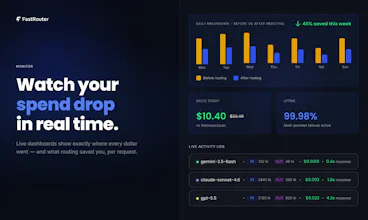
Request-level visibility: See which upstream served each request, allocate costs with tags, and inspect logs, including multimodal outputs.
Evals beyond text: Evaluate production traffic and datasets, including images and video. A successful API response doesn’t always mean a usable output.
Multimodal response caching: Reuse cached image and video responses for matching prompts or cache keys instead of calling the model again.
Better prompt management: Keep prompts in a shared, versioned library, with optimization and compression tools to improve them.
Our production customers are already saving $10K+ per month by acting on FastRouter’s recommendations.
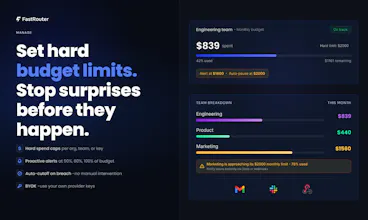
Available as SaaS or fully on-prem, with budget caps, alerts, and access controls built in.
We built this to spend less time maintaining integrations and investigating bills, and more time shipping things that work.
Claim 2 months free: https://fastrouter.ai/product-hunt
What’s your biggest AI production headache right now: reliability, cost, integrations, or quality? Let us know in your comments.
@ritprasad Many congratulations, Ritesh, Andrej and team! 😊
How I met the makers: Andrej reached out to showcase FastRouter, and I was immediately impressed by the product design, clarity of the mission, and the real developer pain point it addresses. It’s a well-timed solution for teams building AI applications at scale.
We worked together for polishing their launch assets, product positioning and messaging before the launch.
What FastRouter does: FastRouter is a unified AI gateway and control plane that routes requests across 200+ LLMs through one OpenAI-compatible API. It helps teams optimize for cost, latency, quality, and reliability, while providing failover, observability, governance and actionable insights without vendor lock-in.
Why I endorse it: Teams often struggle with managing multiple model providers, fragile fallback logic, unpredictable costs, and unclear quality trade-offs.
FastRouter turns that complexity into a single intelligent layer, with proactive recommendations, request-level visibility, and evaluation tools that make model choices easier to trust.
I’m confident FastRouter will see strong adoption among developers and enterprises looking to scale AI products more efficiently. ✨
@rohanrecommends Huge thanks, both for hunting FastRouter and for your feedback.
You’ve captured exactly why we’re building this: teams should spend more time building their AI products and less time managing providers, fallback logic, and cost surprises. What matters is driving meaningful outcomes be it in terms of cost, quality or performance for the AI products we build.
Grateful for your support and for hunting us today!
@ritprasad The biggest pain for me is just the model outages. Does your failover logic handle it when the api provider is totally down?
@hemendra_khatik Yes, Hemendra. Here's an article that we wrote up recently on our blog that explains this in more detail: https://fastrouter.ai/blog/posts/anthropic-went-down-fastrouter-didnt-150-requests-one-live-outage-zero-downtime
@ritprasad Congrats. I'm curious to know what was your "aha" moment while building the product?
@swati_paliwal Great question! A lot of engineering teams at AI product companies at scale don't have the visibility into their spends. This is sometimes because the control is with a centralized IT team that provisions accounts and manages keys. The reason being they don't want keys to be leaked.
Moreover, spend dashboards of the large cloud platforms are not the easiest to navigate. A simple spend report and checking how much you spent on a given model for a given month for a given key can become a challenge in itself.
All this leads to not being able to measure basic metrics - but also an inability to drive outcomes such as cost, performance, quality improvements via processes such as AI Evals because the data is siloed across different platforms.
That's when the 'aha' moment struck us viz. beyond just a rich dashboard - we set our sights on building an easy-to-use evals product along with providing proactive Insights to customers.
grouping retries under the original request is useful. if a stream fails halfway through, can failover continue it or does the user get a new response from scratch?
@jeetendra_kumar2 Great question. Right now failover only kicks in before the first token is sent. If a request fails upfront (connection error, 5xx, rate limit, etc.), we retry/fail over to another provider and the client sees a single, clean response. But if the stream has already started and the provider errors out midway, we don't retry we surface the error on the stream and end it.
Hey @ritprasad
Congrats on the launch.
How is it any different from OpenRouter? Any key differences you have implemented or plan to implement in the future?
@nishit_chittora Fair question. While OpenRouter (and perhaps others as well) is a great product, I'd say where FastRouter shines is in the area of Routing Intelligence i.e. beyond being a model marketplace and catering to a host of other features that both platforms offer.
By Routing Intelligence, some of these differentiating features include:
1. Proactive Insights: Proactive audits of your production LLM traffic to uncover actionable savings and recommendations through prompt caching, flex-tier usage, model swaps that offer the same quality of output at a cheaper price.
2. Real time alerts: Get real time alerts on Slack, PagerDuty, etc. in case of any spikes - be it latency/errors/spend spikes - be it threshold or % based in comparison to previous periods and where metrics are measured per request as that is what matters to your end user.
3. Prompt Management & Optimizations: Via prompt optimization, prompt versioning with rollback
4. Custom Evaluations: Across text, image, and video outputs to evaluate / compare model outputs side by side.
5. Multimodal observability & response caching: Not just log/review your multimodal image / video content in logs but also leverage response caching for such requests.
We have customers who have saved / identified >$10K/month of savings via some of the above recommendations/features and see great traction with customers using AI for multimodal outputs.
And while we will keep pace on some of the features others offer, we will continue to set pace with more of these differentiators going forward.
Congrats on the launch. Can I set my own routing policies in settings on top of the default logic?
@iamanantgupta Thanks, Anant! Yes, you can configure your own routing policies using Virtual Model Aliases: https://docs.fastrouter.ai/explore-features/virtual-model-aliases
Options include Random Shuffle, Lowest Latency, Highest Throughput, Lowest Usage, Lowest Price, Priority Routing, and Category-Based Routing. For example, you can prioritize a specific provider and fall back to the next only if a request fails, or choose the lowest-cost option from a selected set of providers.
In the next couple of days, we’re also launching Optimization Settings, through which you’ll be able to assign a setting to individual model choices within an alias - e.g. try the flex tier always for a particular model within an alias; use prompt compression with one of choices; etc. Stay tuned!
How does FastRouter handle the situation where a model which used to be the cheapest is now starting to experience latency and quality issues?
@iamanantgupta Great question.
1. AI Evals (which you can run via our Custom Evaluations feature) ought to be run systematically and not as a one off. And hence, our Insights feature (with model switch recommendations if turned on) also runs periodically, not once.
2. On every periodic run we track not just cost but also latency and quality scores (LLM-judge based) for the models serving your traffic -- along with other system suggested options.
This way, you know when it's time to switch and are also able to compare against newly launched models.
Can devs prioritise which criteria they want to optimise for: cost, latency, quality, and reliability at the routing layer?
@nuseir_yassin1 Yes, you can configure routing policies using Virtual Model Aliases. These include Lowest Latency, Highest Throughput, Lowest Price, Lowest Usage, Priority Routing, Category-Based Routing, and Random Shuffle. For example, you can prioritize a preferred provider with fallback to the next ordered provider on an error, or choose the lowest-cost option from a selected set of providers.
In the next couple of days, we’re also launching Optimization Settings, which you can assign specific settings to individual model choices within an alias so you have greater control on how you access a model within a provider - for e.g. use the flex tier from OpenAI for model X.
For Quality, our AI Custom Evaluations feature and Insights help you compare models on your actual requests, so you can decide which models to opt for based on cost or speed or quality or combination thereof. Insights gives you recommendations to act on with evidence. The actual switching is a decision you can take based on reviewing the data.
What is the exact mechanism behind the product that decides which model would be the best fit for specific request?
Great question, @himani_sah1! There are two different features:
Insights: We replay a sample of your requests, grouped by use case, against alternative models that perform well for those task types and complexity levels. You get a comparison of cost, latency, and quality scores from an LLM judge and a recommendation so you can evaluate the trade-offs before switching.
Auto-Router (per-request selection): While you can route to various models, you can also route to fastrouter/auto. In this case, the auto-router identifies the matching task/complexity cluster for the incoming request and selects a model based on its scores for this task/complexity level - balancing performance and cost.
In short: Insights helps you validate model choices on your actual traffic. It runs on the underlying Custom Evaluations product feature; whereas the auto-router uses task and complexity scoring to make the selection automatically.