Launching today

Deskcord.chat
A widget to chat with customers from your Discord server
49 followers
A widget to chat with customers from your Discord server
49 followers
Turn Discord into your support desk and chat with your customers. Embed our chat widget in 5 minutes and let your customers reach out to you directly to your server. Every conversation in the widget becomes a Discord thread. Unlimited seats, unlimited domains. Deskcord is built for solo founders and small teams. Skip the bloated and expensive tools and get closer to your customers from the comfort of your Discord server. Deskcord is an alternative to the giants like Intercom, Crisp or Zendesk.




Hi everyone! 👋
I'm Maxime, and I built Deskcord because I was tired of big, bloated and expensive customer support tools. I realised that most people here are either indie developers or work in really small teams. We certainly don't need hundreds of features for these tools and don't want to be spending any more than we should for those.
With that in mind I tried to design a tool that I would love using myself. I didn't want to have yet another dashboard opened in my browser and a whole new set of notifications to keep track of. That's when it hit me. I'm a long-time Discord user and enjoyer. This is my main channel of communication and it is always somehow opened on my laptop or my phone. Why not use it as my support desk, then?
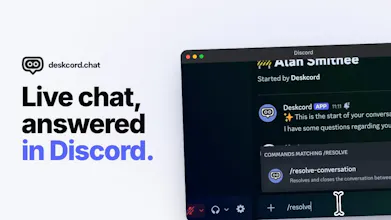
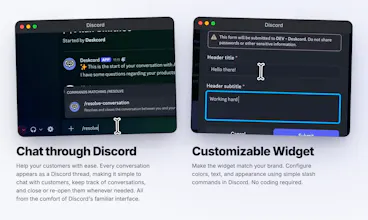
This is why I built Deskcord. It turns Discord into your support desk. Drop a small widget on your site, and every customer message becomes a thread in your Discord server. You reply from the Discord app: mobile, desktop, wherever. No separate login, no new tool to check.
I wanted to make it affordable and straight to the point, because you should be spending your time and money on your products, not on customer support. Deskcord has flat pricing, not per-seat: $4.99/mo solo, $19.99/mo for unlimited team members.
Even better, a single subscription lets you install the widget on an unlimited amount of domains! Are you a indie hacker in search of your next breakthrough? Got 10 products running in parallel? With a single Deskcord subscription, you can set up all your domains with our chat widget.
It installs in a few minutes too! Add the bot, grab the widget snippet, paste it on your site and be done with it.
Would love your feedback, especially if you're currently overpaying for a support tool you barely use. Happy to answer anything in the comments!
How do you handle keeping customer conversations organized when a server starts getting busy?
@amybradley great question, since Deskcord is Discord native, we rely on their interface to quickly search and sort through the threads of your server.
They have a great search feature that lets you search previous thread based off of a user's name or email. Discord's search is also powerful enough so you can make more complex queries like "searching for a message sent by X support member between X and X dates containing an image attachment".
I believe this is enough for now, as we are mostly targeting indie hackers, solo founders and small teams. I want to make sure my product stays as lean as possible because the major players of this market are absolutely packed with features that end up unused by most of their customers.
If a team and its support needs grows to the point where this solution isn't cutting it anymore, I'd be glad to read their feedback and to implement more robust features.
I would like to know what feedback from early users influenced the current version of Deskcord?
@alheri_murya they definitely helped me stay on track with the lightweight solution and the "no dashboard" approach. I've thought about implementing a dedicated dashboard through which you coud customize your widget, but early testers reminded me that the strength of Deskcord is its minimalism and its "discord only" approach.
They also helped me figuring out the onboarding, which can sometimes be a bit obtuse for users who have never installed a Discord bot before.
Does each customer conversation get any extra context so teams can understand the history quickly?
@linpeng no at the moment, but this is definitely something I'm considering. I've thought about adding a slash command that would summarise the user's context, including maybe their navigation through your website or anything that you would collect through the widget.
What do you think? What kind of context would you like to have handy directly through the Discord chat?
Could customers reply to the same conversation later and have it reopen the existing Discored thread?
@magdalena_anderson yes! The thread stays open until the customer support closes it using a slash command.
Once closed, the user can keep reading the history of the past conversation but has to open a new chat and thus a new thread.
How do you handle conversations when several team members need to work on the same customer issue?
@manisha_bhil every team member can read the threads as long as they have access to the support channel.
The first customer support member who answer the thread get assigned to the conversation (which updates the header of the widget, telling the user who they're chatting with).
If another CS member needs to take over a chat, they can simply answer in the thread and the conversation will be assigned to them.
It's a very straightforward and simple approach, as is everything with my project. To be honest, I'm expecting most users to be on the solo plan, but I'd love to hear feedback from small teams so they could tell me if I didn't oversimplify things too much.