Launching today

Design Previewer
See PSD, AI, CDR & More Without Opening Apps
6 followers
See PSD, AI, CDR & More Without Opening Apps
6 followers
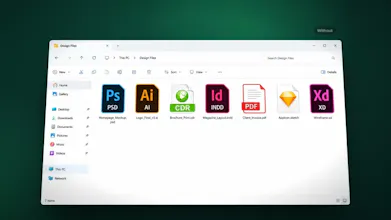
Stop opening massive design files just to find the right artwork. Design Previewer brings instant thumbnails and high-resolution previews directly to Windows File Explorer, even without Adobe, Corel, or Affinity apps. Supports 9+ formats, including PSD, AI, CDR, INDD, XD, Sketch, and PDF. Uses embedded previews for ultra-fast performance, supports Alt+P Preview Pane, and works 100% offline on Windows 10 and 11.


Free Options
Launch Team / Built With


Customer.ioAutomate Messaging Everywhere — Startups Get 12 Months Free
Promoted
Hey Product Hunt!
I'm Muhammad Junaid, and I'm excited to introduce Design Previewer, a lightweight Windows utility that makes working with design files faster and easier.
The Problem
If you work with graphic design, printing, or large client projects, you've probably experienced this frustration. You open a folder containing 60 Photoshop, Illustrator, or CorelDRAW files, only to find dozens of identical application icons instead of actual previews.
Finding the right file becomes a tedious process of opening files one by one. And when you receive files from applications you don't have installed, identifying their contents becomes even harder.
Our Solution: Design Previewer
Design Previewer brings real thumbnails and high-resolution previews directly into Windows File Explorer on Windows 10 and 11. No need to launch heavy design applications just to find the artwork you're looking for.
What Makes It Different?
Fast Previews, Even for Massive Files
Instead of processing an entire design file, Design Previewer reads its embedded preview data. For example, it can extract just 192 KB of preview data from a 623 MB PSB file, helping you identify artwork without loading the entire file.
Support for 9+ Design File Formats
Preview files from Photoshop, Illustrator, CorelDRAW, InDesign, Affinity, Sketch, Adobe XD, and PDF, including formats such as PSD, PSB, AI, EPS, CDR, INDD, and more.
No Design Software Required
Need to inspect client files on another computer? Design Previewer lets you preview supported files without installing their original design applications.
High-Resolution Preview Pane
Press Alt + P in File Explorer to inspect your artwork in a larger preview without opening the original application.
Lightweight, Private, and Offline
No unnecessary background services or startup entries. Your files remain on your computer, are never modified by the preview process, and can be previewed without an internet connection.
Try It Free for 15 Days
You can explore all the features for 15 days without creating an account or entering credit card details.
After the trial, choose between a $7 yearly licence and a one-time Lifetime licence with no recurring payments.
Visit https://designpreviewer.app/ to learn more.
I'd Love Your Feedback!
Design Previewer was built to solve a frustrating everyday problem, and I'd love to hear how it could fit into your workflow.
What design file formats do you work with most? Is there anything you'd like to see improved or added?
I'll be here in the comments to answer your questions, hear your feedback, and discuss how we can make working with design files on Windows better.