Genie, our AI Analyst, can already tell you what changed in your numbers. It's never been able to tell you why, because the why almost never lives in Databox.
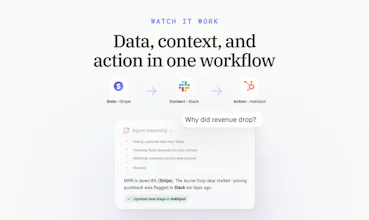
Revenue drops 8%, and the real reason is a stalled deal in HubSpot, a pricing objection buried in a Slack thread, or a support ticket nobody flagged. Right now, finding that out means leaving your dashboard, opening three other tools, and piecing it together yourself. Every time.
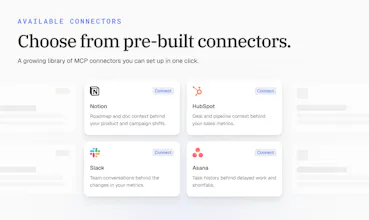
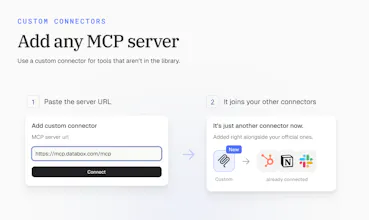
Next week, we're launching MCP Connectors. Connect your CRM, Slack, support desk, or any MCP server, and your AI Analyst gets that same context, right inside the conversation. Ask why a number moved, and it points to the actual deal or thread behind it, not just the number.






The per-tool approval settings are the part I’d want in any setup like this. Pulling context is one thing, but once an analyst can update a CRM or stop a campaign, “needs approval” can’t be an afterthought.
Databox
@znu Agreed, Do Hyeon. That's why we built permissions in from day one instead of adding them later. You decide per tool what Genie, our AI Analyst, can do on its own and what needs your approval first. Looking things up can run freely, while updating a deal or pausing a campaign waits for your OK.
Databox
I like that the approach is safe. Read access now, write access later, same connection not a separate thing bolted on after. When write tools are unlocked (updating a deal, sending a message) it'll just be an extension of what's already connected.
Dial
"it can act on what it finds" is the line I'd want to poke at. explaining why a metric moved is read-only and low risk, but acting implies it's writing something back into the CRM or support desk, not just reading from it. what does that write path actually look like in practice, is it drafting a task for a human to approve, or can Genie create/update records in the connected tool directly without a person in the loop first?
Databox
@galdayan Fair line to poke at, Gal. It depends on how you set it up, and the choice is yours per tool.
Write tools call the connected tool directly. Genie, our AI Analyst, can create or update a record in your CRM or support desk, not just draft a suggestion. Whether a person has to approve first is up to you. For each tool, you choose whether it can run on its own, needs your approval every time, or is blocked completely. By default, write actions ask for approval first. So out of the box there's a person in the loop, and you remove that step only for the actions you trust it to take alone.
In practice, most teams let it look things up freely, allow a few low-risk actions like creating a follow-up task, and keep approval on anything customer-facing or anything that changes pipeline data.
asked genie about a metric that moved and it found the exact slack thread where we'd already talked about it internally lol. Saved time from typing out an explanation the team had already figured out days ago :)
Databox
@tadej_kelc Ha, love this, Tadej! This is the exact moment we built it for. The team already knew why the metric moved, and the answer was sitting in a thread nobody wanted to go dig up. Now Genie, our AI Analyst, finds it for you instead of making you explain it all over again.
Databox
We spent a good chunk of time on connector management, so seeing people use the permission settings is a nice payoff. My setup for Notion: read tools on Always allow, everything else on Needs approval. Fast for lookups, still asks before changing anything.
the number one question on demo calls is basically 'ok but does it actually know whats happening in our other tools'. now i can just say yes, connect hubspot or slack once and genie explains a number using whats actually in there. way easier sell than pointing at a roadmap slide
Databox
@kenneth_won Love this, Kenneth. "Does it know what's happening in our other tools?" is exactly the question we kept hearing. It's much easier to answer with a live demo than with a roadmap slide.
Sourclip — Gemini Notebook Workspace
Bringing MCP connectors makes the “why behind the numbers” much more useful.
Databox
@numerbyte Thanks, Aditya! That's the whole idea. The number tells you what changed, and the context tells you why.