Genie, our AI Analyst, can already tell you what changed in your numbers. It's never been able to tell you why, because the why almost never lives in Databox.
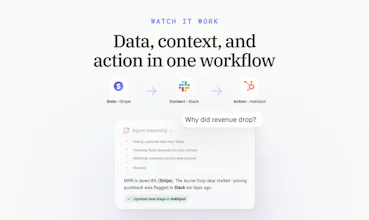
Revenue drops 8%, and the real reason is a stalled deal in HubSpot, a pricing objection buried in a Slack thread, or a support ticket nobody flagged. Right now, finding that out means leaving your dashboard, opening three other tools, and piecing it together yourself. Every time.
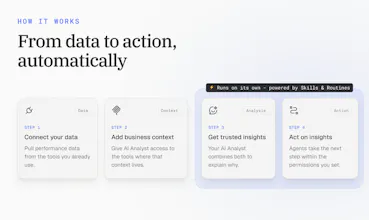
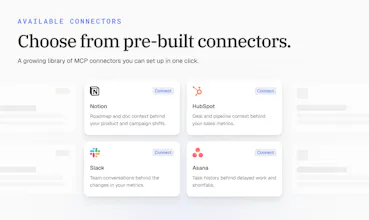
Next week, we're launching MCP Connectors. Connect your CRM, Slack, support desk, or any MCP server, and your AI Analyst gets that same context, right inside the conversation. Ask why a number moved, and it points to the actual deal or thread behind it, not just the number.





Toone
Looking real nice! So as I understand these are a set of MCP's that I can integrate in my workflow?
Databox
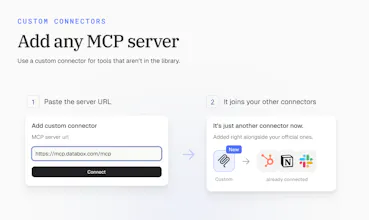
@matheus_paranhos1 Thanks, Matheus! Close. It works the other way around: MCP Connectors bring your tools into Databox. You connect the tools your team already uses, either from our pre-built list or any MCP server you run yourself. Genie, our AI Analyst, can then use them to explain what's behind your numbers.
If you want to go the other direction and use your Databox data inside your own AI tools, that's what the Databox MCP is for.
Toone
@zigapotocnik Thanks for the clarification! Very useful, congratulations!🥂
How much setup is needed before the AI Analyst understands the company context?
Databox
@linpeng Very little, Lin. Pick a tool, click connect, and sign in. That's the whole setup, and it takes a few minutes. There's nothing to map or configure.
From there, the AI Analyst pulls in context from that tool whenever it's relevant to your question. You can adjust what it can access tool by tool, but you don't have to before you start. Most teams connect one tool first, ask a question they'd normally dig for, and add more from there.
Can it learn which business questions matter most to a specific team?
Databox
@jasonwu Good question, Jason. Today your team shapes that directly rather than waiting for it to learn on its own. With Skills, you tell Genie, our AI Analyst, how your team works: which questions matter, which metrics to look at, and how to answer. Routines then run those questions on a schedule. Connectors add each team's own tools, so sales gets answers from sales context and marketing from marketing context.
It's more predictable this way, since the team decides what matters instead of the AI guessing.
Can it understand custom metrics that a company has created rather than only standard analytics metrics?
Does it let users ask follow up questions after an AI Analyst response so they can dig deeper into the same performance issue?
Databox
@haolin Yes, Hao. It's a conversation, so you can keep asking questions and it keeps the context of the thread. For example, ask why revenue dropped, then follow up with "which accounts drove it?" or "what did the team say about those deals?" The AI Analyst goes back to your metrics and connected tools each time, so every answer builds on the last one.
What happens when the available data is incomplete or does not clearly explain a performance change?
Databox
@manonbriffaut Great question, Manon. When the data doesn't explain the change, the AI Analyst should say so instead of guessing. It tells you what it found, what's missing, and where the gap is. That's also where connectors help most. Often the answer isn't in the metrics at all, it's in a deal update or a team conversation. The more of those tools you connect, the fewer dead ends you hit.
Can teams create different report formats for executives managers and individual departments?
Databox
@noahanderson Yes, Noah. With Skills, each team defines how a report should look and what it should focus on. An executive version might be a short summary with top risks and wins, while a department version goes deeper into its own metrics. Routines then send each version to the right people on schedule. Connectors add the context behind the numbers to all of them.