
Databox is an agentic analytics platform that brings performance data from across your business together with consistent metrics and business context. Ask its AI Analyst questions about your business, use Routines to surface important changes automatically, and turn insights into reports that explain what happened and why it matters. Databox does more of the recurring reporting and analysis, so you can understand performance faster and take better-informed action.
This is the 10th launch from Databox. View more

MCP Connectors by Databox
Launching today
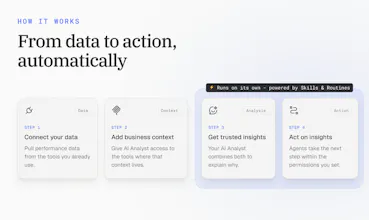
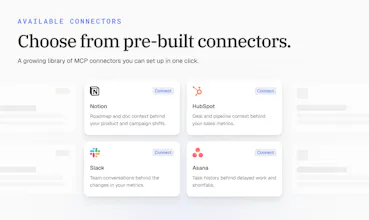
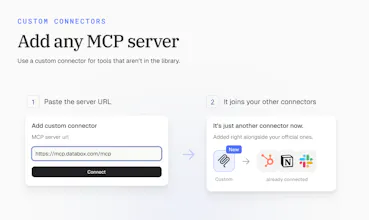
Connect your AI Analyst to the tools your business runs on. It pulls context from your CRM or support desk, so every answer reflects what's happening in your business, and it can act on what it finds. Choose from 10+ connectors or add any MCP server.



Free Options
Launch Team / Built With


Can it learn which business questions matter most to a specific team?
Databox
@jasonwu Good question, Jason. Today your team shapes that directly rather than waiting for it to learn on its own. With Skills, you tell Genie, our AI Analyst, how your team works: which questions matter, which metrics to look at, and how to answer. Routines then run those questions on a schedule. Connectors add each team's own tools, so sales gets answers from sales context and marketing from marketing context.
It's more predictable this way, since the team decides what matters instead of the AI guessing.
Does it let users ask follow up questions after an AI Analyst response so they can dig deeper into the same performance issue?
Databox
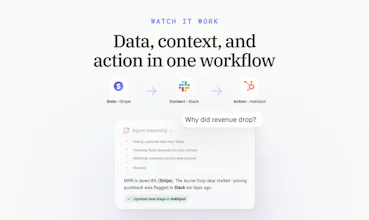
@haolin Yes, Hao. It's a conversation, so you can keep asking questions and it keeps the context of the thread. For example, ask why revenue dropped, then follow up with "which accounts drove it?" or "what did the team say about those deals?" The AI Analyst goes back to your metrics and connected tools each time, so every answer builds on the last one.
What happens when the available data is incomplete or does not clearly explain a performance change?
Databox
@manonbriffaut Great question, Manon. When the data doesn't explain the change, the AI Analyst should say so instead of guessing. It tells you what it found, what's missing, and where the gap is. That's also where connectors help most. Often the answer isn't in the metrics at all, it's in a deal update or a team conversation. The more of those tools you connect, the fewer dead ends you hit.
Can teams create different report formats for executives managers and individual departments?
Databox
@noahanderson Yes, Noah. With Skills, each team defines how a report should look and what it should focus on. An executive version might be a short summary with top risks and wins, while a department version goes deeper into its own metrics. Routines then send each version to the right people on schedule. Connectors add the context behind the numbers to all of them.
The business context layer seems important because numbers without context can easily lead to the wrong conclusion. How is that context added and maintained over time?
Databox
@darly_selby Agreed, Darly, that's exactly the risk we wanted to fix. The good news is that nobody has to add or maintain the context by hand. It already lives in the tools your team uses every day, like your CRM, project tools, and team chat. Once a tool is connected, the AI Analyst reads from it live whenever it's relevant. As your team updates deals, tickets, and threads, the context stays current by itself. There's nothing to copy, sync, or keep up to date.
Mantra Timer
@zigapotocnik having AI access to your CRM via this MCP is an great addition to the toolset. Best of luck with the launch.
Databox
@codeandsea Thanks, Brent, appreciate the support! The CRM is where most of the "why" behind a number lives, so it's usually the first connector people set up. Right now Genie, our AI Analyst, can read from it. Next step is letting it act too, like updating a deal stage right after it spots the problem.
Databox
Hey Product Hunt 👋
Every AI tool has the same blind spot: it only knows what you tell it.
That's bugged me since we shipped Genie, our AI Analyst. It could tell you a number moved, but not why, because the why was never in Databox. It was in the deal that stalled in your CRM, the ticket spike after a release, the Slack thread where someone already explained it. MCP Connectors fix that. Connect your tools, and Genie pulls that context into its analysis. Then it can act on what it finds: update the deal, open the task, pause the campaign.
The acting part is where we spent the most time. Letting an AI touch your CRM or Slack isn't a small decision, and it shouldn't feel like one you made by accident. Nothing connects unless you turn it on, tool by tool, and you decide what needs your approval first.
Ship slower, earn the trust. That was the bet.
One question for you: what's one thing about your business you wish AI already understood, without you having to explain it every time? Not a feature request, just the thing. That's the list we're building from.
Give it a try at databox.com