
Code Atlas Live
A zoomable map of your codebases, like Google Maps for code.
3 followers
A zoomable map of your codebases, like Google Maps for code.
3 followers
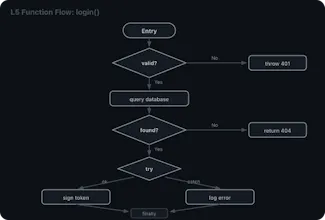
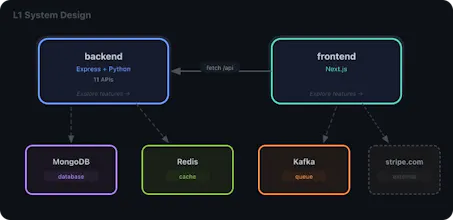
A zoomable structural map of your codebases, like Google Maps for code. Auto-generated architecture diagrams, API sequence flows, dependency graphs, and code health reports for 30+ frameworks across 13 languages. Navigate from service topology down to a single function. Live differential rendering highlights how the architecure at all 5 levels keeps shifting as agent keeps adding code Download or install from Extension registry - https://open-vsx.org/extension/codeatlaslive/codeatlas-live





Vibe coding is genuinely incredible until you look up and realize you've shipped a couple thousand lines you don't fully understand, your AI is making calls based on whatever file you happened to have open. I kept hitting that wall.
The part that bugged me most wasn't the speed, I actually love how fast AI lets me move. It was that I couldn't see anything as it was happening. Diagrams went stale the moment I closed the tab. Code reviews showed me text but not structure. Every developer's AI had a slightly different mental model of the same project. It felt like we'd traded one kind of tech debt for a weirder, more invisible kind.
So I started with one small idea: a live architecture view that updates with your keystrokes. That core never moved. What changed was everything around it. Once the live model was real, I kept running into the same question, why isn't this also doing X? Why isn't the AI reading from it? Why aren't review diffs rendered against it? Why are design discussions still happening in Slack threads instead of pinned to the actual node we're talking about? Every answer expanded the scope a little. Eventually it stopped being "a visualization tool" in my head and became something more like a shared layer that AI, reviews, and teammates all work against.
The extension shipped first because I needed to prove the engine actually works in real codebases.
Install the extension on your cursor/antigravity etc editors.
Post install, it launches the browser on http://localhost:7742, you can review you codebase on different layers, systems design, features, sequence diagrams for endpoints, class/file diagrams, flow charts for each function.
You can review commits, prs, branches, working changes with time line replay feature and quickly find what/where the changes are impacting.