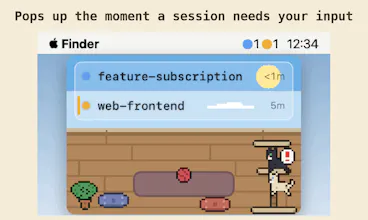
A floating macOS window for every Claude Code session. The moment one needs your input, it surfaces — and hides when all is clear. Jump to the exact terminal in one click. Native Swift, notarized, 7-day free trial.
shows up only when a Claude Code session actually needs input instead of a constant status window - fixes the exact problem of running a few sessions at once and losing track of which one stalled. jump-to-terminal in one click is genuinely fast.
What needs improvement
macOS only, and unclear yet how it handles remote/SSH sessions rather than local terminals - that's a real gap for anyone mixing local and remote agent work.
Ratings
Ease of use
Reliability
Value for money
Customization
Report
6 views
Framer AI AgentsDesign and publish professional sites with AI
Hi Product Hunt! 👋
I'm a solo developer from Japan, and like many of you I run several Claude Code sessions in parallel. I kept doing the same dumb thing: kick off a session, switch to something else, and realize ten minutes later that Claude had been sitting there waiting for a single "yes" the whole time.
AgentManager is a native macOS app that fixes exactly that:
🐈 A floating window shows every session's state — running, waiting, done
⚡ It surfaces the moment a session needs your input, and hides when all is clear
🖱️ Click a row to jump straight to the right terminal (iTerm2 pane, Terminal tab, VS Code / Cursor window…)
🔔 Cat-meow alerts instead of Notification Center banners (mutable, promise)
🎨 Sessions live as pixel-art cats in a little room — day and night change with your clock. There's a Simple mode if cats aren't your thing.
A few things that matter to me:
• Native Swift, ~2.5 MB download, notarized by Apple
• Your session data (prompts, paths, names) never leaves your Mac
• 7-day free trial with no credit card. Then $4.99/mo or $48/yr.
I'd love your feedback — especially which terminals or IDEs you'd like better jump support for. I'll be here all day answering questions!
Report
@umechanhika The quiet/no-banner design is a nice choice for multi-agent work. One edge case I would want to test is remote Claude Code inside tmux: if the state file syncs back but the jump target cannot map to the right pane, does AgentManager still show it as needs attention without trying to focus the wrong window?
Yes — and that's not a hypothetical edge case, it's a rule the app already lives by. Detection and jump are fully decoupled: the status side runs entirely off the state files, so a session shows its waiting/working/done state regardless of whether a jump target exists. The jump side has a strict principle: never focus a window it isn't sure about. If it can't resolve a target, clicking the row deliberately does nothing (logged as a skip), rather than guessing.
tmux is exactly where this bites, and why tmux jump is intentionally disabled today: the tmux server daemonizes, so the host terminal recorded at hook time isn't guaranteed to be the client that's currently attached — focusing based on it could raise a completely unrelated app. Same principle elsewhere: if Ghostty has two tabs with the same working directory, it won't gamble on a tab — it degrades to just bringing the app forward. Every jump attempt and skip is written to a local focus.log, so "why didn't it jump" is always inspectable.
(Worth noting: remote-over-SSH sessions aren't detected today anyway — the hook writes state on the machine where Claude Code runs, so it'd land remote-side. Covered that in another thread here. But if state ever does sync back, the behavior you're hoping for is already the contract: show the state, refuse the guess.)
Report
The 'waiting for input' detection is the whole value here — auto-surfacing and jumping to the exact iTerm2/Cursor pane is what I'd actually use daily. How does it read session state under the hood: scraping terminal output / the TTY, or hooking the Claude Code process directly? Mostly wondering how it avoids false 'waiting' signals when a session is just mid-stream on a long tool call.
Great question! It's neither — no TTY scraping, no process hooking. AgentManager uses Claude Code's official hooks: it registers them in ~/.claude/settings.json, Claude Code invokes a tiny binary on every lifecycle event (prompt submit, tool use, notifications, stop…), that writes per-session state to a local JSON file, and the app watches it with FSEvents. No polling, no daemon, no network — everything stays on your Mac.
False "waiting" can't really happen because state is never inferred from output or silence. "Waiting" only comes from explicit signals — a permission prompt, a plan-approval dialog, or an AskUserQuestion call. A long tool call just fires PreToolUse and stays "processing" until it finishes, no matter how long it streams. Trickiest edge case was background subagents that outlive the main response — those are tracked too, so sessions don't flip to "done" early.
Happy to go deeper if you're curious!
Report
@umechanhika Clean — FSEvents on a hook-written state file is exactly the no-false-positive design I was hoping for. Since it is driven entirely by Claude Code’s hook lifecycle, does that mean only Claude Code sessions surface today, and the Cursor/Codex panes in your pitch need their own hook equivalent — or is there a fallback for agents that do not emit lifecycle hooks?
Sharp read — and yes, Claude Code sessions only today. One clarification on the pitch: Cursor / VS Code appear there as jump targets, not as detected agents — meaning a Claude Code session running inside Cursor's terminal is detected like any other, and the click lands on the right Cursor window. The agent being watched is always Claude Code itself.
And no, there's no fallback for agents that don't emit lifecycle events — deliberately. The only possible fallback is inferring state from output or silence, which is exactly the false-positive machine you were glad this isn't. I'd rather say "not supported" than "supported, sort of, with guesses."
That said, the architecture doesn't actually care who writes the state files — they're just JSON in a watched directory. If another agent CLI exposes a proper hook/event mechanism (or grows one), first-class support is very much on the table. Which agents are in your mix? That tells me where to look first.
Report
The realize-ten-minutes-later-it-wanted-a-single-yes thing is my exact daily paper-cut, so this is aimed right at me. The part I'd want to understand is detection: how do you know a session is waiting for input versus mid-thinking, and how does that hold up across iTerm2 / Terminal / a Cursor window, since they don't expose state the same way? The failure mode that kills these tools for me is a "ready!" ping — or a cat-meow — when it's actually about to keep going on its own; one wrong alert and I start ignoring all of them. Are you parsing the terminal buffer, watching the process, or hooking something Claude-Code-specific?
The third one — it hooks Claude Code itself, and that choice answers your terminal question too. Claude Code has an official hooks system: it invokes a small binary on its own lifecycle events (prompt submitted, tool starting/finished, permission prompt shown, response stopped…), and that binary writes the session's state to a local file the app watches. The terminal is completely out of the loop for detection — iTerm2, Terminal, and a Cursor window all behave identically because nobody is reading a screen buffer or watching a process for quietness. Where the terminal does differ is only the jump-back precision (iTerm2 → exact pane, Cursor → project window, etc.).
Your failure mode is the one I designed against, because I ignore crying-wolf tools too. "Mid-thinking" can't trigger the meow because the meow isn't inferred from anything — it fires only when Claude Code explicitly says it's blocked on a human: a permission prompt, a plan waiting for approval, a question addressed to you. Thinking, streaming, a 10-minute tool call — none of those emit that signal, so the session just sits in "working" until a real stop or a real blocker arrives. "About to keep going on its own" and "waiting on you" are different events at the source, not different heuristics.
So the contract is: if it meows, there is a prompt on your screen that will wait forever until you answer it. If that contract ever breaks for you, I want the bug report — that's the one promise the whole app rests on.
Report
'hides when all is clear' is the half most tools skip, they just add alerts. with several sessions waiting at once, does it rank which to surface first?
Thanks — "hides when all is clear" was actually the starting point of the whole app. The alert part is easy; the quiet part is what makes it livable.
Honest answer: no ranking. All sessions live in one list in a stable order (by launch time), and rows never reorder on state changes — waiting ones just light up with a pulsing amber stripe. That's deliberate: with a handful of parallel sessions, reordering would break your spatial memory of "top row = the refactor, second = the tests", and you'd misclick jumps. A stable list you can scan in a second beat every ranking scheme I tried.
In practice you glance at the amber rows, click the one you care about, and you're in the right terminal. If you'd find explicit prioritization (e.g. "waiting longest first") genuinely useful though, I'm open to it — that's exactly the kind of feedback I'm here for.
Report
Congratulations on the launch! One question: does it also notify when a session finishes cleanly, or only when one is blocked waiting for input? I run long pipeline jobs, and knowing when they are done matters as much as knowing when they are stuck.
Thank you! 🙌 And yes — a clean finish is a first-class event, not just blocked-waiting. When a session finishes, its row turns green and the floating window surfaces the same way it does for waiting; it only hides when there's nothing left that needs your attention. The menu bar also shows a live count per state, so you can see "2 running, 1 done" at a glance.
One detail that matters for long pipeline jobs: "done" isn't premature. If the main response stops but background subagents are still working, the session stays "processing" and only flips to done when the last one actually finishes.
The only thing reserved for waiting is the sound alert — a finished session surfaces silently, so a long run ending doesn't interrupt whatever you switched to. If you'd want an optional sound for completions too, that's an easy toggle to consider — tell me and I'll put it on the list!
Report
Missing a Claude Code session waiting for input is such a specific but real annoyance once you're running multiple sessions. Does it notify across all active sessions simultaneously, or do you need to check in on each one individually?
Exactly the annoyance that made me build it 😄 And no individual checking needed — every session registers automatically and they all live in one floating window, each with its own state light. The moment any of them starts waiting, the window surfaces with that row pulsing amber; when nothing needs you, it hides itself. The menu bar shows a live count too, so even with the window hidden you can see "3 running, 1 waiting" at a glance.
Small detail I'm fond of: if several sessions hit "waiting" at nearly the same time, the sound alert has a global debounce so you get one meow, not a chorus. From the window it's one click to jump to the exact terminal (iTerm2 pane, VS Code window, etc.) that needs the answer.
Report
@umechanhika A floating window with per-session state lights is a great visual solution — way less cognitive load than switching between terminal tabs to check status. Does the window scale well once you've got a lot of sessions running, or is there a practical limit before it gets cluttered?
Thanks! It scales further than you'd think, because the design leans on two things: each session is a single compact row (the window is a fixed 240pt-wide strip that just grows downward), and the order never changes — sessions stack in launch order, so row 3 stays row 3 all day.
But the honest answer about clutter: you mostly don't read the list at all. The app's whole job is to filter attention for you — when everything's fine the window isn't even visible, and when it surfaces, your eyes go straight to the pulsing amber rows and skip the rest. So cognitive load tracks the number of sessions needing you, not the number running. I built it around my own workflow — several sessions in parallel — and in that range it stays calm. If you're orchestrating dozens of headless agents, that's honestly a fleet dashboard problem and a different tool.
(The pixel-art cat room does get delightfully crowded as sessions grow, though. Some call that clutter. I call it a feature 🐈)
Report
@umechanhika A fixed-width strip with rows just growing downward, and stable ordering so sessions don't jump around — that's a smart way to keep it scannable even as the number of active sessions grows. Sounds like the design was really thought through rather than just bolted on.
Report
the hooks-based detection is the right call, way more robust than scraping terminal output. one case I didn't see covered: what happens with a Claude Code session running on a remote box over SSH rather than locally on the Mac - does the hook binary need to be installed remote-side too, or is this strictly for local sessions right now? I run a mix of local and remote-server sessions and that's usually where these menu-bar tools stop working for me.
Honest answer: strictly local right now. The hook fires on the machine where Claude Code runs, so in an SSH session it would run remote-side and write its state file to the remote filesystem — which the Mac app never sees, since it just watches a local directory. So installing the binary remotely wouldn't help today; you'd get state files stranded on the server.
Could it work? Partially, in principle. Detection is just JSON files in a directory, so a synced/mounted ~/.claude/agent-manager/sessions/ could carry remote state to the Mac — that half is plumbing. The hard half is the jump: locally the hook walks the process tree to find the exact terminal pane, and that chain breaks at the SSH boundary. Mapping a remote session back to the local terminal that's SSH'd into it needs a different mechanism, and I'd rather not ship a jump that lands on the wrong window.
You're right that this is where menu-bar tools usually stop, and a local+remote mix is a real workflow — it's on my radar. Out of curiosity: are your remote sessions inside tmux/screen on the server, or plain SSH in a local terminal tab? That changes which approach would actually be reliable.
AgentManager
@umechanhika The quiet/no-banner design is a nice choice for multi-agent work. One edge case I would want to test is remote Claude Code inside tmux: if the state file syncs back but the jump target cannot map to the right pane, does AgentManager still show it as needs attention without trying to focus the wrong window?
AgentManager
@kevinzrzgg
Yes — and that's not a hypothetical edge case, it's a rule the app already lives by. Detection and jump are fully decoupled: the status side runs entirely off the state files, so a session shows its waiting/working/done state regardless of whether a jump target exists. The jump side has a strict principle: never focus a window it isn't sure about. If it can't resolve a target, clicking the row deliberately does nothing (logged as a skip), rather than guessing.
tmux is exactly where this bites, and why tmux jump is intentionally disabled today: the tmux server daemonizes, so the host terminal recorded at hook time isn't guaranteed to be the client that's currently attached — focusing based on it could raise a completely unrelated app. Same principle elsewhere: if Ghostty has two tabs with the same working directory, it won't gamble on a tab — it degrades to just bringing the app forward. Every jump attempt and skip is written to a local focus.log, so "why didn't it jump" is always inspectable.
(Worth noting: remote-over-SSH sessions aren't detected today anyway — the hook writes state on the machine where Claude Code runs, so it'd land remote-side. Covered that in another thread here. But if state ever does sync back, the behavior you're hoping for is already the contract: show the state, refuse the guess.)
The 'waiting for input' detection is the whole value here — auto-surfacing and jumping to the exact iTerm2/Cursor pane is what I'd actually use daily. How does it read session state under the hood: scraping terminal output / the TTY, or hooking the Claude Code process directly? Mostly wondering how it avoids false 'waiting' signals when a session is just mid-stream on a long tool call.
AgentManager
@noctis06
Great question! It's neither — no TTY scraping, no process hooking. AgentManager uses Claude Code's official hooks: it registers them in ~/.claude/settings.json, Claude Code invokes a tiny binary on every lifecycle event (prompt submit, tool use, notifications, stop…), that writes per-session state to a local JSON file, and the app watches it with FSEvents. No polling, no daemon, no network — everything stays on your Mac.
False "waiting" can't really happen because state is never inferred from output or silence. "Waiting" only comes from explicit signals — a permission prompt, a plan-approval dialog, or an AskUserQuestion call. A long tool call just fires PreToolUse and stays "processing" until it finishes, no matter how long it streams. Trickiest edge case was background subagents that outlive the main response — those are tracked too, so sessions don't flip to "done" early.
Happy to go deeper if you're curious!
@umechanhika Clean — FSEvents on a hook-written state file is exactly the no-false-positive design I was hoping for. Since it is driven entirely by Claude Code’s hook lifecycle, does that mean only Claude Code sessions surface today, and the Cursor/Codex panes in your pitch need their own hook equivalent — or is there a fallback for agents that do not emit lifecycle hooks?
AgentManager
@noctis06
Sharp read — and yes, Claude Code sessions only today. One clarification on the pitch: Cursor / VS Code appear there as jump targets, not as detected agents — meaning a Claude Code session running inside Cursor's terminal is detected like any other, and the click lands on the right Cursor window. The agent being watched is always Claude Code itself.
And no, there's no fallback for agents that don't emit lifecycle events — deliberately. The only possible fallback is inferring state from output or silence, which is exactly the false-positive machine you were glad this isn't. I'd rather say "not supported" than "supported, sort of, with guesses."
That said, the architecture doesn't actually care who writes the state files — they're just JSON in a watched directory. If another agent CLI exposes a proper hook/event mechanism (or grows one), first-class support is very much on the table. Which agents are in your mix? That tells me where to look first.
The realize-ten-minutes-later-it-wanted-a-single-yes thing is my exact daily paper-cut, so this is aimed right at me. The part I'd want to understand is detection: how do you know a session is waiting for input versus mid-thinking, and how does that hold up across iTerm2 / Terminal / a Cursor window, since they don't expose state the same way? The failure mode that kills these tools for me is a "ready!" ping — or a cat-meow — when it's actually about to keep going on its own; one wrong alert and I start ignoring all of them. Are you parsing the terminal buffer, watching the process, or hooking something Claude-Code-specific?
AgentManager
@narek_keshishyan
The third one — it hooks Claude Code itself, and that choice answers your terminal question too. Claude Code has an official hooks system: it invokes a small binary on its own lifecycle events (prompt submitted, tool starting/finished, permission prompt shown, response stopped…), and that binary writes the session's state to a local file the app watches. The terminal is completely out of the loop for detection — iTerm2, Terminal, and a Cursor window all behave identically because nobody is reading a screen buffer or watching a process for quietness. Where the terminal does differ is only the jump-back precision (iTerm2 → exact pane, Cursor → project window, etc.).
Your failure mode is the one I designed against, because I ignore crying-wolf tools too. "Mid-thinking" can't trigger the meow because the meow isn't inferred from anything — it fires only when Claude Code explicitly says it's blocked on a human: a permission prompt, a plan waiting for approval, a question addressed to you. Thinking, streaming, a 10-minute tool call — none of those emit that signal, so the session just sits in "working" until a real stop or a real blocker arrives. "About to keep going on its own" and "waiting on you" are different events at the source, not different heuristics.
So the contract is: if it meows, there is a prompt on your screen that will wait forever until you answer it. If that contract ever breaks for you, I want the bug report — that's the one promise the whole app rests on.
'hides when all is clear' is the half most tools skip, they just add alerts. with several sessions waiting at once, does it rank which to surface first?
AgentManager
@andrewzakonov
Thanks — "hides when all is clear" was actually the starting point of the whole app. The alert part is easy; the quiet part is what makes it livable.
Honest answer: no ranking. All sessions live in one list in a stable order (by launch time), and rows never reorder on state changes — waiting ones just light up with a pulsing amber stripe. That's deliberate: with a handful of parallel sessions, reordering would break your spatial memory of "top row = the refactor, second = the tests", and you'd misclick jumps. A stable list you can scan in a second beat every ranking scheme I tried.
In practice you glance at the amber rows, click the one you care about, and you're in the right terminal. If you'd find explicit prioritization (e.g. "waiting longest first") genuinely useful though, I'm open to it — that's exactly the kind of feedback I'm here for.
Congratulations on the launch! One question: does it also notify when a session finishes cleanly, or only when one is blocked waiting for input? I run long pipeline jobs, and knowing when they are done matters as much as knowing when they are stuck.
AgentManager
@alieksia
Thank you! 🙌 And yes — a clean finish is a first-class event, not just blocked-waiting. When a session finishes, its row turns green and the floating window surfaces the same way it does for waiting; it only hides when there's nothing left that needs your attention. The menu bar also shows a live count per state, so you can see "2 running, 1 done" at a glance.
One detail that matters for long pipeline jobs: "done" isn't premature. If the main response stops but background subagents are still working, the session stays "processing" and only flips to done when the last one actually finishes.
The only thing reserved for waiting is the sound alert — a finished session surfaces silently, so a long run ending doesn't interrupt whatever you switched to. If you'd want an optional sound for completions too, that's an easy toggle to consider — tell me and I'll put it on the list!
Missing a Claude Code session waiting for input is such a specific but real annoyance once you're running multiple sessions. Does it notify across all active sessions simultaneously, or do you need to check in on each one individually?
AgentManager
@ark_y_k
Exactly the annoyance that made me build it 😄 And no individual checking needed — every session registers automatically and they all live in one floating window, each with its own state light. The moment any of them starts waiting, the window surfaces with that row pulsing amber; when nothing needs you, it hides itself. The menu bar shows a live count too, so even with the window hidden you can see "3 running, 1 waiting" at a glance.
Small detail I'm fond of: if several sessions hit "waiting" at nearly the same time, the sound alert has a global debounce so you get one meow, not a chorus. From the window it's one click to jump to the exact terminal (iTerm2 pane, VS Code window, etc.) that needs the answer.
@umechanhika A floating window with per-session state lights is a great visual solution — way less cognitive load than switching between terminal tabs to check status. Does the window scale well once you've got a lot of sessions running, or is there a practical limit before it gets cluttered?
AgentManager
@ark_y_k
Thanks! It scales further than you'd think, because the design leans on two things: each session is a single compact row (the window is a fixed 240pt-wide strip that just grows downward), and the order never changes — sessions stack in launch order, so row 3 stays row 3 all day.
But the honest answer about clutter: you mostly don't read the list at all. The app's whole job is to filter attention for you — when everything's fine the window isn't even visible, and when it surfaces, your eyes go straight to the pulsing amber rows and skip the rest. So cognitive load tracks the number of sessions needing you, not the number running. I built it around my own workflow — several sessions in parallel — and in that range it stays calm. If you're orchestrating dozens of headless agents, that's honestly a fleet dashboard problem and a different tool.
(The pixel-art cat room does get delightfully crowded as sessions grow, though. Some call that clutter. I call it a feature 🐈)
@umechanhika A fixed-width strip with rows just growing downward, and stable ordering so sessions don't jump around — that's a smart way to keep it scannable even as the number of active sessions grows. Sounds like the design was really thought through rather than just bolted on.
the hooks-based detection is the right call, way more robust than scraping terminal output. one case I didn't see covered: what happens with a Claude Code session running on a remote box over SSH rather than locally on the Mac - does the hook binary need to be installed remote-side too, or is this strictly for local sessions right now? I run a mix of local and remote-server sessions and that's usually where these menu-bar tools stop working for me.
AgentManager
@galdayan
Honest answer: strictly local right now. The hook fires on the machine where Claude Code runs, so in an SSH session it would run remote-side and write its state file to the remote filesystem — which the Mac app never sees, since it just watches a local directory. So installing the binary remotely wouldn't help today; you'd get state files stranded on the server.
Could it work? Partially, in principle. Detection is just JSON files in a directory, so a synced/mounted ~/.claude/agent-manager/sessions/ could carry remote state to the Mac — that half is plumbing. The hard half is the jump: locally the hook walks the process tree to find the exact terminal pane, and that chain breaks at the SSH boundary. Mapping a remote session back to the local terminal that's SSH'd into it needs a different mechanism, and I'd rather not ship a jump that lands on the wrong window.
You're right that this is where menu-bar tools usually stop, and a local+remote mix is a real workflow — it's on my radar. Out of curiosity: are your remote sessions inside tmux/screen on the server, or plain SSH in a local terminal tab? That changes which approach would actually be reliable.