
Vida
Clone yourself. Let AI do the work before you ask
734 followers
Clone yourself. Let AI do the work before you ask
734 followers
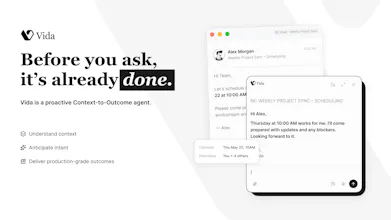
Vida is an AI that learns how you work, remembers what matters, and becomes more like you over time. The more you use Vida, the more it understands your habits, your projects, and your way of getting things done. Eventually, it works like a second version of you—quietly handling repetitive work in the background before you even ask. Today, we’re launching our first 5 SOTA use cases: Reply Rescue · Prompt Rescue · Resume Rescue · Workspace Cleanup · Daily Wrap 95 more to conquer in public.




Free Options
Launch Team / Built With


Tines The single, secure environment for agents, apps, and automations.
Promoted
Hi, I’m Giddens from Vida.
We’re building Vida as your AI clone — an agent that learns how you work, remembers what matters, and gradually becomes another version of you.
The more you use Vida, the more it understands your habits, your projects, and your way of getting things done.
Eventually, it works like a second you — quietly handling repetitive work in the background before you even ask.
We believe the future of AI won’t be defined by outputs, but by outcomes people can rely on.
That’s why we’ve set a public challenge:
Conquer 100 real-world work use cases.
For us, SOTA means one thing:
consistent, reliable outcomes that actually move work forward.
We’ve already shipped the first 5 use cases (live today):
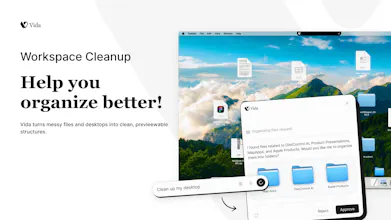
Reply Rescue · Prompt Rescue · Resume Rescue · Workspace Cleanup · Daily Wrap
Here’s what Vida looks like in real work:
Manager: “Why is this project delayed?”
Vida pulls context from Slack / Notion / Figma and drafts a ready-to-send reply.
Your prompt is unclear.
Vida turns it into a production-ready prompt instantly.
CV outdated.
Vida rebuilds it based on your latest experience and target role.
Desktop chaos.
Vida structures everything first, then cleans it in one click.
End of day.
Vida summarizes what actually moved forward — what’s done, what matters, what’s next.
We’re building Vida in public and will keep shipping every SOTA use case one by one.
Try it at vida.app
Help us shape what your AI clone should learn next.
@giddens Congrats on the launch! Been testing it for a few days and it definitely cuts down on repetitive work.
@itsluo Thanks so much Luo — really appreciate you taking the time to test it 🙌
This kind of feedback means a lot. We’re just getting started, more real-world workflows coming soon!
@itsluo nice!
@giddens Congrats on the launch Giddens!
@kutlwano_melamu Thanks so much! Really appreciate your support.
The 'learns how you work and handles repetitive work before you ask' pitch really lives or dies on where the memory lives and how it's scoped. For Workspace Cleanup and Daily Wrap specifically, is the model of what matters built per-workspace, or one global profile that carries across projects, and can I actually inspect and edit what Vida has remembered about me? Also curious whether that memory runs on your servers or stays local, since it's watching my habits in the background.
@noctis06 Thanks for the thoughtful question!
Our philosophy is local-first memory. Your interaction history lives entirely on your own device—not on our servers—and we never use your data to train our models.
Rather than building one giant profile about you, Vida builds context around the work you’re doing. As we expand more use cases, we’re also evolving richer context systems, including workspace-scoped knowledge that lets Vida retrieve and reason over the right information when it’s needed, instead of treating everything as one global memory.
We’ve also open-sourced OpenChronicle, which explores this local-first approach to AI memory. It uses local models to summarize memory, keeps all data on your device, and lets you pause or resume recording whenever you want:
https://github.com/Einsia/OpenChronicle
We believe memory should make AI more helpful—not less private or less controllable.
congrats on number one today. the part i keep circling is clone drift. the way i work in may is not the way i work in july. new tools, new clients, new priorities. how does Vida notice that my old patterns went stale? is there decay on old habits or does it wait for me to correct it after it acts on outdated context? also curious whether there is a morning review queue for everything it did before i asked.
@thenameisarian Thanks so much! That’s a fantastic question.
We believe an AI should evolve as your work evolves, not stay attached to patterns that no longer fit. Vida continuously learns from your recent work context so it can adapt as your tools, projects, and priorities change.
I also love your idea of a morning review queue. We’ll seriously think about it. Making Vida’s work transparent is one of our core principles—we want users to always understand what Vida has done, why it did it, and stay in control.
Really appreciate the thoughtful suggestion!
Congrats on the launch!
The 100 use cases challenge in public is bold. How are you deciding which ones to build next: user requests, usage data from the first 5, or something else?
@abod_rehman Thanks a lot — really great question !
This is exactly why we’re building in public. We don’t want to decide everything in isolation.
Instead, we’re asking users to actually try Vida and tell us what painful, repetitive work should be solved next — and then we take responsibility for building it properly.
You can see what we’ve already shipped and what’s in progress here:
https://vida.app/sotacases/
We’ll keep updating progress there as we go 🚀
Since Vida integrates with tools like Slack, Notion, and Figma to pull context for tasks like 'Reply Rescue,' how does it handle data privacy and security, especially when accessing sensitive or proprietary workspace information?
@justin2025
Hi Justin, great question—privacy is something we’ve treated as a core product principle from day one.
Our approach is built around three commitments:
Zero cloud retention. Voice and screen data are processed in real time, and we don’t store the original inputs on our servers.
Local-first memory. Your interaction history is stored on your own device whenever possible, so you stay in control of your data.
Never used for model training. Your data is never used to train or improve our AI models.
When Vida connects to tools like Slack, Notion, or Figma, it only accesses the specific context required to complete the task you’ve asked it to perform. The goal is to make Vida genuinely useful while keeping your data private and fully under your control.
@giddens Thanks for the detailed breakdown, Giddens! Appreciate the transparency here.
@justin2025 Thanks a lot 🙏
We’re trying to stay as transparent as possible while building. Really appreciate you taking the time to engage like this.
I guess defining SOTA as consistent outcomes instead of benchmark scores is quite hard. Though, this is what makes the 100 use case challenge interesting! What does the bar look like before a use case ships? By all means, great work!
@artstavenka1 Thanks so much—that’s exactly what makes this challenge so hard.
For us, SOTA isn’t about benchmark scores. It’s about consistently delivering better real-world outcomes than any existing AI for a specific use case.
The biggest challenge in AI today isn’t producing an impressive result once—it’s doing it reliably, every single time.
That’s our release bar: we don’t ship a use case until we believe Vida can consistently outperform other AI solutions for that job. If it doesn’t meet that standard, it stays in development.
the shift from doing tasks to doing them before you ask is the interesting line. how many runs before it earns enough trust to act without checking first?
@andrewzakonov That’s a really important question.
We don’t think of it as a fixed number of runs, but more as a gradual trust curve. Vida starts in a “suggest + preview” mode, and only becomes more autonomous as it consistently proves it understands your patterns and preferences.
In practice, users stay in control first, and autonomy is earned through repeated correct context handling—not assumed upfront.
The goal is exactly what you described: shifting from reactive task execution to proactive assistance, but with trust built step by step.