
TouchGrass
Context-aware break reminders without invasive permissions
594 followers
Context-aware break reminders without invasive permissions
594 followers
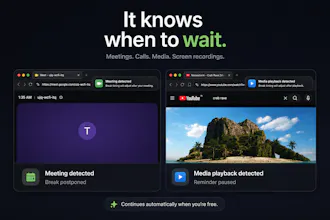
TouchGrass is a context-aware break reminder built for macOS. Most break reminders only know one thing: time. TouchGrass waits through meetings, calls, media playback and screen recordings, counts time away from your Mac as a completed break, and reminds you to blink, improve your posture and rest after long typing sessions. Everything runs locally, never asks for Accessibility permission, and respects your workflow. 7 day free trial, then a one time purchase of $3.99 with lifetime updates.



Hi everyone! I'm Saran, the solo developer behind TouchGrass.
Like a lot of people, I had installed a break reminder before... and eventually trained myself to ignore it. Not because I didn't need breaks. Because reminders always seemed to appear at the worst possible time:
In the middle of a meeting.
While watching a tutorial.
During a screen recording.
Right when I was deep in flow.
So I built TouchGrass to do the opposite.
Instead of interrupting you on a timer, it waits for the right moment. It automatically pauses during meetings, media playback and screen recordings, counts time away from your Mac as a completed break, and includes blink, posture and typing reminders.
One thing I cared about from day one was privacy. TouchGrass never asks for Accessibility permission, and everything runs locally on your Mac.
It's my first commercial macOS app, built over months of evenings and weekends. It's currently available with a 7 day free trial, then a one time purchase of $3.99 with lifetime updates.
I'd genuinely love your feedback. I'll be here all day answering questions and taking notes for future updates.
Website: https://touchgrass.land
Download: https://touchgrass.land/download
Thank you for checking it out, it really means a lot.
@touchgrassland Quick question: what’s one simple, low-friction way you’d recommend new users try TouchGrass for a week so they actually form the habit? For example, which settings do you set first, how long do you let “time away” count as a break, and any tips to avoid re-disabling it when deep in flow?
@swati_paliwal I'd actually recommend leaving the defaults on for the first week. They're tuned to be pretty low friction. Time away feature is configurable, but by default a short idle just pauses the timer, while a longer idle counts as a completed break if TouchGrass is confident you've naturally taken one. My biggest tip is to resist tweaking things for a few days. Once you stop thinking about it and it quietly fits into your workflow, that's when it works best.
@touchgrassland Congrats on the launch today! I really love the concept but sadly, I'm not a cool Mac user - any plans for us PCers?
@anna_ludwinowski Thanks! A Windows version is something I'd love to build in the future.
congrats on shipping, the "waits for the right moment instead of a hard timer" framing is the right instinct, most break apps get uninstalled exactly because they interrupt a call. curious about the other direction though - if I'm sitting at my desk not touching the Mac for a while (reading something on paper, on a phone call with earbuds, just thinking) does that idle time count toward a completed break the same as actually walking away, or does it only credit a break once you've been away long enough that it's confident you left the desk?
@galdayan Great question! It's configurable. If you're idle, TouchGrass doesn't immediately assume you've taken a break. It uses a few privacy friendly signals to build confidence before deciding. For short breaks it usually pauses and resumes where you left off, while longer idle periods can count as a completed break and reset the timer. The goal is to avoid reminding you to take a break you've already naturally taken.
Saran, the answer you gave ivory (idle time, media playback, sleep/wake, the mic indicator, and nothing else) is more useful than the tagline, and right now it lives only in a comment thread.
I sell software that runs on the machines where patient notes get typed, so every app a clinician installs becomes a security review item. What passes that review is never the privacy policy, it is the claim someone can verify without trusting you: no Accessibility permission is checkable at the OS prompt, a sentence in a doc is not.
Is that API list anywhere on the site? The person who approves a $3.99 install on a work Mac is usually not the person who wants it.
@clemente_lopez1 That's a really good point. You're right, and I hadn't thought about it from an IT approval perspective. Right now it's only mentioned in a few places, but I'm going to add a dedicated page explaining exactly which Apple APIs TouchGrass uses, what it doesn't access, and why no Accessibility permission is required. I'll also be publishing it on the Mac AppStore soon, which should give people additional confidence since it goes through Apple's review process. Thanks for the suggestion!
@mrbrjan Great question! The biggest change was realising people do not need more reminders. They need reminders at the right time. I started with a traditional timer, but it felt just as interruptive as every other app. That is when making TouchGrass context aware became the core idea
Hi)
How exactly does the app detect that a call or screen recording is happening, given that it deliberately never requests the Accessibility permission?
@av777a TouchGrass queries CoreAudio's running state and process ownership metadata. All these information are provided by Apple. Along with that we have some logic which helps in detecting better.
The tagline mentions context-aware break reminders without invasive permissions, which raises a practical question: what kinds of context can TouchGrass safely use without asking for broad access? Is it more about local activity signals, calendar/focus state, or something else? That boundary would be helpful to understand for teams that are cautious about productivity tools watching too much.
@ivory_xuxuxu Great question! TouchGrass only uses Apple provided system APIs to observe privacy friendly system signals such as idle time, media playback, sleep/wake events, screen recording status, and whether the system microphone is currently in use (the same status shown by the macOS microphone indicator).
It does not access your calendar events, meeting details, call details, screen contents, browser tabs, browser history, browser content, keystrokes, typed text, microphone audio, camera, or Accessibility APIs. Everything runs locally on your Mac because privacy was one of the core design goals from day one.
The privacy tradeoff feels well judged. How does TouchGrass distinguish a long thinking or reading session from an actual break without using Accessibility data?
@adityaharish2002 It doesn't rely on a single signal. TouchGrass combines several privacy friendly system signals to build confidence before deciding whether you've naturally taken a break, all without needing Accessibility permission. I'm also continuously improving the algorithm to make those decisions even smarter over time.
@touchgrassland Smart approach. Keeping it privacy-friendly while improving accuracy is the right balance.