
SnapGrid
Collect, organise, and analyize UI screenshots
135 followers
Collect, organise, and analyize UI screenshots
135 followers
SnapGrid is an open-source desktop app for collecting, organizing, and analyzing UI screenshots. It uses AI to automatically detect UI components and patterns, making it a powerful tool for designers and developers.

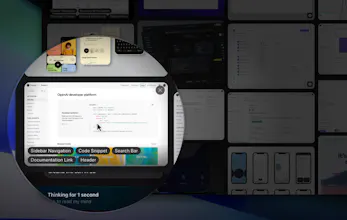
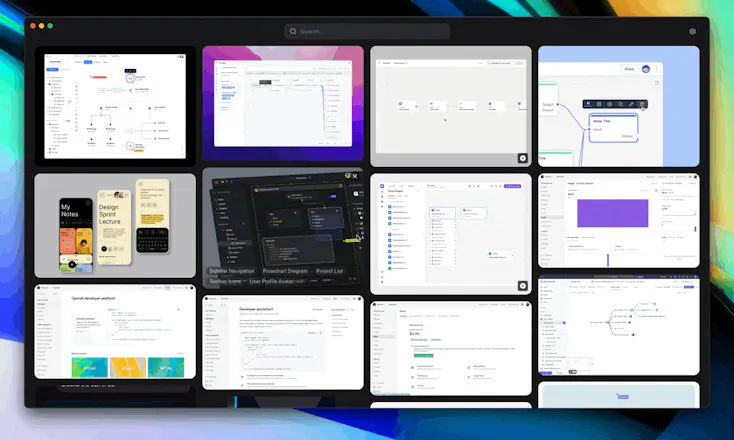


I just released a Mac app built entirely with AI—it's called SnapGrid!
SnapGrid is an evolution of an idea I first explored over 10 years ago with an app called Inboard. It's a simple, focused app designed specifically for designers who want to collect and organize screenshots of UI designs that inspire them.
The key difference now: AI handles the tagging automatically. You no longer need to manually categorize each screenshot—AI does it instantly, making your collections easier to manage and search.
Building SnapGrid highlighted how fundamentally AI is reshaping software development. With very basic coding knowledge, I was able to create a fully functional app. This shift dramatically expands what's possible, especially for niche applications and personal productivity tools.
Given how accessible software development is becoming, I'm excited about the potential rise in high-quality open-source projects built by people simply for fun and contribution. That's why I'm releasing SnapGrid as an open-source project. You can run it completely free, locally on your own Mac—you'll just need an OpenAI API key for image analysis.
Let me know if you have any suggestions or feedback!
Get it here: https://github.com/gustavscirulis/snapgrid
Useful idea. I'm not a developer but I work with frontend devs for UI designs quite a lot. Wish you had a website or an easier way to use this.
@aishwaryalohi Thanks, makes sense. Having it be a mac app allows using it for free and without ads since no one has to pay for hosting of the screenshots. It also makes the app super fast since all files are stored locally.
This is exactly what I need. I've tried organizing UI screenshots in folders and it doesn't work. Not only is it time-consuming, it's difficult to find screenshots when you want something specific. Does this have the ability the organize things like color palettes and logos as well?
Congrats on the launch! I'll definitely be checking this out.
@smjburton Nice, good to hear. At the moment it doesn't organise by color, but interesting idea. What do you mean by organising by logo? As in what product is in the screenshot?
@gustavscirulis I typically take screenshots and photos of logos that I like for design inspiration, so it would be great to have a solution to organize these files as well (i.e. by color, text, shapes, etc). For color palettes, I take screenshots and photos of images that capture a set of colors really well, and then use tools like https://tools.picsart.com/color/palette-from-image/ to create a color palette from the image for use in website/app themes. Having something to automatically tag and organize these color palettes would be awesome.
@smjburton Ah, I see. It doesn't do this well at the moment, but could be a future improvement. Or if you're interested, you could also fork the code yourself and edit the prompt to work better for logos. With tools like Loveable and Cursor anyone can do it, no coding skills required.
Really love the concept, congrats on your launch! I don't design myself but need to find and organize many UI screenshots for our team.
Quick question: Does SnapGrid sync with sources like Figma, or other? I’m thinking that would be a major plus for designers who are flooded with references from all these different platforms and struggle to keep them organized.
@ioana_sima It doesn't integrate with Figma natively, but you can just drag and drop or copy/paste images in. Thanks!
The concept is brilliant and can be extended to possibilities only limited by creativity. Congrats on the launch, @gustavscirulis ! One thing though, it requests me to input my OpenAI API key but also notes "You can still upload and organized screenshots without an API key". So is the request an expected behavior?
@thefullstack Thanks! OpenAI API key is required to do image analysis, but you can use the app without image analysis too.
Really a great product.
Does Intel Mac support is planned?
@enzo_marc Just added support for Intel Macs too: https://github.com/gustavscirulis/snapgrid/releases/tag/v1.0.0. You'll need the `SnapGrid-1.0.0.dmg` version.
This could save so much time in design organization!👍