Genie, our AI Analyst, can already tell you what changed in your numbers. It's never been able to tell you why, because the why almost never lives in Databox.
Revenue drops 8%, and the real reason is a stalled deal in HubSpot, a pricing objection buried in a Slack thread, or a support ticket nobody flagged. Right now, finding that out means leaving your dashboard, opening three other tools, and piecing it together yourself. Every time.
Next week, we're launching MCP Connectors. Connect your CRM, Slack, support desk, or any MCP server, and your AI Analyst gets that same context, right inside the conversation. Ask why a number moved, and it points to the actual deal or thread behind it, not just the number.








 HubSpot
 Power BI
Databox
Hi Product Hunt! 👋
I'm Pete from Databox. Today we're launching MCP connectors for Genie, our AI Analyst.
Genie analyzes your live metrics and tells you what changed. But a metric alone rarely explains what's going on.
Trial signups dip, and the reason is a pricing change your team shipped two weeks ago. Traffic jumps, and behind it is an influencer mentioning you on reddit that none of your analytics can track. The numbers alone can't tell you why something happened.
The deal context in your CRM, the tickets in your support desk, the tasks in your project tool and the Slack messages where your team discussed that unexpected Reddit mention. That's the explanation, and it's spread across the tools where work and conversations happen.
That context is what separates a generic report from a useful one. Any AI can look at a chart and tell you a number fell 12%. Knowing that two big deals slipped because you didn't anticipate a more extensive legal review, support tickets spiked after a feature release, and the reasons your ad strategy changed mid-month is what makes a report useful and actionable. Until now, getting that kind of answer meant someone gathering the context by hand, every time.
MCP connectors give Genie that context. Connect your tools, and Genie pulls from them during analysis, so its answers reflect what's actually happening in your business.
In addition to automating reporting, you can also use Databox's new MCP connectors to execute actions in other tools, based on your analysis. Want to shut down an ad campaign once it stops performing? No problem. Just write a skill in Databox that instructs your ad platform to shut down a campaign once frequency hits 5 and conversion rate drops below 1%. Want to update content on a website page after it stops getting search traffic? Easy. Want to create a task for your sales team if they have too many deals open without a next step? Even easier.
How it works:
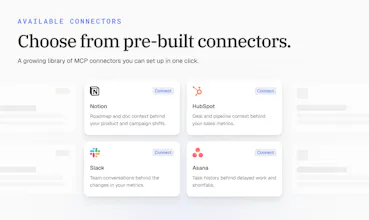
One-click connectors: HubSpot, Slack, Notion, Linear, Mixpanel, Semrush, Klaviyo, Ahrefs, and more, with 10+ available at launch
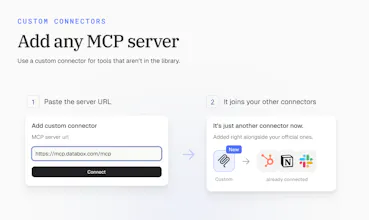
Custom connectors: add any MCP server by URL, with OAuth, API key, or bearer token support
Permissions you control: set every tool to always allow, needs approval, or blocked, so Genie only acts where you've said it can
Skills & Routines: Write skills that pull data from specific integrations and context from specific MCP servers, automate actions based on the analysis. Run it completely autonomously using Routines.
MCP connectors are live today: https://databox.com/
If there's a tool you want Genie connected to, tell us below.
Thanks for checking it out 🙏
@pc4media The one-click connectors with HubSpot, Slack, Notion, and Linear sound really useful. Having all that context in one analysis could save a lot of manual work.
@pc4media Many congratulations Ziga, Peter, Davorin and team on another great launch! 😊
How I met the makers?
I met the makers through a hunter friend in March. This is our seventh launch together in the past seven months.
What is the new launch about?
Databox is an agentic analytics platform that brings together your business performance data and gives your AI Analyst, Genie, the context behind every metric.
With MCP Connectors, it can pull information from tools like HubSpot, Slack, Notion, Linear, Mixpanel, Semrush, and Klaviyo, so when a number changes, you do not just see what happened, but also why it happened. You can even automate actions based on the insights through Skills and Routines.
Why I endorse it?
I endorse this launch because it solves a very real problem: dashboards often tell you that a metric moved, but the actual explanation lives in your CRM, support desk, project tools, or team conversations.
@Databox connects those dots automatically, saves teams from manual reporting, and makes AI-generated insights more grounded, actionable, and useful.
The team’s consistent shipping cadence and focus on practical AI workflows make this a standout launch. ❤️
Product Hunt
Databox
@curiouskitty Great question. Here's how we approached it.
What shipped first. We started from two signals. The first was which tools our customers already connect to Databox as data sources, since that's where the metrics come from. The second was where the "why" behind those metrics usually lives: team chat, docs, project tools, email, and calendars. A connector made the first list only if it could explain a real metric change. For example, it should show the actual ad creative behind a CPC shift or the deal notes behind a revenue drop, not just repeat numbers we already have.
Our bar for good enough:
Vendor-built and vendor-hosted. Every official connector uses the vendor's own remote MCP server. We don't maintain community forks.
Standard, reliable auth. Almost all use OAuth, so connecting takes one click and a sign-in. Servers that need self-hosting or a custom deployment stay out of the official list.
Tools that add context. We rated each server on whether its tools actually help explain a number. Some servers only return the same numbers we already ingest, with no access to the content behind them. We ranked those lower even when the tool is popular.
Granular tools. Every tool is listed separately, and permissions work tool by tool with one main setting per connector. That only works if the server's tools are split sensibly.
Everything else goes through custom connectors. The MCP ecosystem is moving too fast for any official list to keep up. Custom connectors take any server URL with OAuth, API key, or bearer token auth. They go through the same schema parsing and the same per-tool permissions, so the long tail works on day one. Tools that people keep adding as custom connectors are strong candidates for the official list.
Routines and skills are nice on their own, they give the power to anyone using them. But pairing them with MCPs inside Genie, AI Analyst? Sweet :) Having MCPs to provide more context for a report (e.g. a CRM note) so I can better understand why the numbers changed is super helpful.
Now all three parts come together into one system that can help me get better results and insights. Can't wait to also get the agents in the mix, I've heard they're coming soon.
Databox
@mateja_verlic_bruncic Thanks, Mateja! That's the part we're most excited about too. Skills tell Genie, our AI Analyst, how to do the work. Routines make sure it happens on schedule. Connectors bring in the context behind the numbers, like that CRM note, and let it act on what it finds. Put together, a weekly report doesn't just show what changed. It explains why and can help you do something about it.
Agents are next, and they build on all three. Stay tuned.
Do you trust AI tools to explain your business data or do you still perfer checking the numbers yourself
Databox
@shivam_kushwaha16 Both, and that's how it should be. We don't think you should trust an answer you can't check.
That's why the AI Analyst shows its work. When it explains why a number moved, it points to the actual deal, ticket, or conversation behind it, so you can open the source and see for yourself. The difference is you're checking an answer instead of building one from scratch across five tools.
Trust comes from being right a few times in a row. Showing the source makes that easy to judge.
@zigapotocnik Exactly this is what makes ai useful for data work the ability to check the source instead of just trusting the answer
49agents IDE
Do you have mechanisms for provenance checking facts/numbers via some kind of multi-agent checks or "citing"? How do you make sure that there are no hallucinated results?
(i assumed that this might be the problem you have, but depending on structure of your soft ig you might even avoid this entirely with retrieval-based approach over generated (AI just needed to find and point to smth in the data instead of "read and then rewrite in the return response")
Congrats on the launch!!
Databox
@alp_adur Thanks, Latif, and great question. You're right that the retrieval side does most of the work here.
The numbers aren't generated. When Genie, our AI Analyst, answers a metric question, it queries your actual Databox data sources connected or uses correct MCP tool calls and works from what comes back. It doesn't recall or estimate numbers. Connectors work the same way. The context behind a number comes from live tool calls to your connected tools, so the AI Analyst is pointing at a real deal, ticket, or thread. It isn't writing its own version of what probably happened.
It also points you to the source it used, so you can open it and check. We don't claim hallucinations are impossible. No one building on LLMs honestly can. But grounding every answer in retrieved data and showing where it came from is how we keep it tight, and how you can catch it when something's off.
Databox
Hey PH, I am Jakob, one of the engineers who worked on MCP connectors.
The idea is simple: Genie already knows your number, and now it can check the tools where the whole story behind them lives, eg. your CRM, Slack, or ad account. It can also act there on your behalf, like updating a deal or posting a message.
Since that means AI touching real tools, we put a lot of care into permissions. Every single action can be set to always allow, needs approval, or blocked. Anything that can change something asks you first by default, and Genie waits for your OK before running it.
And if any tool you use isn't in our predefined catalog, you can still connect it yourself. Many apps now offer MCP connection link, so you just paste that in and Genie picks up that functionality. Because that link could point anywhere, we check it carefully before connecting.
Happy to answer any technical questions :) Which tool is the first you would trust Genie to use?
Boy is there a lot of scenarios one can cover in Databox nowdays!
We already import the data from our internal database into Databox, to analyze scheduled data preparations - errors, trends,.. to get insights like error rate etc.. But of course that's never enough to find the reason for these errors. cc @uros_trstenjak
Looking forward to connecting more internal tools via those MCPs (logs, resources,..) so agent will get to the bottom if things before we start our maintenance shifts ;)