FlutterFlow
Build cross-platform mobile apps visually
4.4•43 reviews•3.1K followers
Build cross-platform mobile apps visually
4.4•43 reviews•3.1K followers
Create beautiful UI, generate clean code, and deploy to the app stores or web in one click. Fully extensible with custom code.
This is the 10th launch from FlutterFlow. View more

Campus
Launching today
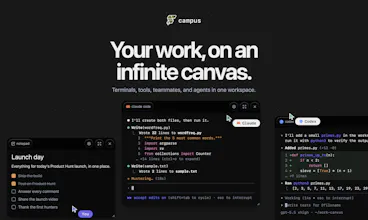
Campus gives builders a shared space to build with teammates and AI agents. Keep your repo, terminal, project knowledge, conversations, and agent work together in one persistent workspace, instead of scattering context across Slack threads, docs, tickets, canvases, and one-off AI chats. Campus is organized around the thing you are building, so humans and agents can pick up where the work left off.


Free
Launch Team


FlutterFlow
Hey Product Hunt! Alex here, co-founder of FlutterFlow.
Not long ago, I used to have 20+ terminal tabs open, each connected to a different part of my projects. Claude in one. Codex in another. Browser tabs, docs, notes, Git worktrees, design files, all scattered across different windows. Every time I switched tasks, I had to remember where everything was and rebuild context.
It got even harder because we're a remote team. I wanted to share context, get feedback, and see what everyone was working on without scheduling another meeting or asking someone to share their screen.
So we built Campus.
Campus gives every project its own persistent workspace. Instead of jumping between apps, everything lives together on one canvas: terminals, browsers, documents, designs, files, AI agents, and most importantly your teammates. When you come back tomorrow or someone new joins the project, the context is already there.
Today our entire team builds in Campus every day, and it's completely changed how we work together. My favorite part is the sense of connection - we’re dropping GIF reactions, memes, and screenshots into the canvas mid-build.
Download Campus and create your first work area: campus.flutterflow.io
Happy to answer anything in the comments.
— Alex, co-founder at FlutterFlow
FlutterFlow
@agreaves okayyyy but being able to execute INSIDE of Campus is actually wild.
and the gifs/memes really do pop off over here.
everyone, get your whole team to join, build, AND joke together! literal best way to do team bonding :)
The project-first structure makes a lot of sense. as someone building with a small team and using several AI tools, the hardest part is often not the work itself, but keeping terminals, conversations, docs, decisions, and agent context connected without constantly rebuilding the mental map.
I also like that Campus includes the social side of building, not just another serious productivity dashboard. GIFs, screenshots, and quick reactions probably matter more for remote teams than people admit :) Curious how Campus handles multiple agents or teammates changing the same project at once. can everyone clearly see what changed, why it changed, and safely roll back or branch the work?
FlutterFlow
@andrasczeizel Campus runs 'local first', meaning everybody is working on their own local files and local terminal sessions. By default terminals are view-only for team-members in the same room (think, everybody sitting in the same physical room but working on their own computers). You can however setup shared workspaces where everybody has access to terminal/files etc. for collaborating on the same files. More on this in future Campus releases! :)
FlutterFlow
@andrasczeizel @norbert1 not to mention the social side brings us all back into one spot - nothing like judging your teammate's song choices :)
FlutterFlow
@andrasczeizel Norbert gave a great answer, but "GIFs, screenshots, and quick reactions probably matter more for remote teams than people admit :)" is so true!
Once we started using it we felt instantly more connected as a team, it's almost like being in an office and feeling the "hum" of the room. Also, the easter eggs can be fun :)
Campus feels most useful if it keeps the context handoff map, not just the tools, in one place.
When I run Claude/Codex alongside normal dev work, the hard part is usually returning later and knowing: what did the agent inspect, what assumption did it make, which terminal state mattered, and what still needs a human review.
If Campus can make that history easy for a teammate or future-me to scan, that is a stronger workflow win than simply having fewer tabs open.
FlutterFlow
@grace_lee26 totally - that's the goal. Give it a try and let us know what you think!
FlutterFlow
@grace_lee26 totally agree. The biggest bottleneck right now is context switching.
We're actively optimizing Campus to be equally easy to use for a human & an AI!
FlutterFlow
@grace_lee26 future-me matters SO. MUCH.
The challenge of shared context between human devs and AI agents is underrated. Most tools treat AI as a sidecar; mixing them in the same project space changes how you think about state and handoffs. Figuring out where agent context ends and human context begins is one of those problems that bites you late. How do you handle concurrent writes from agents and humans on the same resource?
FlutterFlow
@anand_thakkar1 couldn't agree more, Anand! For code, we recommend the tried and true version control (as a team we lean heavily into worktrees). For most non-code resources it's effectively live collaboration (via CRDT) and making sure that agents have the tools (via the CLI) to understand what's currently present in the canvas live.
Congratulations on the launch! Qq: as rooms and projects pile up, does the canvas itself start to become the thing you have to navigate e.g. the same clutter, just in one place? Curious how it holds up once there's a lot on it.
FlutterFlow
@alieksia Thanks! And yes, we noticed things cluttering up a bit if you only have a singular space with everybody on it.
For this, we created rooms - they let you organize work in multiple canvases! Besides that, rooms also act as a nice collaboration boundary. You can choose who can access rooms and collaborate with any set of people!
@norbert1 Thank you for your reply! That makes sense. One thing I'm trying to understand: how is this different from something like Miro? They also do infinite canvas, boards, and access control. Is the real difference that your canvas runs live things like terminals, browsers, agents actually doing work rather than static content?
FlutterFlow
@alieksia yeah exactly. Campus is for the full work cycle, brainstorming, implementing and testing.
Jotting down notes and planning with colleagues in the morning, pulling coding agents right into Campus to implement said notes and reviewing work by using the built in web browser - all right within Campus!
FlutterFlow
@alieksia great question! Like Norbert said, rooms help but also something about it being arranged in 2D makes it easier. And lastly, the whole canvas is searchable!
One space for humans and agents is the right direction, the tab-switching between "my work" and "agent work" is real overhead. How do you handle permissions, can an agent touch anything a human can, or are there locked lanes?
FlutterFlow
@vladimir_iudin yeah exactly one of the core pillars is that the agent can do anything a human can. More specifically, Campus ships with a CLI + a skill which an agent can use, so everything is just a tool call from your agent, gated by your agent's own permission management.
@norbert1 Huh, so the workspace itself stays dumb and all the gating lives in the agent's permission config. That inverts how I'd have built it, I'd have put locks on the workspace side by default. Makes sense for a CLI-first setup though. Thanks Norbert.
FlutterFlow
@vladimir_iudin that's actually good insight!
We do have a couple of features cooking up in that area (remote workspaces), but a local sandboxed workspace is definitely something that could be interesting for Campus as well! Thanks for the feedback :)
AISA AI Skills Test
the context-switching problem is real, especially when you've got agents running across different tools that don't share state. curious whether Campus handles agent-to-agent handoffs — like when one agent's output needs to feed into another's context without manual copy-paste.
FlutterFlow
@ozandag Campus is built to be a sandbox. Every tile has a dedicated API for the agent to interact with. If you want agents to collaborate, just tell them! They will be able to figure out the details :)
FlutterFlow
@ozandag let us know if you have any other questions!