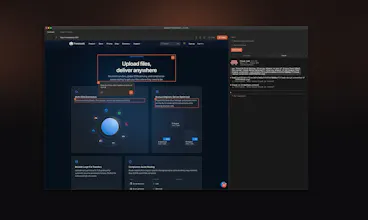
Design In The Browser lets you point at any element on your website and tell AI what to change. Click a button, a heading, or select text — describe your edit in plain language, and it sends the instruction (with a screenshot) directly to Claude Code, Cursor, or Gemini CLI running in the built-in terminal. No more copying selectors or describing layouts in chat. You see it, you change it, and AI does it. Supports multi-edit queuing, responsive viewports, and your preferred code editor.
No reviews yetBe the first to leave a review for Design In The Browser
Maker
📌
Hi everyone! I built Design In The Browser because I was frustrated with the back-and-forth of describing UI changes to AI coding tools.
I'd be staring at a button that needed to be bigger, but then I'd have to switch to the terminal, describe which button, where it was, what component it was in and half the time the AI would change the wrong thing. So I built a tool where you just click the element and type what you want. It sends a screenshot and selector directly to Claude Code, Cursor, or Gemini CLI running in a built-in terminal. The AI sees exactly what you see.
Let me know what you think!
@assentorp well done Peter, great it works with lcaude code
Report
@assentorp Congrats on the launch! What’s the hardest frontend pattern for AI to generate cleanly?
Report
Looks awesome! Does it work with more sophisticated requests like creating icons and illustrations? Can it learn from brand style guidelines / a design system?
It works best for things that live in the codebase.
Icons: Yes. If your icons are SVGs (inline files or icon components), you can ask it to generate new SVG icons or tweak existing ones (stroke, size, alignment, variants), depending on what Claude / Gemini / Cursor can produce.
Illustrations: Not really. It won’t create illustration assets, it’s not an image generator.
Brand guidelines / design system: It won’t “learn” your brand permanently, but if your tokens/components/guidelines are in the repo (or you paste a short rules snippet), the AI can follow them and apply them consistently.
Report
Do you have, or are you planning, a browser extension?
Would be awesome for getting references on the fly. Sometimes you see a reference that perfectly fits something you have in mind for a project, and being able to capture it ( in code ) would be beautiful.
Report
Maker
@marcelo_bottoni No plan on browser extension, currently looking for feedback/ideas to improve it. It is mainly build for frontend work. So whatever change you normally would type to an agent to do, it can do. It just makes it easier instead of back and forth between the browser and the terminal.
You can already reference other stuff, for that you will take a screenshot and added to the prompt via the Image icon. It then takes that into context when you send the prompt.
Report
Wow, Design In The Browser looks amazing! The direct AI integration from a visual selection is genius. How well does it handle CSS specificity when queuing multiple edits?
Report
Maker
@jaydev13 I think it handles it quite well actually. Give it a try and let me know what you think.
Report
I love the concept and would be curious to see how it handles larger UI systems and component libraries. Integration with tools like Figma or React workflows in the future would be amazing.
Report
Maker
@kaito_takahashi Thanks, if you already have the component you can just use @ThisIsaFile.tsx to mention that file in the prompt.
Report
Interesting idea. Will there be integration with Canva or other design AIs? For now, general-purpose AIs don’t always generate high-quality design.
Report
Maker
@mykyta_semenov_ No there will not be an integration with Canva. I get quite good results with the frontend design skill. Have you tried that?
Report
@assentorp Minor frontend tweaks — I agree, AI handles those well. But when it comes to building entire design elements or even full pages, problems can arise specifically at the design stage. In other words, there’s a need for a tool that can both produce high-quality design itself and then generate the frontend based on that design. Right now there are many separate tools, and that makes the process complex.
This is just an idea on how you could evolve your service to better differentiate it from competitors.
Report
@mykyta_semenov_ Figma is probably the more appropriate tool for this. I use the html.to.design browser extension/Figma plugin to turn live websites into Figma artboards and it’s pretty nifty.
Report
Does it work on Windows with WSL/Ubuntu? Looks awesome, congrats.
Report
Maker
@flyweelin It works on Windows with WSL, not Ubuntu. If you try it, let me know what you think!
Report
@assentorp Works great. One request is more control over clipboard text copy pasting. I can't seem to copy paste text in to CLI when working with Claude. Loved it so far though!



Prototypr
@assentorp well done Peter, great it works with lcaude code
@assentorp Congrats on the launch! What’s the hardest frontend pattern for AI to generate cleanly?
Looks awesome! Does it work with more sophisticated requests like creating icons and illustrations? Can it learn from brand style guidelines / a design system?
Hi@alina_petrova3
It works best for things that live in the codebase.
Icons: Yes. If your icons are SVGs (inline files or icon components), you can ask it to generate new SVG icons or tweak existing ones (stroke, size, alignment, variants), depending on what Claude / Gemini / Cursor can produce.
Illustrations: Not really. It won’t create illustration assets, it’s not an image generator.
Brand guidelines / design system: It won’t “learn” your brand permanently, but if your tokens/components/guidelines are in the repo (or you paste a short rules snippet), the AI can follow them and apply them consistently.
Do you have, or are you planning, a browser extension?
Would be awesome for getting references on the fly. Sometimes you see a reference that perfectly fits something you have in mind for a project, and being able to capture it ( in code ) would be beautiful.
@marcelo_bottoni No plan on browser extension, currently looking for feedback/ideas to improve it. It is mainly build for frontend work. So whatever change you normally would type to an agent to do, it can do. It just makes it easier instead of back and forth between the browser and the terminal.
You can already reference other stuff, for that you will take a screenshot and added to the prompt via the Image icon. It then takes that into context when you send the prompt.
Wow, Design In The Browser looks amazing! The direct AI integration from a visual selection is genius. How well does it handle CSS specificity when queuing multiple edits?
@jaydev13 I think it handles it quite well actually. Give it a try and let me know what you think.
I love the concept and would be curious to see how it handles larger UI systems and component libraries. Integration with tools like Figma or React workflows in the future would be amazing.
@kaito_takahashi Thanks, if you already have the component you can just use @ThisIsaFile.tsx to mention that file in the prompt.
Interesting idea. Will there be integration with Canva or other design AIs? For now, general-purpose AIs don’t always generate high-quality design.
@mykyta_semenov_ No there will not be an integration with Canva. I get quite good results with the frontend design skill. Have you tried that?
@assentorp Minor frontend tweaks — I agree, AI handles those well. But when it comes to building entire design elements or even full pages, problems can arise specifically at the design stage. In other words, there’s a need for a tool that can both produce high-quality design itself and then generate the frontend based on that design. Right now there are many separate tools, and that makes the process complex.
This is just an idea on how you could evolve your service to better differentiate it from competitors.
Does it work on Windows with WSL/Ubuntu? Looks awesome, congrats.
@flyweelin It works on Windows with WSL, not Ubuntu. If you try it, let me know what you think!
@assentorp Works great. One request is more control over clipboard text copy pasting. I can't seem to copy paste text in to CLI when working with Claude. Loved it so far though!