We've been thinking a lot about this moment. A stakeholder asks "how did our paid campaigns do last week?" or "are we on track for the month?" - and even with dashboards already built, getting a clean answer still takes more steps than it should.
You open the right tool. Filter the right date range. Cross-reference another source. Paste it into a Slack message. Sometimes you just end up saying "let me get back to you on that."
The data exists. The dashboards exist. But the path from question to answer still has too much friction in it.
That's the problem we set out to solve with Databox MCP - launching on Product Hunt May 28. Instead of navigating dashboards, you ask the question directly in whatever AI tool you already use - Claude, ChatGPT, n8n, Cursor - and get an answer pulled from your live data.
Databox
We built Databox MCP because of a pattern we kept seeing: teams were doing their thinking in Claude and ChatGPT, but their actual performance data lived elsewhere. So they'd export it, paste it in, and hope the AI understood it. It didn't. The data was already in Databox, connected, defined, with all the historical context. It just wasn't reachable from the tools where people were actually working. MCP closes that gap. One connection, and your AI can talk about your real numbers instead of guessing.
This is the part that matters more than people realize. An AI is only as good as the data layer underneath it. Databox isn't a pile of raw exports; it's a governed semantic layer: metrics defined once and consistently, data cleaned and modeled across all your sources, with the historical context that tells you whether a number is actually good or bad. That's the difference between an answer you can act on and a confident guess you have to double-check.
Asking questions and getting trusted answers is the obvious first use. What I'm most excited about is what comes next: workflows that act on the data on their own. Performance management, monitoring, and decisions that trigger automatically. Your AI stops being something you ask and starts being something that keeps the business moving week to week.
Proud of the team for shipping it.
@davorin Congrats on the launch Davorin. How do you address privacy? when handing over business data to llms?
@zolani_matebese I assume that is the data owner's problem not the service provider problem.
My suggestion is: run your own local open weights model in house and you get all the compliance, privacy and security needed.
I hear Gemma 4 from Google is quite good and can be run on a phone or a server cluster.
Databox
@zolani_matebese A few layers here: Databox itself is SOC 2-certified, so your data is governed by enterprise-grade security standards. MCP only exposes the metrics and datasets your account has access to. The data is used to answer your question in that session and is not used to train any AI models. More details at developers.databox.com/docs/mcp/security.
@davorin Many congratulations Davorin, Ziga and team on shipping yet again! :)
I’m excited to be hunting Databox again today after their previous launches Custom Integrations by Databox and Genie by Databox.
This time, the team is tackling one of the other pain points of analytics, marketing and RevOps teams... context management of your business data inside Claude, ChatGPT and more.
You usually copy the metrics, paste it on Claude/ChatGPT and ask questions. The answers are only as good as the context you pasted. It misses the metric definitions, semantic layer and historical trends.
Databox MCP lets you bring the AI to where the truth already lives: Databox as a governed semantic layer with clean, modeled datasets, consistent metric definitions, and historical context baked in.
Instead of stitching together dashboards, filters, and exports, you just ask questions in Claude, ChatGPT, Cursor or n8n and get answers grounded in the actual numbers your team already trusts.
A few things I especially like:
Using natural language to analyze existing dashboards (e.g. “summarize my Google Ads dashboard” or “why did CAC spike last week?”) without rebuilding prompts from scratch.
The ability to push new CSV/API data into Databox from an AI conversation and immediately join it with existing metrics.
Turning recurring analysis into workflows via n8n/automation, so weekly summaries, anomaly alerts, and exec updates just “happen” instead of eating up someone’s Monday morning.
For teams already living in Databox for performance reporting, this feels less like “another AI add-on” and more like the missing bridge between dashboards and decisions.
Excited to see the kinds of real-world playbooks Databox users build on top of MCP next.
Give it a spin today!
The real challenge in analytics MCP isn't data retrieval, it's grounding the LLM in correct metric definitions. We've run into this on customer data pipelines: 'churn' means different things across systems. How does the MCP layer handle semantic disambiguation? When a user asks about revenue or pipeline, does the context layer resolve conflicting metric definitions or surface the ambiguity to the user?
Databox
@retain_dev you're hitting the real problem. In Databox, metrics are defined once - name, calculation, data source - and that definition is what the MCP exposes to the AI. So when you ask about "revenue," it queries the metric you've already defined in your account, not whatever the LLM thinks revenue means. If you have two metrics that could match (say, MRR vs total revenue), the AI will typically surface both and ask which one you mean. It's not perfect disambiguation, but the single-definition-per-metric model cuts most of the ambiguity before it reaches the LLM.
Hi Product Hunt! 👋
I'm Pete from the Databox team, and today we're excited to share something we've been building for a while: Databox MCP.
Every team we talk to uses AI for writing, planning, and thinking through problems. When it comes to performance data, teams are still piecing it together by hand. Someone asks "why did my ad cost spike last week?" and answering takes 20 minutes of combing through multiple dashboards, adjusting date ranges and filters.
Some teams have shortcut this by uploading a CSV to Claude. The answer sounds confident, but it’s built on context that the AI doesn’t have. No metric definitions. No historical trends. No understanding of how their business measures success. The answers are hard to trust, and even harder to act on.
Databox MCP closes that gap.
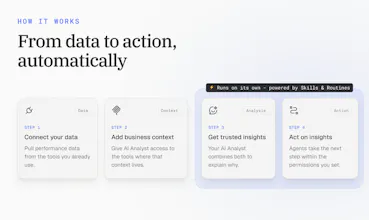
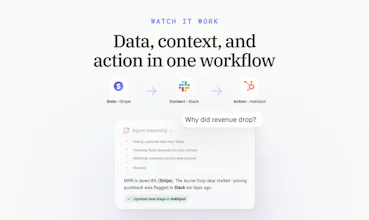
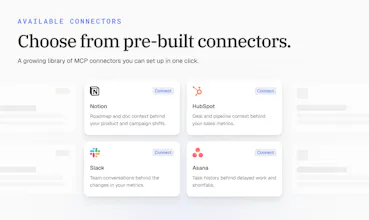
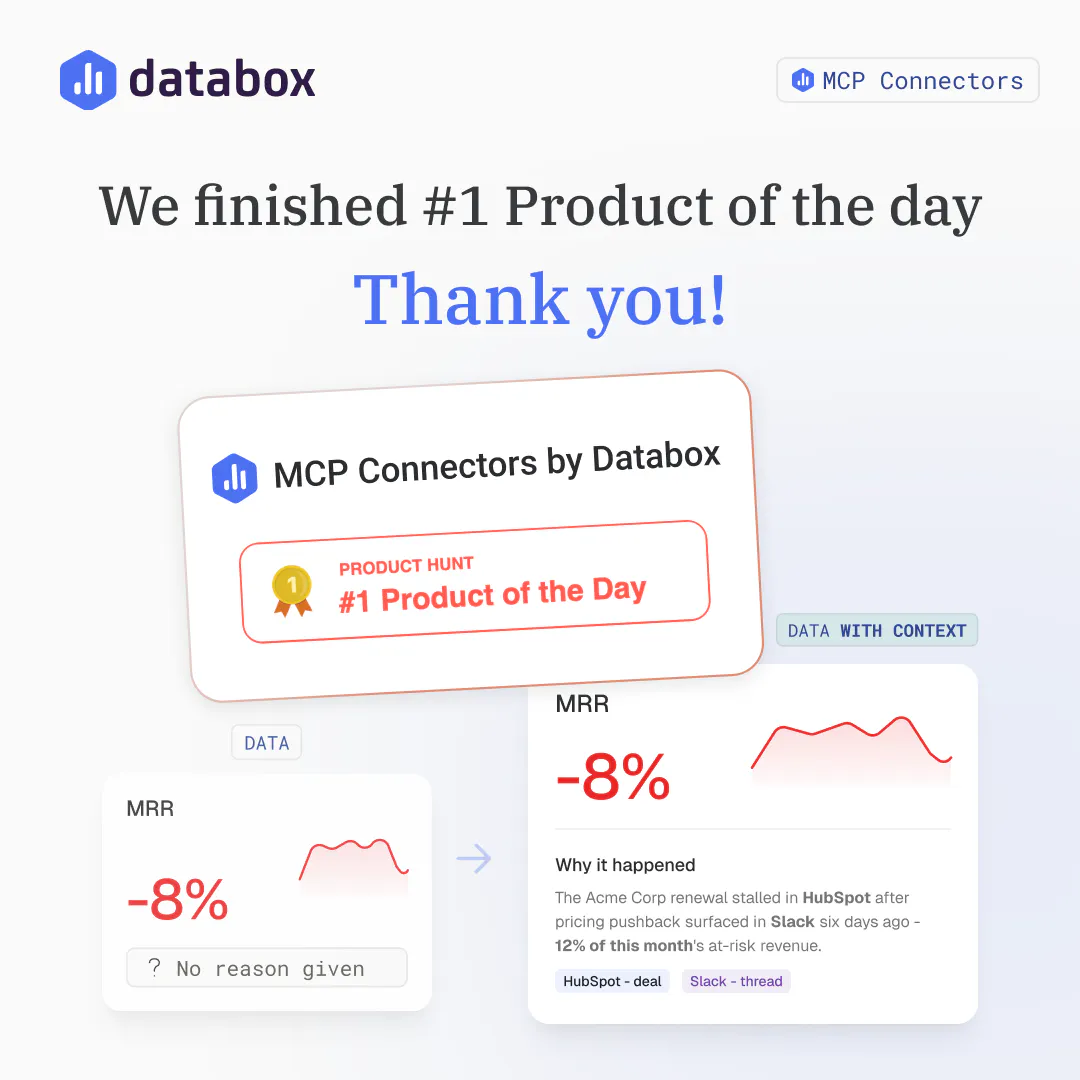
Databox connects to all of your tools, then it feeds the AI tools with data, analysis and insights. You ask questions in plain language, and the answers come grounded in your real business data: your metric definitions, your historical context, and the way your team measures success.
Here are a few things you can do with it:
Get fast answers without leaving your AI tools: Ask "why did ad cost spike last week?" and your AI pulls the answer from your trusted data, and gives you a written explanation with visual context.
Point your AI at any of your dashboards: Say "analyze my Google Ads dashboard" or "summarize my client reporting dashboard," and your AI knows which metrics to pull. You skip the setup work that usually goes into every AI prompt.
Push new data into Databox from your AI: Upload a CSV or pull from an API in your AI conversation, and your AI sends it to Databox as a clean, structured dataset. Analyze it the same minute alongside the metrics you already track.
Rely on Databox for mathematical analysis: Whether it's simple things like understanding wether an increase in a number is good or bad, or more complicated things like calculating correlations or detecting anomalies, Databox is doing the math the same every time.
Turn recurring work into workflows: Connect MCP to n8n or Make, and your recurring AI analysis runs on its own. Schedule the Monday performance summary, trigger alerts when key metrics change, and send executive summaries that arrive with the context built in.
We soft-launched it in February, and the most interesting thing has been watching what customers do with it. Rick Kranz used the Databox MCP with Claude to turn traffic, search, and CRM data into weekly content creation recommendations. He even made the skill available for others to download. Agency operations leaders like Gary Magnone started using it to spot the root cause of KPI spikes in minutes instead of hours. High volume digital advertising agency owners like (like Kamil Rextin) used it to build paid media benchmarks from client data. Island, a software development firm used it to automate data analysis for 25 leading online publications, cutting reporting time by 96%!
It takes 60 seconds to connect and is available on all paid Databox plans.
We'd love your input 👇
What's the one performance question your team asks every week - but still takes too long to answer?
Thanks for checking it out 🙏
Hi@pete_caputa - why MCP? Agents can read OpenAPI specs and create REST requests. So is investment worth it?
GrowMeOrganic
@pete_caputa @simon_tutek Isn't MCP just a default feature in their pricing? There is nothing extra to pay. Is my understanding correct? @pc4media
@simon_tutek @pc4media @iamanantgupta
The MCP server is available on all plans except our free one. The lowest price plan where the MCP server is available is $79/mo.
@simon_tutek
In order to enable data analysis, there is a lot more work that needs to be done once the data is pulled in.
Getting the data is important. But, just step 1.
Three more things that need to be done. Not saying you can't do them in some other way, but our product does it elegantly.
1. Define the semantic layer. (Relationships between objects, definitions of each dataset, definition of each column in a dataset). This can be done for any data ingested into Databox. Also, data can be merged inside Databox from different systems to define new datasets.
2. Metric definitions: Metrics (or KPIs) need to be calculated consistently each time. Databox does this out of the box for many metrics you'd expect to find in the interface of popular tools. This can be as simple as adding values together, counting values, etc; but it can also be rules around when numbers can be averaged or when they can't; defining whether a higher number is better or worse; rules about when to take the last value vs adding values, etc.
3. Statistical analysis: Calculating or detecting things like trends, anomalies, correlations are important in order to understand why a system is behaving the way it is. Why is a number going up or down? Is there a problem we need to address? How can we improve performance of x?, How are we likely to perform next month, if nothing changes or if we change x?, etc, etc. These questions require mathematical analysis. Our system does this.
The semantic layer design is what separates this from copy-paste workflows. You're connecting to metrics with definitions and historical context baked in, so the AI knows if a number is actually good. Does it handle custom fiscal calendars or non-standard reporting periods?
Databox
@dhiraj_patel5 exactly right on the semantic layer - that's the core of why it works. On custom fiscal calendars: Databox supports custom date ranges and you can query any time period conversationally, but dedicated fiscal calendar mapping isn't a built-in feature today. It's on our radar. Happy to dig into your specific reporting setup if you want to share more details!
@dhiraj_patel5 Databox does allow for custom fiscal calendars. https://help.databox.com/switch-to-a-fiscal-calendar
Can you be more descriptive about what you mean by non-standard reporting periods? (Are you using it as a synonym for custom fiscal calendars or just asking about date range capabilities?)
If the former, the link above should address it. If the latter, here you go: https://help.databox.com/select-date-ranges
@pete_caputa, date range. Ziga kind of answered my question
Sounds very interesting.
I actually do upload a google sheet of my company stats which includes revenue and marketing data. I have a Claude Project that analyzes the google sheet and then creates a dashboard. This solution is very interesting and more dynamic.
Databox
@heyitsirenechan the Google Sheets + Claude Project workflow you have is a solid start - Databox MCP takes it further by connecting live data sources directly, so there's no manual upload step and your dashboards stay current automatically. Worth a try if you want to cut that prep work out of the loop!
@heyitsirenechan @zigapotocnik
I would also add that when you want to start asking deeper questions like:
- Why did my revenue grow or dip?
- What can I do to increase my revenue?
- What marketing performed better this month and why?
.... than having your data converted to KPIs in a system like Databox is the key. (Spreadsheets and dashboards require you to manually go through the data.)
It'll help you understand the relationship between marketing activities and sales results, or which marketing channels changed.
I don't know how big or complex your business, but if you have multiple people/teams/functions all doing things each day/week that can impact revenue, than being able to run in-depth analysis can help increase the frequency at which you/your team can make decisions, adapt plans, etc
That decision speed is what leads to increased performance.
Too many companies wait til the end of a month or quarter to adapt what they're doing or do more/less of something.
With "instant analysis" available and not just "data/dashboards" they don't have to wait to review numbers and take actions.
every marketer I know already pastes their numbers into chatgpt and asks 'what happened last week.' the fact that you're just connecting the data directly so the AI actually has real context instead of whatever we copy-paste is one of those obvious ideas that should've existed sooner
Databox
@tina_chhabra you nailed it - copy-pasting numbers into ChatGPT works until it doesn't (wrong export, stale data, missing context). Live connection means the AI always works from the actual source. Glad the idea landed!
I tested Databox MCP against some of the scenarios I use most often in client work - cross-channel performance comparisons, weekly trend checks, flagging anomalies in paid acquisition. In every case, connecting through MCP and asking conversationally was faster than navigating dashboards manually. The answers referenced real metric data, not approximations. For anyone who spends time preparing performance summaries, the productivity difference is immediately obvious.
Databox
@tadej_kelc , this is exactly the workflow we had in mind - cross-channel comparisons, trend checks, anomaly detection, all conversational. The "real data, not approximations" part is what makes it useful for client work rather than just a party trick. Thanks for putting it through real scenarios and sharing the results here!