I'm a paying Pro user. The core reason I subscribed — transcribing from a URL — has been broken on my account since July 28, 2026.
One public YouTube link, pasted by hand into their "Transcribe file on the Internet" form, gets created, sits for 10–20 minutes at zero duration and zero file size, then fails with status 400 and errCode 10011, "online link lambda time out". A public Vimeo link fails the same way with errCode 10010. Local file upload still works fine, so it's their link download step.
Credit where it's due: the transcription itself is good. Accuracy holds up on accented and multilingual audio, speaker ID works, the editor is quick, and export covers TXT, DOCX and SRT. That's why I paid.
The support is what I'd actually warn people about. I opened a ticket on July 29 with error codes, timestamps and failing URLs. Eleven days and twelve replies later: no diagnosis, no ETA, no decision on the refund I asked for twice. Two replies asked for a screenshot, two more asked how I submitted the links, and the last two say it's with the technical team. There's also no status page and no incident notice, so you find out a core feature is down by watching your own tasks fail.
Fine for local files. If your workflow depends on URL import, know that it can go down for weeks with nobody able to tell you when it comes back.
Clipto
Hi Product Hunt! 👋 Henry here, a few months ago, I launched @Clipto , a fully local AI media search engine that helps people search terabytes of videos, photos, audio, meetings, and documents using natural language.
Since then, one request kept coming up:
“Can Claude use Clipto?”
“Can ChatGPT search my media library?”
“Can my agent actually edit videos using my own footage?”
Today, we’re excited to launch Clipto MCP.
AI agents can already access your files. What they can’t do is understand what’s inside terabytes of media.
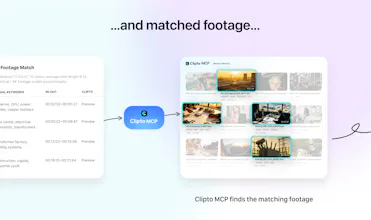
That’s what Clipto MCP changes. It gives AI agents semantic understanding of your local media, so instead of manually browsing folders or scrubbing through timelines, you can simply describe what you want.
Some examples:
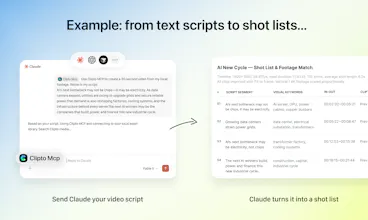
🎬 Turn a script into a video by matching every sentence with relevant footage.
🔍 Find every clip where someone mentioned a specific topic.
🎤 Search years of meetings for a decision or discussion.
✂️ Generate rough cuts from thousands of hours of video.
Everything runs on the media already stored on your computer. No uploading your library to the cloud.
This is only the beginning. As AI agents become more capable, they’ll need more than file access. They’ll need to understand the content inside our personal media.
To celebrate our launch, we're offering 1 month free to anyone who signs up this week with code PHLNCH.
We’d love to hear what you’d build with Clipto MCP.
We’ll be here all day answering questions and collecting feedback.
Thanks for giving it a try! 🚀
Clipto
One more experiment we wanted to share because this one surprised us.
We downloaded a bunch of Elon Musk interviews, indexed them in Clipto, connected the library to Claude through Clipto MCP, and basically asked:
“What would be something fun to make with all this footage?”
Claude came up with the idea of turning Elon into a music video using Daft Punk’s Around the World.
From there, the whole thing ran automatically.
Clipto had already analyzed the footage in detail, turning every interview into structured, searchable media with transcripts, speakers, scenes, and precise timestamps. Through Clipto MCP, the agent could understand and retrieve exact moments across the entire library.
Claude analyzed the song, decided where Elon’s words could fit, asked Clipto for the matching moments, picked from the results, and assembled the final video with FFmpeg.
We didn’t manually select the clips or clean up the result. What you see here is the first output:
Raw output: https://youtu.be/sNLo3_-ybiQ
Want to try it yourself? We packaged up the same Elon interview clips we used, so you can download them and run your own experiment.
Elon Interview Library — the same footage we used for this experiment. Try a different prompt and see what your agent comes up with.
https://www.clipto.com/mcp/demo-library
We also put together a B-roll library if you want to try something completely different.
B-roll Starter Library — 1,000 royalty-free clips across people, work, cities, travel, nature, and more. Use them to experiment with your own ideas and workflows.
https://www.clipto.com/mcp/demo-library
Or connect Clipto MCP to your own media and see what your agent can make from the footage you already have.
We’d love to see what your agents come up with.
Clipto
@henrykang To make it easier for everyone to try, here’s the prompt we used for the experiment.
Feel free to copy it, remix it, or use it with your own footage. Have fun—and we’d love to see what your agent comes up with! The following is the original text of the prompt:
clipto-editing # Elon Musk × Around the World — Lyric Supercut Prompt Using my authorized media package in Clipto MCP and local video tools, make a 60-second Daft Punk "Around the World" × Elon Musk lyric-replacement supercut, delivered as a directly playable local MP4. Work fully autonomously — don't ask me to approve individual shots.
The Effect I Want
The song's original music video plays continuously as the base. Every time the song sings "around the world", hard-cut to a clip of Elon Musk saying a complete "around the world", with his "around" landing exactly on the real vocal onset of "around" in the song — so it sounds like Musk is singing the lyric in place of the original vocal. The shot count is determined by how many verified "around the world" occurrences actually exist in the chosen 60-second window — cut on every one of them, spread across the full minute with continuous momentum, never feeling like scattered interview inserts. Reference specs: 1280×720, 25fps, 60 seconds, H.264+AAC, ~-14 LUFS. Overlay a title once at the start (ELON MUSK — AROUND THE WORLD in bold white, with a smaller subtitle line below); during each Musk line, show the full caption AROUND THE WORLD at the bottom in bold yellow with a black outline — never covering the mouth, never split. Musk clips are full-frame with the mouth clearly visible; if the aspect ratio doesn't fit, fill with a blurred background from the same source — no stretching, no black bars. Hard cuts throughout, no fancy transitions.
Non-Negotiables
Alignment must be real. Cut points may only come from word-level forced alignment of the entire song (WhisperX or equivalent), refined by real onset detection of each "around" vocal onset. Never fabricate cut points from BPM grids, average spacing, drumbeats, or interpolation — not even one. If the alignment tool is unavailable, go through the installation flow; never silently degrade. Pronunciation must be complete. Every Musk clip has all three words clear and complete, mouth visible, audio and video in sync, with the initial consonant of "around" and the tail of "world" intact. The best clips may repeat, but never back-to-back; prefer repeating a great clip over padding variety with a mumbled one. Prefer swapping clips over time-stretching that mangles pronunciation (if truly needed, limit to 0.80–1.25×). Audio must be clean. If a qualified instrumental exists, use it as the bed; otherwise smoothly duck the original vocal during Musk's lines so the two never fight. No clipping, clicks, gaps, or level jumps; two-pass normalization to ~-14 LUFS, true peak ≤ -1 dBTP. Failure must be honest. If anything falls short of the bar, auto-fix and retry; if it can't be fixed, report exactly what's blocking — never deliver something substandard as finished, and never pass off a low-precision method as accurate alignment. Everything else — which 60-second window, exact shot sequencing, mix parameters, render pipeline — is your call, guided by the goals above: choose whatever maximizes the "lyric replacement" illusion, and record the reasoning behind key decisions.
Environment Preflight and Guided Installation
Before starting, run minimal live tests on FFmpeg/FFprobe, WhisperX, PyTorch, onset detection tools, Clipto access, and the output directory (actually run them — don't just check that commands exist). If anything is missing, pause, explain what it does and what breaks without it, and propose an installation plan adapted to my actual environment (OS / Apple Silicon / NVIDIA / CPU), noting download size and whether network access or model downloads are needed. Install only after I approve; prefer a project virtual environment, don't touch the system Python, don't upload my media. After installing, resume automatically from where you left off — no need for me to resend the prompt. If I decline, deliver the completed analysis and mark the run dependency_blocked.
Delivery
Create a fresh version directory (never overwrite old ones). Deliver the final MP4 with a matching SRT, plus alignment evidence, the edit plan, and verification results. Wrap up with a few sentences: which segment you chose, how many shots you cut, how many distinct Musk clips you used, the alignment error, and any trade-offs. Then hand me the MP4 directly.
@henrykang How can I redeem producthunt promo offer? Sign-up doesn't allow existing coupon code to be removed/replaced with ph offer.
Clipto
@chintankarnik hi Chintan, when you download and install the app, there is a box for you to type in the invite code: PHLNCH. It will then automatically apply the offer. If you dont see it please DM me the email you used to sign up. I will have the team apply to your account manually. Thanks!
Visla
@henrykang Congrats on this launch, very cool!
Clipto
@mogabr Thanks Gabe, your support means a lot for us!
PodcastorAI
Really curious how well the semantic search performs once you throw a huge media library at it.
Clipto
@sylvialane That’s exactly the scale we built Clipto for. We’ve tested it on multi-terabyte libraries with years of footage, and keeping search fast and relevant as the library grows has been a big focus for us. Would love to hear how it performs on your library if you give it a try!
Fish Audio
This sounds useful for large media libraries, but how long does it take to analyze and index several terabytes of footage? Can I continue using my Mac during the process, or will it consume most of the system resources?
Clipto
Clipto
@hehe6z At the same time, we’ve put a lot of work into balancing speed and resource usage, so Clipto can run smoothly across a wider range of supported Macs without getting in the way of your normal work. We’ve also added pause and resume controls, along with three performance modes: Light, Balance, and Turbo.
Turbo is ideal when you’re stepping away from your Mac and want Clipto to process the library as quickly as possible. Balance dynamically manages performance while you continue working. If keeping your Mac responsive is the priority, you can switch to Light mode.
Memmy Agent
congrats for the launch! this is really helpful, I can imagine starting a project in Claude and asking it to find all the relevant material before I even open my editor 👀
Clipto
@brattyaiguy Exactly! That’s one of the workflows we’re most excited about. Start with the idea, let the agent understand your project and source the right moments from your entire media library, then bring those clips straight into the editor. Thanks for checking it out!
@brattyaiguy This is exactly why we built the MCP connection — so your existing media library can become part of the Claude workflow, instead of something you have to search through separately. Would love to see how you use it!
Dollop 2.0
Such a smart idea that addresses a real pain point. The hardest part of putting together a demo video is looking for that particular screenshot called "Screenshot 2026-08-19 at 12.04.44 PM" or video named "858551D6-F8A4-4CE0-9A71-DC6EF6DDD2A5" 🤦🏻♀️
I'm excited to try Clipto's NPL search for this and curious if the tags work!
Clipto
Clipto
@annerjiao Thanks! That’s the kind of problem Clipto is built for :) The filename can be completely meaningless—as long as you can describe what was in the screenshot or a particular moment in the video, Clipto can search what’s actually inside the file and find it.
You don’t need to rename or tag everything first. We’d love to hear how it works with your archive!
congratulations! what has been the most surprising use case you have discovered while testing agents with large personal media libraries?
Clipto
@avery_thompson2 Avery, thanks! Check out my other comment about our experiment with Elon Musk's interview clips. That's one of the surprising use cases: AI figuring out something creative based on all the media library, even beyond my expectation!
Tate-A-Tate
Meeting recordings might be the boring use case here, but honestly probably one of the most useful.
Clipto
@jianqiang_hao Exactly. Meeting recordings may not be the flashiest use case, but they’re probably one of the most practical. You can import a recording into Clipto for local analysis, or start recording directly in the Mac/Windows app. For sensitive meetings, keeping the recording and analysis on your own Mac(or PC) can make a real difference. We hope this makes things easier for anyone who needs to keep their conversations private. Thanks for calling this out!