Launching today

Clipto
Fully local, natural language search over terabytes of media
653 followers
Fully local, natural language search over terabytes of media
653 followers
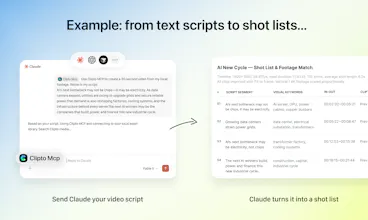
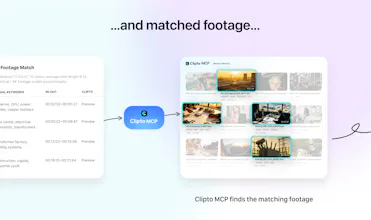
Like Google Photos, but fully local. Turn the terabytes of video, audio, meetings, and files you work with into searchable memories, without uploading anything to the cloud. Clipto automatically tags people, dialogue, and scenes, so you can instantly find any moment buried in your media just by describing what you're looking for. It's fast too: on a MacBook Pro M5, Clipto indexed 2TB of videos in just 24 hours.


Raycast
We've been honing Clipto's story for a few months. At the end of our last call @henry_kang proved the value of the product.
He and his team were out in the desert, testing Clipto remotely: minimal reception, terabytes of footage sitting on his laptop, and he needed to find a specific shot for the launch video.
He searched for: "the wide drone shot where the car enters the desert".
He didn't want "a cinematic moment." Not a "vibes" search.
He knew he had the clip but in the pre-Clipto world, it would take hours of video scrubbing to find it.
He found that clip in seconds using natural language to search over his own media, fully local.
Just like Google Photos — but nothing lives in the cloud.
This isn't an easy problem to solve. Henry's been pursuing this direction for over twenty years, when at CMU's Robotics Institute (my alma mater, FYI), he began pushing the limits of computer vision. He starting with indexing hundreds of images and then advanced to millions of objects — and watched recognition basically explode once memory scaled.
Clipto is in many respects the culmination of that work, pointed at your personal hard drive.
And it's quick: a modern M5 MacBook chews through ~2TB of video in about a day. Why not push yours through its paces?
Clipto
@chrismessina
Thanks Chris. 🙏
One thing we’ve learned from today’s discussions is that people aren’t really looking for “AI magic.”
They already know the clip exists.
They already own the footage.
They just need a reliable way to find it.
Whether it’s:
• the exact moment a decision was made in a meeting
• a specific quote from a podcast recorded months ago
• a particular shot buried in terabytes of footage
the common problem is the same:
our computers store everything, but remember nothing.
That’s ultimately what we’re building toward: a local memory layer for the media people already own.
@henry_kang I'm really glad that you mentioned the fact that people are not looking for AI magic - that's indeed true. Great stuff!
Clipto
@sk_uxpin Thanks! 🙌
ViralSort
This looks really interesting.
I'm curious about how deeply it understands media content.
Does it recognise things like camera angles, shot types (wide, medium, close-up), camera movements, transitions, B-roll, and multi-camera sequences?
It would be incredibly useful if I could search for something like "close-up shot of a person smiling" or "drone footage with a slow pan" and instantly find matching clips across my archive.
Would love to know how detailed the visual understanding gets beyond basic object and dialogue detection.
Clipto
@pradeepmalakar That's a really professional cinematography question. We're working hard to enrich our understanding of cinematic language to better serve professional video creators — here's what we can reliably recognize today:
Shot Type: Wide Shot, Medium Shot — e.g. "wide shot of a city street" or "medium shot interview"
Camera Angle: High Angle, Overhead/Top-down — e.g. "overhead shot of a table" or "high angle crowd scene"
Framing & Composition: Landscape — e.g. "landscape framing outdoor scene"
Scene & Setting: Urban/City, Green Screen/Studio, Day — e.g. "studio interview daytime" or "urban street scene"
Technical Specs: AV1, Rec.709, 4:2:0, 8-bit, 25FPS — e.g. filter footage by codec or color space when you need format consistency in an edit
Focus & Quality: Out of Focus — e.g. quickly filter out unusable takes
...and more, these are just a few examples across the many dimensions Clipto tags. Sorry I can't list them all here! Every case shown in our demo video is a real.
Camera movements, transitions, B-roll classification, and multi-camera sequences — those are on the roadmap and we're heads-down on it.
Would love to hear what specific search queries matter most to your workflow — it really helps us understand what to build next:)
'like Google Photos but fully local' framing is clean but Google Photos works because the index follows you across devices seamlessly. curious how Clipto handles the multi-device problem. if i index 2TB on my MacBook and then want to search from my iPad or a second machine, what does that look like. is the index portable or does each device need to reindex independently because that changes the use case significantly for anyone with more than one machine
Clipto
@ansari_adin That’s a very insightful question.
Today, Clipto works independently on each machine. The index is built locally and stays local, so if you index 2TB of media on your MacBook, that index currently doesn’t automatically appear on another device.
We made that tradeoff intentionally because our first priority was privacy, local ownership, and offline usability.
That said, we completely agree that long-term memory becomes much more valuable when it can follow you across devices. Cross-device memory and synchronization are already on our roadmap, and we’re actively exploring ways to do that while preserving the local-first principles that make Clipto unique.
In many ways, this is one of the most interesting problems for us: how do you build a Google Photos-like memory layer without giving up control of your data to the cloud?
Cool concept. Real question though — is this doing actual frame-by-frame visual understanding or is it metadata/transcript/keyframe analysis? Because the gap between those two is enormous for practical use. What I actually want: upload 10 raw clips of the same scene, AI watches them all, ranks by emotional resonance, suggests best cuts.
Clipto
@joe_rucker Great question. It’s not just metadata, transcripts, or simple keyframe extraction.
We combine multiple signals, including metadata, speech transcripts, visual understanding, and information extracted directly from the video stream.
That said, we also don’t do naive frame-by-frame analysis across every frame. At scale, that becomes extremely expensive while often adding little value. Instead, we use a more selective approach to identify and analyze the most informative moments within a video.
Our current focus is helping users find the right moments and clips from large media libraries as quickly as possible.
The workflow you described, where AI reviews multiple takes, ranks them, and suggests the best cuts, is a fascinating direction. While Clipto doesn’t currently optimize for edit recommendations, many of the underlying building blocks are already there.
Out of curiosity, what’s your current editing workflow today? Are you using Premiere, Final Cut, Resolve, or something else? And how much of the selection process is still manual versus AI-assisted?
We’re spending a lot of time thinking about how AI agents and creative tools could work together, so I’d love to learn how you’re approaching it.
YouMind
This is genuinely impressive — local-first AI search for video is something I didn't know I needed until now. The desert story really sold it for me.
Quick question: does Clipto index audio content like podcast recordings or interview transcripts the same way it handles video footage? I have hundreds of hours of recorded interviews and this could be a total game-changer for my workflow.
Clipto
@jaredl Absolutely. Video gets most of the attention, but Clipto works with audio just as well.
Podcasts, interviews, meetings, voice recordings, and other audio files are all indexed and made searchable. You can search across transcripts using natural language and jump directly to the relevant moments.
In fact, if you’re sitting on hundreds of hours of recorded interviews, that’s one of the strongest use cases for Clipto. Those recordings often contain valuable insights that are almost impossible to rediscover later without a system like this.
We’d love to hear how you’re currently managing and searching those interviews today.
Gro
Does the natural language search support complex scene descriptions? Like, can I search for 'man running in the rain at night' across all my unorganized clips?
Clipto
@lily_liu8 Yes, you can search that way. Clipto is designed to understand scene-level descriptions. It can recognize people, dialogue, actions, scenes, objects, and so on in your footage, and automatically tag them during indexing. So a query like “man running in the rain at night” is a good example of how you can search across messy, unorganized clips without tagging everything manually first. I’d definitely suggest trying a few real phrases from your own footage:)
I’m a YouTuber and managing b-roll is my biggest nightmare. Does Clipto allow for tagging, or is it all AI-based search?
Clipto
@song_kirby Totally feel you. Managing B-roll was my personal nightmare back when I was creating videos. It's actually one of the core reasons we built Clipto. It automatically analyzes and tags your footage across multiple dimensions — shot type, people, actions, dialogue, expressions, subjects and more. All AI, zero manual work. Your B-roll will become a fully searchable library.
And what makes it really special — at least for me personally — is this: when you're deep in an edit, you often need that one specific detail to nail the emotional continuity, the storytelling flow, or the movement between cuts. Something you half-remember from the shoot, or honestly didn't even notice you'd captured. Just describe it in plain language, and you'll find exactly what you need in seconds.
Hope Clipto will help you a lot:)