
API to MCP
Turn any API into an MCP server for AI agents
333 followers
Turn any API into an MCP server for AI agents
333 followers
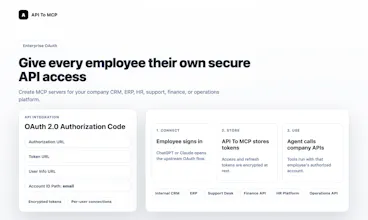
API To MCP turns REST, GraphQL, SaaS, and internal business APIs into hosted MCP servers that AI agents can use in minutes. Build visually from the dashboard, or let an AI agent create, test, and deploy tools from API docs. End users can connect live MCP servers to ChatGPT, Claude, Codex, Cursor, VS Code, Antigravity, or custom agents with OAuth, secure auth, workflows, and forkable snapshots.




Free Options
Launch Team / Built With


EneyProactive AI for Mac. Free test, 20,000 credits.
Promoted
API to MCP
Hey Product Hunt 👋
I built API To MCP because AI agents are getting smarter, but connecting them to real business APIs is still too hard.
Most teams already have valuable systems: CRMs, ERPs, support tools, finance dashboards, internal APIs, and SaaS platforms like Google, Meta, GitHub, Notion, Shopify, and Slack. But turning those APIs into something ChatGPT, Claude, Codex, Cursor, VS Code, Antigravity, or custom agents can actually use often requires custom engineering.
API To MCP helps you turn REST or GraphQL APIs into hosted MCP servers.
You can build visually from the dashboard, or connect the API To MCP Manager MCP to an AI coding agent and let it create, test, deploy, and update MCP servers from chat.
Today it supports:
- Hosted remote MCP URLs
- REST and GraphQL APIs
- API Key, Bearer, Basic Auth, OAuth2 Client Credentials, and per-user OAuth
- Workflow tools and JMESPath response mapping
- Live MCP servers and forkable snapshots
- Public MCP directory
I’ve worked hard to make the product stable for launch day, but this is still an early version. If you run into any issues while trying it, I’d really appreciate your feedback.
I’d love to hear:
1. What API would you turn into an MCP server first?
2. Would you rather use a live MCP directly, or fork a snapshot and add your own credentials?
3. What would make this easier for non-technical users?
As a launch thank-you, all paid plans are 30% off during the Product Hunt launch period.
Thanks for checking it out. I’ll be here all day answering questions.
radiusHQ - Personal Assistant
@akudanh that's an amazing use case. I recently have the habit of using ai for almost anything. Made me lazy but also productive its definitely going to help
API to MCP
@subhrajbasu Thank you! I feel the same way 😄
AI has definitely made me “lazy” in the best possible way. I still want to understand what’s happening, but I no longer want to manually wire every API, write every integration from scratch, or repeat the same setup work again and again.
That’s a big part of why I built API To MCP: if AI agents are becoming part of our daily workflow, connecting them to real tools and data should feel much easier.
@akudanh congrats! Quick question: if you could pick one real-world task for an AI agent to do with full access to a single API, which API would you choose and what exactly should the agent accomplish?
@akudanh Which single internal API or everyday SaaS integration would unlock the most value for your team if an AI agent could reliably read, write, or automate it; and what would that agent do first?
@akudanh The MCP bridge concept is clever — how did you decide on the scope of what to abstract? Wondering if you're seeing teams use this for internal APIs or mostly third-party integrations.
@akudanh The live-vs-snapshot choice is the most interesting part here. For internal APIs I would default to a forked snapshot for first use, then promote to a live MCP only after the team has seen the generated tool names, auth scopes, sample responses, and failure behavior.
One small thing that would make non-technical users safer: show a diff between the API doc, generated MCP tools, and the deployed server before credentials are attached. If the tool list changes later, make that visible before the agent can call it.
Wrapping heterogeneous APIs behind a unified MCP layer is a smart abstraction. The hardest part isn't the HTTP adapter. It's auth propagation across OAuth, API keys, and custom schemes without leaking secrets into agent contexts. We've hit this friction proxying third-party integrations in multi-tenant setups. How do you handle token refresh when an OAuth TTL expires mid agent tool call?
API to MCP
@anand_thakkar1 Great point. I agree, the hard part is not just turning HTTP into a tool. The hard part is keeping auth safe across many providers and tenants.
In API To MCP, upstream credentials are never passed into the agent context. The agent only calls the MCP server. API keys, Bearer tokens, OAuth access tokens, and refresh tokens are stored encrypted on the backend and resolved only at execution time.
For OAuth, refresh is handled server-side. Before a tool call hits the upstream API, API To MCP checks the connection expiry and refreshes the access token if it is expired or close to expiring, then stores the new encrypted token. There is also scheduled refresh in the background.
If refresh fails because the refresh token was revoked, expired, or the provider requires re-consent, the connection is marked as needing reconnect and the tool returns a clear auth error instead of exposing token details to the agent.
So the model is: agents get MCP tools, API To MCP owns credential refresh, and upstream tokens stay out of prompts, tool arguments, and agent-visible context.
The live vs forked MCP split is the right product question. I’d be curious how you want teams to carry policy with the fork: allowed actions, credential scope, approval rules, and a receipt after a write. Otherwise the fork solves setup, but production teams still have to prove what an agent changed.
API to MCP
@blah_mad Yes, that’s exactly the next layer I’m thinking about.
Today the forked MCP gives teams control over the server config, credentials, auth model, tools, and output mappings, so they are no longer dependent on the publisher’s live runtime. But I agree that for production teams, “it works” is not enough. They also need to prove what the agent was allowed to do and what it actually changed.
The direction I want to take is to make policy part of the MCP server itself:
- allowed actions per tool or tool group
- read/write separation
- credential and OAuth scope boundaries
- approval rules for sensitive writes
- structured audit logs for every tool call
- a write receipt showing who/what triggered the action, which tool ran, what changed, and the result
For now, API To MCP already logs usage and keeps credentials out of the agent context, but richer policy + receipts are important for serious business adoption. My goal is for a forked MCP to become not just a copied integration, but a controlled execution layer that teams can review, operate, and trust.
This is the right product surface. I’d probably version every policy edit per fork, not just log tool calls: who changed allowed actions, what approval rule changed, and what happens to agents already using that server. Are you thinking about policy diffs as first-class objects?
This solves a real bottleneck: business systems already have APIs, but agents need a safer execution layer. Curious how you handle permission boundaries. Can an MCP server expose different actions by role, for example read-only CRM access for one agent and write/update access for another?
API to MCP
@rahulbhavsar Great question. Permission boundaries are one of the core things I care about here.
API To MCP handles this in two layers.
The first layer is the MCP server itself: you can expose only the tools an agent should be able to use. For example, a read-only CRM MCP can contain only search/get tools, while an admin CRM MCP can include create/update tools.
The second layer is the upstream API credential. If a shared MCP exposes both read and write tools, the actual API call still runs with the connected user’s OAuth account or Bearer token. So if that token only has read scopes or a limited role, write/update calls should be rejected by the upstream API.
Today API To MCP supports scoped account tokens for the manager MCP, OAuth scopes for MCP client access, and upstream OAuth scopes for providers like Google/Meta-style APIs. I’m also working toward more explicit per-tool policy controls, but my preferred production model is still: expose the smallest safe tool surface, then let OAuth/token scopes enforce the second boundary.
Thanks for the detailed answer. The two-layer model makes sense: smallest safe MCP tool surface first, then OAuth/token scopes as the second boundary. I like that because it maps well to how real teams think about AI employees: not every agent should see or do the same things.
The per-tool policy controls you mentioned feel important for production use. I’d be curious whether you see those becoming business-readable rules over time, like “this agent can update CRM fields but needs approval before sending messages or changing billing data.”
API to MCP
@rahulbhavsar @rahulbhavsar Exactly. This is the direction I’m very interested in.
Today, teams can already model part of this by splitting MCP servers/tools by responsibility and relying on OAuth/token scopes as the second boundary. But I agree that production use needs something more business-readable than raw scopes or config.
The direction I want to move toward is a policy layer that feels closer to:
- this agent can read CRM records
- this agent can update CRM fields
- sending messages requires approval
- billing, refunds, or destructive actions require stronger approval
- every write produces an audit receipt
So instead of policy living only in code or API docs, the MCP server becomes a controlled execution layer that business and technical teams can both review.
A lot of people have asked about this today, so I’m planning to ship an early version of this soon: tool-level policies, approval rules for sensitive actions, and clearer audit receipts for write operations.
This is exactly the kind of direction that makes MCP feel production-ready rather than just developer-friendly. The policy examples you listed are the ones business teams will actually understand: read records, update fields, require approval for messages, protect billing/destructive actions, and generate audit receipts.
The audit receipt idea is especially strong. If every write action can explain who/what initiated it, what tool was used, what policy allowed it, and whether a human approved it, then AI agents become much easier to govern inside real companies. That could be a meaningful differentiator for API To MCP.
This solves a real headache. Setting up MCP servers from scratch for every API is tedious, so being able to just point it at a REST or GraphQL API and have it generate the server automatically is a big time saver. Does it handle authentication flows like OAuth or API keys automatically too, or is that something you configure manually?
API to MCP
@doganakbulut Thanks Dogan, really appreciate it.
Yes, API To MCP supports the main auth types we see in real integrations: no auth, API key, Bearer token, Basic Auth, OAuth2 Client Credentials, and OAuth Authorization Code.
The auth method is configured when creating the MCP server. For API keys, Bearer tokens, and Basic Auth, you can store credentials securely, or in some cases let the connecting agent/user provide the token. For OAuth Authorization Code, each end user can connect their own provider account, so the MCP server can work for multiple users without sharing one credential.
You can also connect the API To MCP Manager MCP to an AI agent and let it help create the server, tools, schemas, and auth configuration from API docs. That said, for sensitive credentials like client secrets, API keys, and production tokens, I recommend reviewing and entering them manually instead of pasting them into a general chat prompt.
So the balance is: let the agent automate the repetitive setup, but keep final control over credentials and auth boundaries in the product UI.
The forkable snapshots idea feels useful. Teams may want to try a live MCP quickly, but still need control over credentials, auth, and mappings before using it seriously.
API to MCP
@farrukh_butt1 Exactly. That was one of the reasons I moved from a “template-first” model to live MCP servers + forkable snapshots.
A live MCP is great for trying something quickly, especially when the publisher supports OAuth or a safe public use case. But when a team wants production control, they usually need their own credentials, auth settings, output mappings, limits, and review process.
So the idea is: try the live MCP when it makes sense, then fork a snapshot when you want your own controlled version. The snapshot gives you a clean starting point without inheriting the publisher’s secrets or live runtime state.
Mailwarm
Can you pin a snapshot version for an agent so updates don’t change behavior mid workflow?
API to MCP
@thamibenjelloun Yes, that’s an important point.
Forked servers are based on a published snapshot version, not the publisher’s live draft/config. So once a team forks a snapshot, their MCP server has its own copied configuration and won’t change just because the original publisher updates the live server or publishes a newer snapshot.
That gives teams a stable version boundary for production workflows.
The next step I want to make more explicit is version pinning in the UI: showing which snapshot revision a fork came from, letting teams compare newer revisions, and choosing when to upgrade intentionally instead of changing behavior automatically.
So the current model already avoids mid-workflow behavior changes after fork, and the roadmap is to make version pinning, diffing, and controlled upgrades clearer.