
Kai
Autonomous assistant designed to handle meetings and email
354 followers
Autonomous assistant designed to handle meetings and email
354 followers
Kai is an AI executive assistant for solopreneurs, freelancers and startup founders. It works across your email, calendar and tasks: it triages your inbox and drafts replies, schedules around your real availability, records and transcribes your meetings, then turns them into summaries and action items. Workflows run in the background, and Kai hands tasks to Claude or ChatGPT with the context of the meeting or email they came from. Available on Web, desktop and mobile app. Free trial available.
This is the 2nd launch from Kai. View more

Kai
Launching today
Kai is an AI executive assistant for solopreneurs, freelancers and startup founders. It works across your email, calendar and tasks: it triages your inbox and drafts replies, schedules around your availability, records and transcribes your meetings, then turns them into summaries and action items. Workflows run in the background, and Kai hands tasks to Claude or ChatGPT with the context of the meeting or email they came from. Web, desktop and mobile. Product Hunt sign-ups get 2x trial credits.




Free Options
Launch Team / Built With


World model AI : Sharm SEKAISimulate your idea on a living world.
Promoted

Hey Product Hunt 👋
Today we’re launching Kai, and I want to share a bit about why we built it.
Every founder and team lead has two jobs!
We’ve spent more than five years in productivity building Morgen, and we kept hearing the same thing from founders and team leads. They all juggle two jobs:
The job they were hired to do
Everything around it: managing coordination across people, the back-and-forth, jumping between calls, scheduling meetings, answering emails, chasing people
The second job quietly eats the first one. We built Kai for the second job.
Why now
AI tools like Claude and ChatGPT get more capable every month. But they still wait for you to ask, and they don’t really know you. They don’t see the promise you made on Tuesday’s call, the reply you’re still waiting on, or the clash hiding in next week’s calendar. That context lives in your meetings, your email and your calendar, and that’s exactly where Kai works.
Honestly, I’m sick of hearing about CLIs, MCPs and connected workflows. I just wanted to build an extremely simple, delightful personal assistant that gives people back hours every day, without asking them to become prompt engineers.
AI deserves a real interface
I’m a big UI and UX nerd. Every AI product I’ve tried was either a chat bar stuck onto an existing app, or a plain chat with almost no interface. We set out to make Kai the first AI that gets both right: an agent you can talk to, and a UI that’s a joy to use.
So Kai doesn’t wait to be asked. It shows up with a question and a fix ready:
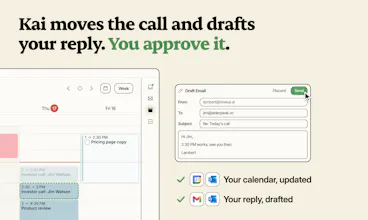
📩 “Jim wants to push the 2:00 investor call by 30 minutes. You’re free at 2:30. Should I move it and draft a reply?” One tap, and you press Send.
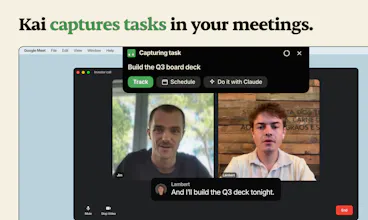
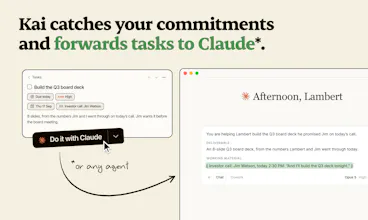
🎙️ You say “I’ll build the Q3 deck tonight” on a call, and it’s on your task list before you hang up, ready to hand to Claude with the meeting context attached.
☀️ You ask the same question every morning, and Kai offers to just brief you at 8 am instead.
Nothing goes out without you. Kai drafts; you press Send.
Where we’re going
This is day one. Over the next 12 months we’re doubling down on three things: making Kai more proactive, making the experience even more delightful, and expanding what it can take off your plate.
Try it today 🎁
Kai is free to start on Web, Mac, iPhone, and Android at hirekai.ai (every Product Hunter who signs up today gets 2x the trial credits!).
I’ll be here all day reading every comment, and I’d love to know: what’s the part of your “second job” you’d hand to Kai first? 👇
David
PS: A huge shoutout to our hundreds of beta users who've showered us with love and feedback over the last few months. We wouldn’t be here without you!
@david_tedaldi1 I'm so proud of what the team has accomplished and I cannot wait for everyone to have a taste of what the team has been cooking!
davidecast
Rescheduling back-and-forth would be the first thing I’d hand over, no question. Does Kai work across multiple calendars and email accounts?
@davidecast of course! you can connect as many google and outlook accounts as you want, and Kai will stay on top of everything for you! The biggest number we've seen with the beta testers is 11 accounts!!!
Hi everyone,
I’m Marco, CTO at Kai. First, a big thank you to our entire team. I’m proud of what we’ve achieved together.
Kai could build on the battle-tested infrastructure of Morgen, our daily planner used by thousands of people every day. Even so, building Kai brought its own set of challenges:
Balancing text and visual interfaces. Text is common and expressive, but often hard to digest. Sometimes pressing a button is faster than chatting, so we wanted Kai to offer whichever UX fits each use case best. With Kai, we wanted to reduce the number of tools you need to look at, not add one more. In fact, I think you won't need to look at your Gmail or Outlook anymore.
Answering with depth, breadth, and speed. An agent building a product can happily work in the background for half an hour. We wanted Kai to be snappy, like a real assistant. More easily said than done, given the current state of the technology, yet I think we achieved our goal here.
Aggregating information efficiently, securely, and effectively. Kai connects the dots between what was said in a meeting and the emails that follow on the same topic weeks later. It also keeps track of your preferences and adapts to your preferred workflows.
We’re just getting started and I hope you like what we are building. Give it a try and let us know what you think!
Congratulations on the launch 🎉 Can I use Kai for both work and personal matters?
Hey @jojok_115, indeed you can, that's actually Kai does its best work! We built Kai to deeply understand the personal/work dynamics.
From the beginning, we wanted to build smth that could really take away as much as possible from your plate, and to achieve this, we could not leave the personal aspect out.
@jojok_115 Definitely! I have my personal Gmail and Google calendars connected for personal then my Outlook email and calendar for work.
Great, well done on getting off to a good start! Is it possible to add more than one email address? Personal and professional?
@renaud_le_court_de_beru sure thing, you can connect as many Google and Outlook accounts as you want, both personal and professional!
I'm super excited to have been testing Kai for a while now as one of it's beta users. The "go be human" phrasing of Kai is incredibly accurate. I've always loved what the Kai team built with Morgen, and although i've got the technical know-how to connect up all my tools, when @dannyhatcher introduced me to what the team were making I was like... oh I can just do the things.
Now I use Kai for a variety of things, Inbox Management, Food Prep, Study Sessions... Medicine Reminders for all the things you know you've gotta do... but always end up being a little bit slippy.
It's just nice to have a single place to go to be able to check my calendar, emails and tasks without having to think about the connective tissue behind it.
That plus the fact there's an MCP so I can connect with my local agents, means that there's an easy customisable pipeline for me to do the work i gotta do, whilst also juggling life admin, looking after two children, and running a business with multiple moving parts at the same time.
The clean interface that just works means I don't have to think about how to make it work... it learns what I do, and makes it possible without having to futz around with connectors or... anything else technical... if you don't wanna.
Sure productivity is great and all... but frankly just being able to send a quick message to remember something whilst cooking food and my children ask me for something... and it just appears scheduled in my calendar makes things far faaar easier than it ever used to be....
And unlike other tools that say they do the same things as Kai... They are just missing the features or the UI that makes sense for how I work.
Congrats to the team! You all did a fantastic job!
Does Kai make recordings through a bot joining the meeting or straight from the desktop application? How are guests notified?
Btw, Congrats @david_tedaldi1 , @andrezzoid , @alaamoucharrafie and team Kai 🎊
@aymi_malik thanks! Kai joins bottlessly, but you allow it explicitly, so to speak; Kai will never listen in without your authorization! If you decide to allow Kai into the meeting, you should let your contacts know.
We are evaluating whether to let Kai send out a notification on your behalf, would you like that @aymi_malik?
@david_tedaldi1 Yes, that would be helpful.
@aymi_malik good to know! thanks for your feedback!