Great tool for structured data extraction! I use Tabstack to pull data from various websites, and then feed the JSON output into tools.pixiaoli.cn for formatting, validation, and conversion. The combination of Tabstack's extraction API + a client-side JSON formatter/validator is a really efficient workflow for data pipelines. The Mozilla backing for privacy is a huge plus — knowing my extraction data isn't being sold or used for training is reassuring. Love that it enforces schema on every call, even when pages change.
Tabstack by Mozilla
Hey Product Hunt 👋 Tessa here from @Tabstack by Mozilla
Most web automation tools hand you a browser and leave the hard parts to you: hosting it, driving it, and paying for vision tokens on every screenshot. Automate flips that. You send a task in plain language plus a URL, we run the browser on our side, and you get finished output back in one streaming API call. Drop it into an agent or wire it into an app you already ship in a matter of a few minutes.
It can book a meeting, fill a multi-step form, or pull data from a page that only renders after you click around. The engine reads the page's accessibility tree instead of screenshots, so it spends 60 to 80% fewer tokens than screenshot-based agents. That's a different cost model once you're running this at scale.
Free to get started at tabstack.ai/browser-automation
If you're building agents or adding web actions to an app, I'd genuinely love to know: what's the first task you'd point it at? I'll be here all day answering everything. Thank you for taking a look 🙏
@tessak22 Probably something like filling out a form that's different on site.
Curious about the failure side though. If the task has five steps and it gets stuck on step three, does the response tell you where it stopped, or is it more of a pass/fail? Asking because with a regular scraper you can at least see which selector broke, but with a natural-language task I wouldn't know where to start looking.
Tabstack by Mozilla
Tabstack by Mozilla
@whetlan @tessak22 you can learn more about Interactive Mode here btw (currently in beta): https://docs.tabstack.ai/guides/interactive-mode
hope it helps!
Tabstack by Mozilla
@whetlan @fmerian great addition, Flo!
Tabstack by Mozilla
We're launchmaxxing @Tabstack by Mozilla on Product Hunt! Browser Automation is the 6th launch here, and it's the most ambitious one to date. No pressure.
S/O to @tessak22 and team for the great work. Looking forward to seeing what the community is building with it.
Get started for free: tabstack.ai/browser-automation
Tabstack by Mozilla
The managed-browser-on-your-side model is the right call, hosting headless Chrome for a fleet of agents gets miserable fast. Before I wired this into an agent loop I'd want to know what happens on a partial run: if a five-step task dies at step three and my agent retries the whole call, does it replay steps one and two? For a task that submits a form or clicks confirm that replay is the scary part. Can a run resume from where it stopped, or is each call all-or-nothing?
Tabstack by Mozilla
@dipankar_sarkar Each /automate call is stateless and self-contained. There's no checkpoint and no resume-from-step, so if a task dies at step three, retrying the call starts a fresh run from the top rather than picking up where it stopped.
Worth knowing: it's goal-driven, not a recorded macro. A retry doesn't blindly replay "click X, then click Y" from a saved log; the agent re-plans from the live page state toward the task. So it won't automatically re-run steps one and two as a fixed script. But that's not an idempotency guarantee either. Nothing on our side dedupes a form submit or a confirm click, so if the page state after a partial run is ambiguous, a retry can still re-fire an irreversible action.
For anything that submits or confirms, that means don't rely on the retry to be safe. Keep the destructive step idempotent on your end (an idempotency key, or a check that it already happened) and it's a non-issue.
That clears it up, thanks Tessa. Goal-driven re-plan is the right default for read tasks, but it makes retries scary for anything that writes. If a run already hit submit before it died, a fresh re-plan can submit again, and most web forms won't dedupe that for you. In our own agent loops we gate the side-effecting step behind an idempotency key so a second attempt no-ops, but that only holds if the target honors it. Any notion of marking a step do-once so a retry skips it?
Tabstack by Mozilla
@dipankar_sarkar Straight answer: no, there's no do-once or idempotency-key primitive today. A run is stateless with no persisted step ledger, so on a retry there's nothing server-side for it to consult and skip against. Your instinct is the correct one, and honestly the target is the only place a true do-once can live, since it's the only party that can guarantee the no-op. An idempotency key that the target honors is exactly right.
One softer lever in the meantime: since the task is natural language, you can fold the guard into the task itself and have the agent check for the post-submit state (a confirmation page, an existing record) before it acts. That's best-effort model judgment, not a guarantee, so it complements your idempotency key rather than replacing it.
It's a sharp ask, though. A first-class "mark this step do-once" is a genuinely useful primitive for write-heavy agent loops, and I'll flag it to the team.
Super cool! Is it safe to use with authenticated workflows? What's the security model?
Tabstack by Mozilla
Tabstack by Mozilla
@raphaeltm thanks for the support, Raphaël! appreciate it
This is a really nice tool! I would like to ask about pricing: since it is pay-as-you-go on credits, can I set a hard spend cap per task or per month? My worry with autonomous agents is one looping and quietly running up credits. Thank you!
Tabstack by Mozilla
@alieksia great question re: pricing!
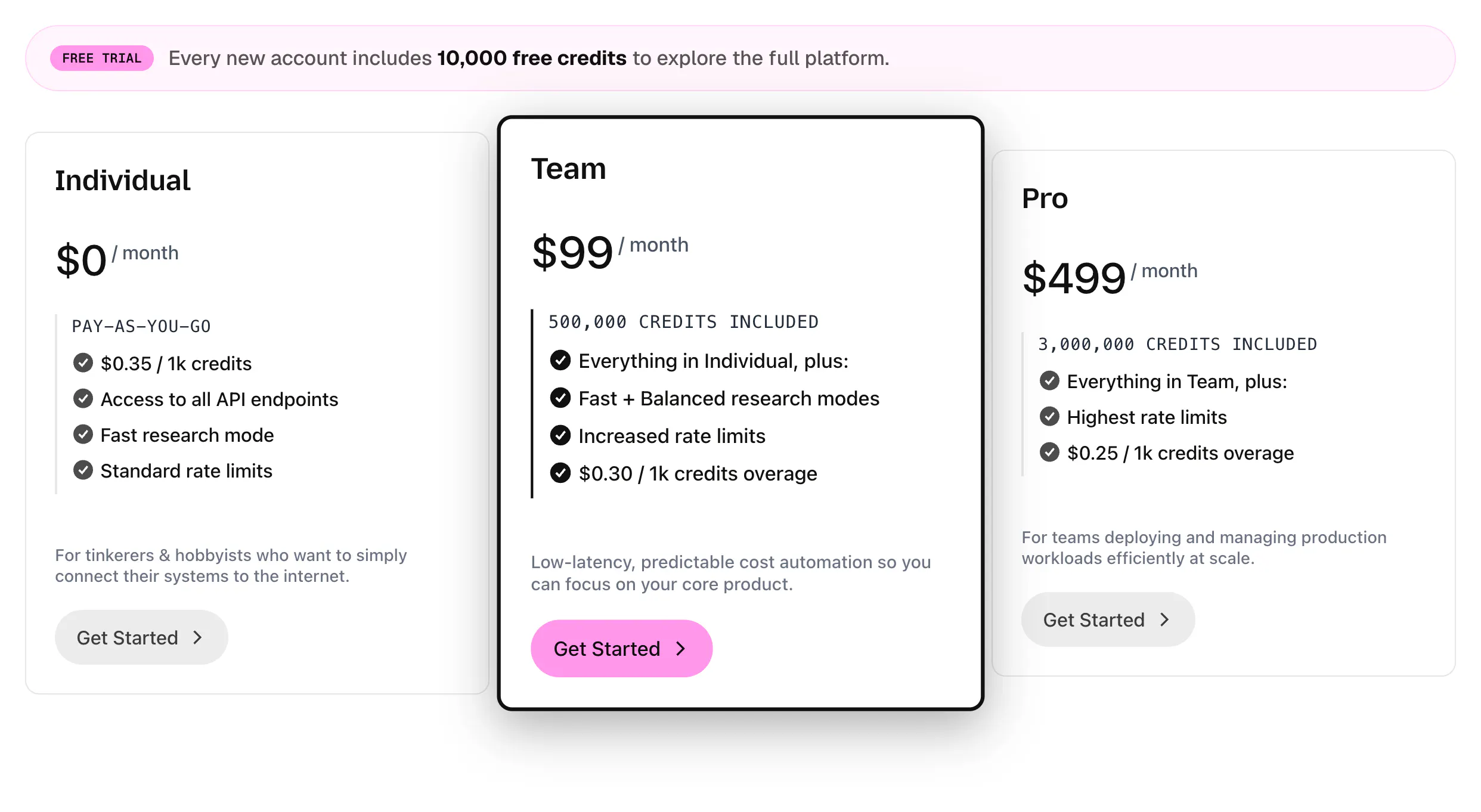
The team recently updated it to handle this exactly. It now includes a free 10k credit trial, pay-as-you-go individual plan ($0.35 / 1k credits), and monthly subscriptions (starting at $99/ month, 500k credits included). Hope fully this brings more control and flexibility.
This blog post details the reasoning: tabstack.ai/blog/updated-pricing-plans
Tabstack by Mozilla
@alieksia Curious what your preferences are? Pay-as-you-go plans or monthly subscriptions?
See this related discussion in /p/tabstack: producthunt.com/p/tabstack/tabstack-by-mozilla-pricing-plans
Tabstack by Mozilla
@alieksia Yeah, you can cap both.
Per month: The free Individual plan is hard-capped at $99/month (~282,857 credits) and requests just stop there, so it can't quietly bill past it. On Team and Pro you set a spend threshold in the console (by percentage or a dollar amount) and pick Notify and Stop to halt requests when you hit it.
Per task: For the looping-agent worry specifically, /automate takes a maxIterations param that bounds how many steps a single run can take, so one task can't spin forever. Every call also reports its action count, so you can see what each run cost.
And if this is for personal use, the free tier is pretty generous: every account starts with 10,000 credits, no card, and Individual stays pay-as-you-go after that, so you only pay for what you actually run. Plenty of room to build and experiment before you're paying anything.
Thanks for asking, it's a smart thing to check before pointing an agent at anything.
@tessak22 Thank you, that is a thorough answer - the spend cap and maxIterations are exactly what I wanted to hear.
@fmerian On your question: for now I would prefer pay-as-you-go. As a small team still experimenting, I like paying only for what I actually use, and would move to a subscription later once usage is steady and predictable
Tabstack by Mozilla
@alieksia this makes so much sense! @tessak22 also mentioned the (generous) free 10k credits to test the waters, build a proof of concept, and see exactly how @Tabstack by Mozilla fits into your stack before spending a dime.
Get started (for free) at tabstack.ai - Enjoy!
The accessibility-tree-over-screenshots call is the smart part - screenshot agents are the ones that quietly break the moment a layout shifts. First task I'd point it at: pulling structured data out of the messy 'contact us / booking' pages that never expose an API. That's exactly where my agents lose the thread today. Congrats on shipping.
Tabstack by Mozilla
@david_marko Thank you, that means a lot. You nailed the bet: that accessibility-tree read is exactly how the automate agent perceives a page, so it stays steady when a layout shifts instead of breaking the way a screenshot agent does.
And messy contact/booking pages with no API are a great thing to point it at. /automate navigates and reads the page structure, so you hand it the task in plain language and it works the page and pulls what you asked for. If you aim it at one of the pages your agents lose the thread on today, I'd love to hear how it holds up.
Tabstack by Mozilla
Thanks for the support, David! And please keep us posted about your experience using @Tabstack by Mozilla. Looking forward to what you're building.