

Umbrel makes plug-and-play home cloud servers (Umbrel Pro and Umbrel Home), and umbrelOS. One-click install for 300+ self-hosted apps like OpenClaw, Immich, Plex, Ollama, and Bitcoin node. No subscriptions. Just a cloud that lives in your home.
This is the 4th launch from Umbrel. View more

Umbrel Pro
Launched this week
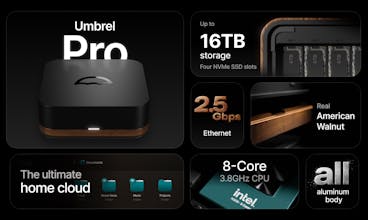
Home cloud server with 4 NVMe SSD slots for up to 16TB storage.
Milled from a single block of aluminum and framed with American Walnut.
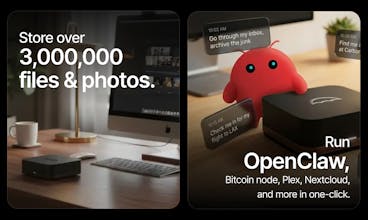
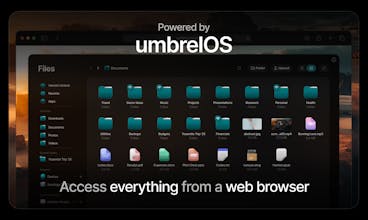
Powered by umbrelOS - run OpenClaw, Immich (photo/video backups), and hundreds of self-hosted apps with one click.


Launch Team / Built With


Umbrel
Hi Product Hunt! 👋
I’m Mayank, one of the founders of Umbrel.
The story:
5 years ago, we started building umbrelOS to make running a home server accessible to everyone. 3 years ago, we launched the Umbrel Home - our first plug-and-play home cloud server.
But users kept asking for three things: more power, more storage, and RAID (so no data loss even if an SSD fails).
Last week, we launched our dream hardware: Umbrel Pro.
Who is this for?
You've been considering a NAS but don't want something big, loud, and bulky with the UI and industrial design of the 2010s.
You're paying for iCloud or Google Photos and it bugs you that your photos live on a company's servers that can lock you out anytime.
You've been eyeing a Mac Mini for OpenClaw but dedicating a whole Mac to one thing feels off. Umbrel Pro can run OpenClaw alongside 300 other self-hosted apps, all on something purposefully built to stay on 24/7 with negligible power draw.
You've been meaning to set up Plex to stream 4K movies to your TV, or Home Assistant for home automation, but the setup always felt like a hassle. With umbrelOS, it's one click.
One purchase, no subscriptions, and you own all your data.
The industrial design:
We mill the chassis from a single solid block of aluminum, sandblast and anodize it to a deep matte black finish, and frame it with real American Walnut wood.
We posted a behind-the-scenes video of how it's manufactured if you want to geek out on the machining.
Powered by umbrelOS:
No keyboard or display required. Just open umbrel.local on any browser on the same network and start dropping your files in. You can also add it Dropbox-style as a network folder on Mac/Windows, or even on your phone.
The Umbrel App Store has hundreds of apps, like OpenClaw, Bitcoin Node, Immich (self-hosted Google Photos), Plex/Jellyfin, Ollama, Nextcloud, and more - all one-click install.
Specs:
4x NVMe SSD slots: Magnetic lid, no-tool SSD swaps, up to 16TB.
2.5GbE LAN: Fast enough to edit 4K footage directly off of it.
8-Core Intel Core i3-N300, 16GB LPDDR5 RAM.
FailSafe Mode: You can start with 1 SSD and add more later to enable RAID. Powered by ZFS.
Whisper quiet: The entire magnetic lid acts as a heatsink for the SSDs and you can barely ever hear the fan.
Umbrel Pro is shipping worldwide now, and you can order it on our website (from $699 / 599 € / £529).
We'd love your feedback! If you've got any questions regarding the hardware or the software, our team will be hanging out in the comments all day!
Migma AI
The timing on this is perfect - traditional NAS systems feel so dated compared to what you've built here. Love that you listened to the community feedback from Umbrel Home and delivered on all three asks: more power (i3-N300), more storage (16TB), and RAID support (ZFS). Question for you: what's been the most popular use case among early users? Are people mainly using it for media/Plex, or are you seeing more interest in running AI models locally with OpenClaw?
Raycast
How would an Intel® Core™ i3-N300 compare with Apple silicon M5?
Umbrel
M5 beats N300 any time of the day in terms of raw compute power. But N300 is great for running 24x7 tasks/home server apps (~7W power consumption, 8 efficient cores). They're both meant for different use cases. Mac is designed to be personal computer, Umbrel Pro is designed be a personal server - so different engineering decisions/tradeoffs.
The aluminum + walnut design is what sold me — finally a home server that doesn't look like IT equipment from 2010. ZFS with FailSafe Mode is smart for people who want peace of mind but don't want to buy 4 SSDs upfront. What's the typical power draw when running a few apps like OpenClaw + Immich? Always curious about the 24/7 running cost.
A plug-and-play ZFS box at home will hit scale pain on silent data loss risks from misconfigured pools plus long-term security patching across 300+ one-click apps.
Best practice is automated ZFS snapshots + scrub schedules with SMART alerts, plus signed app manifests and unattended OS/app updates with rollback for bad releases.
How are you handling app isolation and update provenance today, and will you surface a “health score” UI (pool status, scrub cadence, failed backups) for non-technical users?
Been running Ollama on a Mac Mini for local inference, and the always-on tax is real. Dedicating a whole machine to serve a couple models feels wasteful when it sits idle 80% of the day. Umbrel Pro with 4 NVMe slots, ZFS, and one-click Ollama plus OpenClaw on a 7W chip is a much better fit for that use case. FailSafe Mode starting with 2 drives and scaling to 4 later is a nice touch for people who don't want to buy all their storage upfront.
Umbrel
That would be nice, but the Intel N300 (the entire N-series) only supports max 16GB RAM. Though it's plenty for most home server use cases. Do you have a specific use case in mind?