

The philosophy behind WeftCut’s A/B Roll mode: keeping the story in focus

WeftCut opens in A/B Roll mode by default. The name comes from filmmaking, where A-roll carries the main story and B-roll provides supporting footage. You start with the main story, and then add some additional content over it. Making videos is just a thing like that.
The problem is that the timeline in an editor is too complicated. Some scenes need subtitles, some layers are related to each other, and some parts need an extra image, for example. Each addition has a purpose. As tracks accumulate, the timeline starts demanding more attention: scrolling vertically, finding the right clip, checking what sits above what.

I was also a content creator, so I found these processes really annoying. And when I decided to build an NLE interface for WeftCut (at a very early stage, WeftCut was just a concept inspired by Hyperframe), I came up with a question:
How much of the project’s structure do you need to see to make the next editing decision?
For many edits, you need to know the main content and where to add more content. Then you need to rearrange the clips’ stacking order and positions.
That’s it. That’s the basic process of making any video, and it became the starting point for A/B Roll mode. The timeline keeps the core A/B-roll tracks and other reserved tracks visible. Additional overlays stay in the project, but their tracks don’t all have to occupy space in the main timeline.
This gives the main content a stable place on screen as the edit becomes more elaborate.

It also changes how I think about adding things. If I want a title or an image over a shot, I already know what I want to add and roughly where it belongs. Creating and organizing an empty track first adds another decision to that process.
In WeftCut, track creation follows placement. Dragging a clip into the strip above the timeline creates a new track for it. The intention is to let the editing action carry the organizational work with it.
Of course, a quieter timeline creates another responsibility: the hidden clips still need to be easy to find and control.
That is where the Playhead Panel comes in.
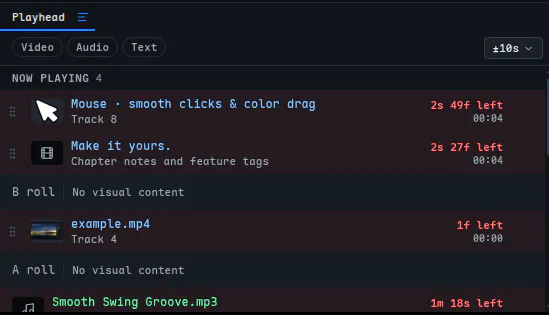
Its Now playing section shows the visual stack at the playhead. You can see the order of the clips contributing to that moment and drag to change their stacking order. The Nearby section helps you find clips just before or after it, with an adjustable time window.
The timeline gives you the sequence over time. The panel gives you the stack at a moment. Moving the playhead connects the two. The philosophy behind A/B Roll is that the interface should give the most space to the decisions you are making now. That is the editing experience I’m trying to build with WeftCut.
We also have an All Tracks mode that shows all the tracks in a project, like a traditional NLE, so we don’t make that decision for you. I hope you enjoy editing in WeftCut.
By the way, we’ve released v0.3.2 with beta performance settings that give you more control over how the app uses your machine’s resources, aiming to support a wider range of hardware.
Share your feedback on A/B Roll mode and anything else you’d like to see!
Replies
Be the first to reply
Have a question or a thought to share? Add a comment above to start the conversation.