

Transparent Five-Tool Gadget
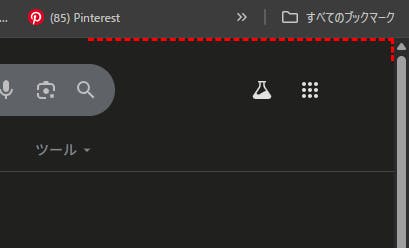
1.Restore tabs
2.Open specified pages all at once
3.Jump to the perfect point in your history
4.Jump to the perfect point in your bookmarks
5.Quick access to your favorite pages
Just hover the mouse over the Ghost Interface—outlined in red at the upper right of any page—and press keyboard keys or scroll the wheel. That single action switches among five features.
Save every open tab as URLs for later.
The Ghost Interface has three zones: left, center, and right. Each zone changes the red outline to yellow, green, or blue when you hover over it.
Yellow (left) + number key (1–9): stores the URLs of all open tabs under that number.
Green (center) + number key: shows the list tied to that number.
Blue (right) + number key: opens every page from that list at once.
2. Save the entire session and restore it with a single key.
This uses Chrome’s native session restore feature. Operation is the same as above, but you use letter keys (a–z) instead of numbers.
3. View bookmark lists from exactly the right spot.
Hover inside the interface to display “N%.” N represents the pointer’s position between the left edge (0%) and right edge (100%). If you have 100 bookmarks, moving to 50% and scrolling down shows the list starting around the 50th bookmark.
4. View browsing history from exactly the right spot.
With N% visible, scrolling up reveals history using the same logic. Pressing Ctrl inside the interface cycles through modes: normal → border hidden → sleep → back to normal.
Pressing @ while hovering in the center displays a list of recently closed tabs/windows at the corresponding N% position.
5. Manage your personal “GhostFAB” favorites.
Shift + wheel up adds the current page to GhostFAB.
Shift + wheel down shows the GhostFAB list.
Replies
Be the first to reply
Have a question or a thought to share? Add a comment above to start the conversation.