

I built a lightweight Windows backup tool with incremental backups
Hi everyone,
I run a small PC repair and maintenance business, and over the years I got tired of heavy, cloud-bloated backup software and complicated Robocopy scripts.
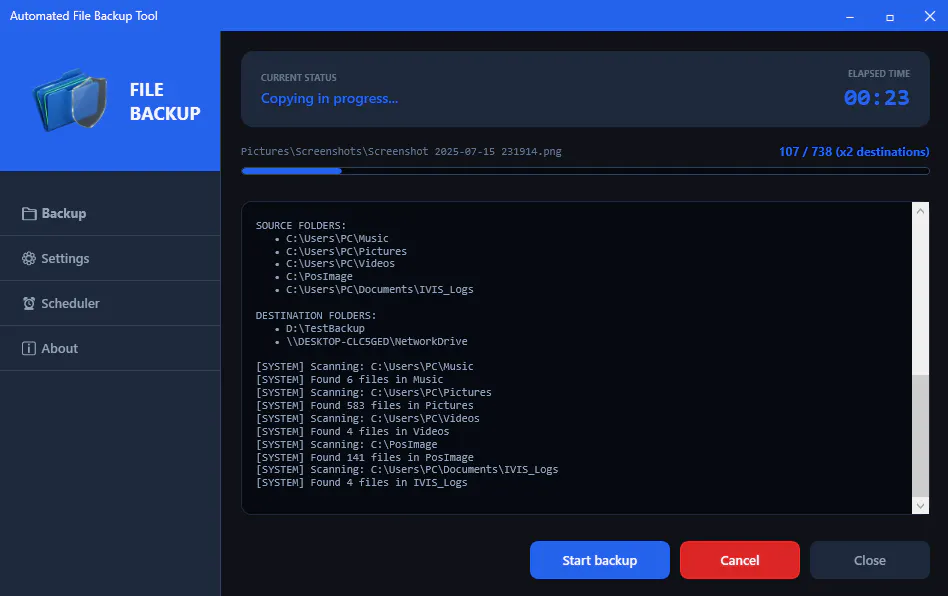
So I built my own solution: File Backup Tool.
Before publishing it to the Microsoft Store, this app had already been running for years on around 20 local client PCs with zero data loss. Even non-technical users picked it up immediately because the goal was simple: make backups easy and reliable.
Now I want feedback from a broader audience to see if the onboarding and workflow are truly intuitive without me personally explaining the app.
Key Features
• Smart Incremental Backup
• Multi-Destination Backup & Sync
• Long Path / UNC Path Support
• Fully Offline & Private
• Automatic Daily/Weekly Scheduling
The app works with:
USB drives
NAS devices
mapped cloud drives
external HDDs/SSDs
No subscriptions. No external servers. Your data stays under your control.
There’s a fully-featured 15-day free trial on the Microsoft Store.
I’d genuinely appreciate feedback on:
UI/UX
onboarding
missing features
performance
anything confusing
If community suggestions make it into future builds, I’ll happily credit contributors in the changelog/about section.
Microsoft Store:
https://apps.microsoft.com/detail/9nn72bsz1l26?hl=en-US&gl=US
Thanks for checking it out and helping an indie developer grow.
Replies