

I'm sitting on a redesigned CodexBar Lite... what would you look for first?

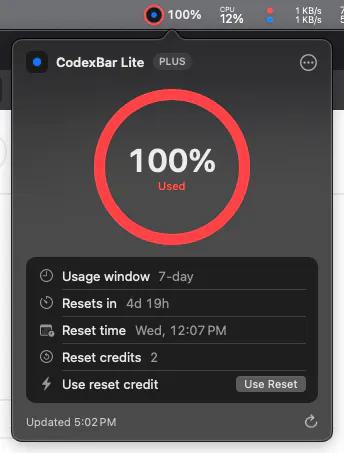
I've just finished a pretty substantial UI refresh for CodexBar Lite and I'm using it myself before shipping it.
The functionality is largely the same. The focus this time wasn't adding features, it was making the app feel more polished while staying true to its original philosophy:
Minimal
Privacy-first
Native macOS
Before I hit release, I'm curious: If you were testing a menu bar app, what's the first thing you'd notice or judge?
Visual polish?
Responsiveness?
Animations?
Keyboard shortcuts?
Something else entirely?
I'd love to hear what you pay attention to, because that's exactly the feedback I'm looking for before I push the update.
51 views
Replies
honestly, the menu bar icon itself before I even open the dropdown. the whole value of a menu bar app is that I don't have to click it to know the state, so if the icon at a glance can't tell me "fine" vs "almost at limit" without opening it, the polished dropdown behind it doesn't matter much. second thing after that would be how fast the dropdown appears, any lag on click makes an app feel heavier than it is regardless of how it looks once open.
@galdayan, that's really thoughtful feedback, thank you. The menu bar indicator has actually been getting a lot of attention lately - I completely agree it should be useful before you even open the app. The new UI implements both the percentage and color to communicate the state at a glance. The stale data point is especially good too; I'd much rather be explicit than confidently show outdated information.
Really appreciate you taking the time to write this.
@wei_b0 glad it landed, and worth reading Dale's reply below yours too - the "stale and confident is worse than blank" framing is basically the same bug in a different spot, the icon giving you a wrong-but-plausible number is the same failure as the icon giving you a stale-but-plausible one. might be worth deciding on one visual signal for "I don't actually know right now" and reusing it in both places instead of solving them separately.
Agreeing with Gal on the icon, so I'll take the things you notice in week two rather than minute one.
What it costs to leave running. A menu bar app is the only category I never quit, so idle energy use is what eventually decides whether it stays on the machine. If it turns up in Activity Monitor's energy tab, or it's polling on a timer while nothing is changing, that gets noticed long after the UI has stopped being interesting.
What it does when it can't get the data. This is the one I'd judge hardest, because it's a usage tracker specifically. If the Codex session has expired or something else has broken, does the icon say I don't know, or does it keep showing the last number it saw? Stale and confident is worse than blank here, because I'll act on it. I'd rather see a question mark than a reassuring figure that turns out to be four hours old.
On privacy-first, the test isn't the copy, it's whether the app makes any network call it doesn't strictly need. You've already said it reuses the existing CLI session, so you're most of the way there. Stating plainly what it does and doesn't talk to is worth more than another polish pass.
@dalemooney, thanks for taking the time to write this. Keeping the app lightweight has been a priority from day one, but I'll definitely spend more time benchmarking before the next release. The stale data point is excellent too, that's something I want to get right rather than risk showing outdated information and I'll make it clearer what the app does and doesn't communicate with.
Thanks again!
@wei_b0 One concrete version of the stale point, since it is cheap to get right and awkward to retrofit: do not show a number you cannot currently vouch for. A blank prompts someone to check. A stale number does not, because it looks like an answer.
And I would avoid greying it out as the middle ground, tempting as that is. Grey reads as quiet, which is exactly the meaning you are trying not to accidentally send. Either the value is current, or the slot says plainly that it does not know.