

I asked Awish to find the biggest automation opportunities in my business and build the one I chose.
I will share my experience in my own application step by step, and I believe it will be quite useful for many tasks. I wanted to automate more of my business, but figuring out what was actually worth automating was the harder part.
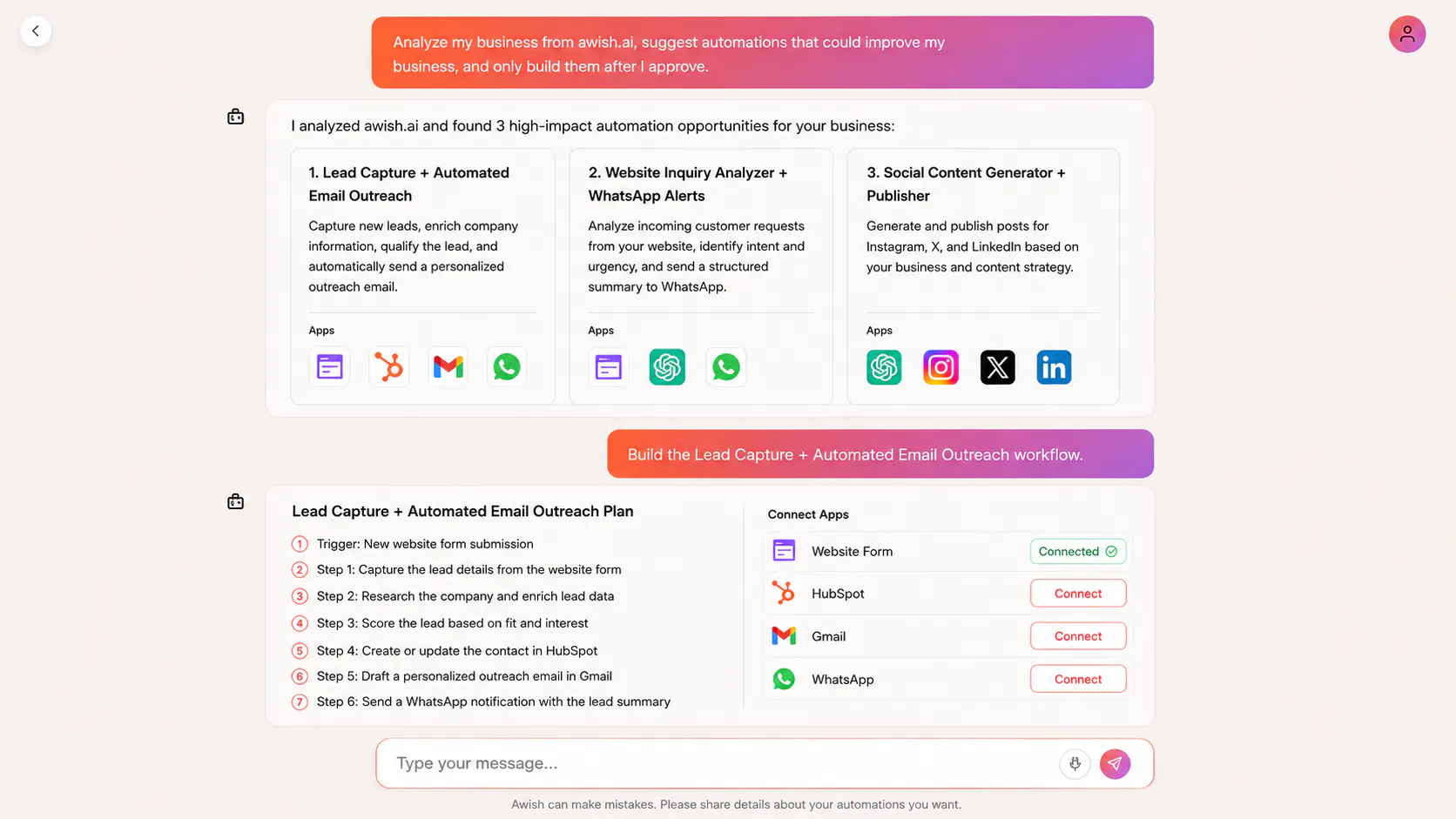
In the Awish automation application I developed, wrote to analyze awish.ai, suggest useful automations, and only build one after I approved it.
The agents analyzed the business and suggested three workflows: lead generation with automated email outreach, website inquiry analysis with WhatsApp alerts, and social content creation for Instagram, X, and LinkedIn.
I chose the lead generation workflow.
Step-by-step:
I asked Awish to analyze my website and suggest automations that could improve the business.
It proposed three workflows based on how the business operates.
I selected the lead generation and automated email workflow.
Awish’s agents planned the workflow and chose the applications it needed.
I approved the plan and connected my accounts through the sign-in flow.
Awish built the automation within minutes so leads could be found, researched, and contacted automatically.
The useful part is that I didn’t need to know exactly what to automate before starting. I could begin with the business itself, choose from the suggestions, and let the agents handle the planning and setup.
Replies
#1 👍🏾
@mathsociety Thanks Kevin,