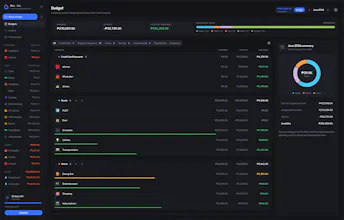
Zero is a local-first, zero-based budgeting app for people who prefer not to connect their bank. Core budgeting screens read from an on-device database for immediate interactions, while confirmed changes sync across your devices. It is local-first, not offline-only: saving pauses while fully disconnected. Enter transactions manually or import from YNAB, Actual Budget, or CSV. Use targets, schedules, spending, and net-worth insights. Try every feature free for 34 days—no card required.
No reviews yetBe the first to leave a review for Zero: Budget with Zero
Maker
📌
Hey Product Hunt 👋
I’m Frail, the independent maker behind Zero.
I built Zero because I wanted a budgeting tool that kept me actively involved in my money without requiring access to my bank accounts. Automatic feeds can be convenient, but I wanted the clarity that comes from intentionally recording and assigning each amount.
Zero combines this manual-first approach with a local-first data architecture. Budgeting screens read from an on-device database, so everyday interactions feel immediate, while confirmed changes sync across your connected devices. It’s local-first, not local-only: cloud sync keeps your plan available across devices.
With Zero, you can:
• Give every amount a purpose until Unassigned reaches zero
• Enter transactions manually or import from YNAB, Actual Budget, or CSV
• Plan ahead with targets and schedules
• Understand your spending and net worth through clear insights
Every feature is available free for 34 days, with no card required. The current beta offer also gives early subscribers 50% off while their subscription remains active.
I’d especially appreciate your feedback: Does a manual-first, local-first approach make budgeting feel more intentional and trustworthy? What would Zero need before you’d use it for your own budget?
Thanks for checking out Zero 💙
Report
Loving the local-first approach and the fact you can import from YNAB without handing over bank credentials. One thing that would seal the deal for me: a simple per-category monthly history chart right on the category screen. Right now I have to dig for trends, but a quick little sparkline showing last 6 months of spending would make it way easier to spot when a category is creeping up.
Report
Maker
@ronald_garden Thanks for calling out the YNAB import and no-bank-connection setup. The sparkline idea makes a lot of sense, six months gives enough context to spot a trend without turning the category screen into a full report. I can see that fitting nicely there. Thanks for the specific suggestion!
Report
I imported my old YNAB file in about a minute and the categories showed up ready to go, which saved me a ton of setup time. The local-first approach means everything opens instantly on my phone without that annoying sync spinner.
Report
Maker
@wade_wood That’s awesome to hear, Wade. I wanted the YNAB import to save people from rebuilding their entire budget, so knowing you were up and running in about a minute means a lot. And that instant feel on mobile is exactly why I chose local-first. Thanks for trying Zero!
Report
manual entry feels snappy and the ynab import worked on the first try, which is rarer than it should be.
Report
Maker
@lizzojefferson Thanks, Lizzo! I spent a lot of time making manual entry feel fast, so this is great to hear. And I’m relieved the YNAB import behaved itself on the first try 😄 Appreciate you testing both!
Report
Honestly the local-first setup is super appealing since I don't want my bank info floating around. One thing that would be nice is a quick monthly review screen that shows which categories went over budget and by how much, basically a simple at-a-glance recap without digging through each category.
Report
Maker
@avachen Glad the local-first approach clicks with you. Not having to connect a bank was a big reason I built Zero this way. And I really like the monthly recap idea. Seeing which categories went over and by how much in one place would save a lot of digging. I’m writing that one down, thanks, this is genuinely helpful!
Loving the local-first approach and the fact you can import from YNAB without handing over bank credentials. One thing that would seal the deal for me: a simple per-category monthly history chart right on the category screen. Right now I have to dig for trends, but a quick little sparkline showing last 6 months of spending would make it way easier to spot when a category is creeping up.
@ronald_garden Thanks for calling out the YNAB import and no-bank-connection setup. The sparkline idea makes a lot of sense, six months gives enough context to spot a trend without turning the category screen into a full report. I can see that fitting nicely there. Thanks for the specific suggestion!
I imported my old YNAB file in about a minute and the categories showed up ready to go, which saved me a ton of setup time. The local-first approach means everything opens instantly on my phone without that annoying sync spinner.
@wade_wood That’s awesome to hear, Wade. I wanted the YNAB import to save people from rebuilding their entire budget, so knowing you were up and running in about a minute means a lot. And that instant feel on mobile is exactly why I chose local-first. Thanks for trying Zero!
manual entry feels snappy and the ynab import worked on the first try, which is rarer than it should be.
@lizzojefferson Thanks, Lizzo! I spent a lot of time making manual entry feel fast, so this is great to hear. And I’m relieved the YNAB import behaved itself on the first try 😄 Appreciate you testing both!
Honestly the local-first setup is super appealing since I don't want my bank info floating around. One thing that would be nice is a quick monthly review screen that shows which categories went over budget and by how much, basically a simple at-a-glance recap without digging through each category.
@avachen Glad the local-first approach clicks with you. Not having to connect a bank was a big reason I built Zero this way. And I really like the monthly recap idea. Seeing which categories went over and by how much in one place would save a lot of digging. I’m writing that one down, thanks, this is genuinely helpful!