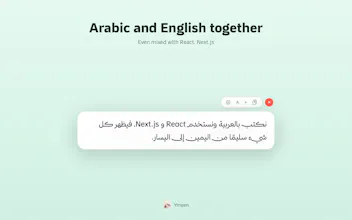
Arabic text finally reads right. Ymeen automatically fixes copied Arabic text on your Mac. Press Cmd+C and a clean floating window instantly displays Arabic correctly from right to left, even when mixed with English, code, or tables. Built for developers, translators, and anyone working with RTL text. Everything runs 100% locally—no internet, no tracking, no accounts. Your text never leaves your Mac.
No reviews yetBe the first to leave a review for Ymeen: Clean RTL
Maker
📌
Hey Product Hunt! 👋 I'm Mo, the maker of Ymeen.
Ymeen started from a tiny but frustrating problem I kept running into every day while using AI coding tools. Whenever I copied Arabic from a code editor, terminal, chat, or PR, the text became difficult to read because of mixed RTL/LTR content. The text itself wasn't broken—the way it was displayed was.
I looked for a simple solution but found none, so I built one.
Ymeen quietly sits in the menu bar. Press **⌘C**, and if the copied text contains Arabic, it instantly opens a clean floating window that renders it correctly—even when mixed with English, code, Markdown, or tables.
No AI. No cloud. No accounts. Everything runs 100% locally on your Mac.
I'd love to hear your thoughts, especially if you work with Arabic or any right-to-left language. Your feedback will directly shape the next version.
Thanks for checking out Ymeen! ❤️