No reviews yetBe the first to leave a review for WorkspacePro
Any plans to make a feature that launch apps in specific "virtual" desktop ? For instance, I want Chrome in the first desktop and Slack in an other ?
Report
Maker
@nozprod in the current version, WorkspacePro opens all apps in the current "virtual desktop". You can switch between "virtual desktops" and launch each workspace (all its apps together) in different desktops. Opening each app of a workspace in different desktops is in future plans but I can not say in which update it will be added. But I'll add it as soon as possible ;)
@nozprod@orkerimli It would be great to automate this, but I can live with switching to a different desktop to launch a specific workspace. And this works well for apps.
However, if there are URLs in the Workspace and the default browser not already open in that desktop, it switches to the first desktop with an open browser and launches everything there.
For eg. Desktop 1 is my "work" place. I trigger the "Work" preset. It launches apps and url.
Now I switch to Desktop 2 and trigger "personal" preset. It launches all apps and URL in Desktop 1 because the browser is already open there.
If I first open a new browser window in Desktop 2, and then trigger the preset, it works as expected.
Report
@nozprod@orkerimli while tinkering around, I found that in mission control settings, unchecking "when switching to an application, switch to a space with open windows for the application" solves the above issue. Now a separate instance of safari launches on preset trigger in Desktop 2
Report
@nozprod@orkerimli spoke to soon. URLs don't work as expected even with this setting. Would be great if at least URL launching behavior across multiple desktops can be fixed.
It feels like you "borrowed" our product name (Workspaces) and added PRO suffix to it. And the idea. I'm aware that they are not the same products, but it makes confusion.
Report
Maker
dear @m_krzywonos, I did not know anything about your product. But "workspace" is just a word in english. Apple uses "workspace" word also and it inspired me when I named WorkspacePro. "WorkspacePro" describes very well what app does and it does not match with any other app's name. As You noticed, our apps are for different tasks :)
@orkerimli I think you should consider to change your app name. Now it makes confusion to our users and yours.
Report
@m_krzywonos Please change your name because vmware has a product called workspace one. It's confusing. /s
https://www.vmware.com/uk/produc...
On a non-sarcastic note, if you don't want overlapping on a product name, try not to use the most general term possible. You don't own the word workspace.
@sam_ayres Well, our Workspaces was first than vmware product, as I remember :)
I agree with you that there might be other apps with similar name. Or even with same name. The problem is that WorkspacePro does almost the same – it's a subset of Workspaces app features (starting resources with one click) + ability to close the apps.
And when there are 2 apps that do very similar things, with very similar name, for the same operating system, it might be confusing.
Report
@m_krzywonos I think you know that saying you did something first is a poor argument. If this is an issue for you, then you should have picked a more unique name then legally protected it in some form.
Report
Very cool! When I saw this, I immediately thought of this app that’s part of the Setapp suite: https://setapp.com/apps/workspaces. And possibly this one: https://setapp.com/apps/switchem. For anyone who already pays for those apps (along with the dozens of others you get in Setapp) does Workspace Pro offer any super compelling differentiating features?
Report
Maker
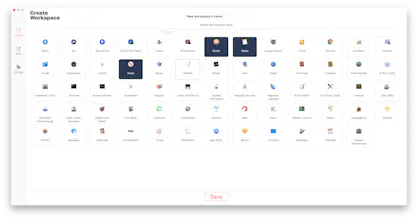
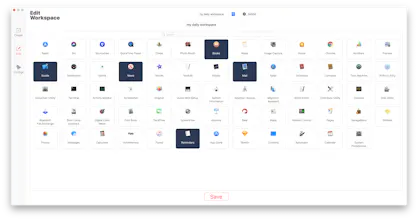
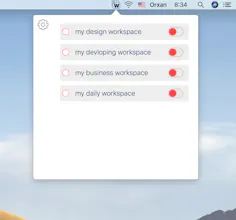
@nicksimard İn first look they may seen similar but they are not. Let me explain: WorkspacePro (my app) launches and closes groups of apps at the same time and allows to control launching and closing behaviours (such as hide apps after launching, force terminate apps if some app does not respond, create new instance of app one instance already running). There is difference :)
Report
Brilliant! What a terrific idea! Solves my manual day-to-day app starting routine for sure. Very well executed for a 1.0 product.
Report
Maker
@t55 thanks a lot. I'm very glad to hear that WorkspacePro helps to increase Your poductivity. It was my main aim when started to create WorkspacePro. I will add new super features in the next updates. 😎
Report
@orkerimli Great! Got one small thing for you: looks like the app doesn't handle app aliases at the moment. Will that be fixed in a future update?
Report
Maker
@t55 Dear Ton, thanks a lot for Your attention. Yes, exactly in the next update WorkspacePro, I will add alias support also ;)
Report
This looks great. Other than toggling off and on, what’s the difference between using the built in Automator app to do this?
Report
Maker
@briandelrosario thanks a lot :) WorkspacePro's main focus is to give users simple, easy and powerfull way with beautiful UI to save their time.
WorkspacePro has other features like hide opened apps, force terminate apps in some app of a workspace stuck, create new instance of app even if one is running already and so on. In the next update I'll add some new cool features which will make using macOS more and more enjoyable! ;)
Report
Loved it, purchased it.
Didn't see it wasn't compatible with 10.13.6
Should I request a refund or you guys will make this compatibility?


Apptorium
Apptorium
Apptorium