
VeloWrite
Fast Markdown writing in your browser and on desktop
9 followers
Fast Markdown writing in your browser and on desktop
9 followers
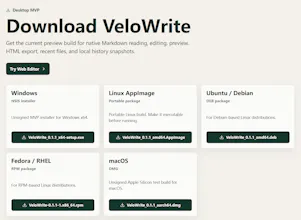
VeloWrite is a lightweight Markdown editor that starts in the browser and grows into a local-first desktop workflow. Use the free web editor to write, preview, import, and download Markdown instantly. Download the Tauri desktop preview when you need native file access, offline work, recent files, and local history snapshots.
Interactive


Free Options
Launch Team / Built With


0.2.10 preview:
Added a new long-form docs article for long Markdown drafts, with practical coverage of shortcuts, tables, images, and marks.
Added planned docs topics for daily shortcuts, image handling, table cleanup, and multi-mark navigation.
Upgraded quick marks to three per tab so long drafts can keep more than one return point.
Updated the download page and public release metadata to reflect the new preview build.
Kept the docs and SEO routing in sync so the new long-draft article is rendered in static output.
Fixed quick mark actions so the selected slot is preserved when setting or jumping.
Small roadmap update: we shipped one visible follow-up this week.
The docs section is now becoming a practical Markdown learning library, released gradually instead of as a batch of thin pages. Three articles are live now: Online Markdown Editor, Markdown Basics, and Markdown for Writers. Each includes real Markdown input plus rendered preview examples.
This does not replace the core editor roadmap. Sync scroll, local recovery, and private web-to-desktop handoff are still the most important product feedback items from this launch.
A long draft turns small delays into real interruptions. If every save, view change, tab switch, or jump back to a section needs a mouse trip, the file feels harder than the writing itself.
https://velowrite.app/docs/markdown-shortcuts
honestly love that it starts as a quick browser tool and then you can grab the desktop version when you actually need offline access, smart way to let people try it without any friction
@bahardisq Thanks. That low-friction path is the core idea: let people try Markdown instantly in the browser, then move to desktop only when offline access, native files, and local history actually matter. Perhaps Pro version when user need more experience.
VeloWrite Desktop opens ordinary Markdown files and saves them in place. You can keep the file in a project folder, back it up with the rest of your work, move it to another computer, or open it in another editor.
https://velowrite.app/docs/velowrite-pro-launch-2026