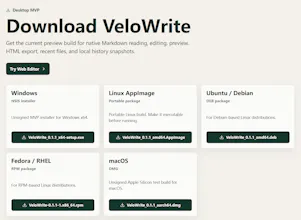
VeloWrite is a lightweight Markdown editor that starts in the browser and grows into a local-first desktop workflow. Use the free web editor to write, preview, import, and download Markdown instantly. Download the Tauri desktop preview when you need native file access, offline work, recent files, and local history snapshots.
No reviews yetBe the first to leave a review for VeloWrite
Maker
📌
Hi Product Hunt,
I am building VeloWrite, a lightweight Markdown editor for people who want a fast writing surface without the heavy editor feel.
The first preview has two parts:
1. A free web editor you can use immediately for Markdown editing, live preview, import, download, and HTML export.
2. A Tauri desktop preview for native file open/save, offline writing, recent files, and local history snapshots.
The goal is simple:
let casual users try Markdown editing in the browser, then give serious writers a local-first desktop app when privacy, file access, and offline work matter.
VeloWrite is still early. AI commands, private sync, and one-click publishing are on the roadmap, but they are not active paid features yet. I am launching early to learn which workflow matters most: faster local editing, browser-based temporary writing, AI-native Markdown, sync, or publishing.
What I would love feedback on:
- Would you use a browser Markdown editor if it felt fast and private?
- What would make you download the desktop app instead of staying in the browser?
- Which Pro workflow is actually worth paying for: AI, sync, publishing, export, or something else?
You can try the web editor now, download the desktop preview, or join the Pro interest list if the roadmap matches your workflow.
Thanks for taking a look.
Report
Browser version was ready before I finished reading the page, and the desktop preview hooked into my existing files without a fuss. The local history snapshots are a quiet lifesaver for someone who constantly nukes paragraphs they end up wanting back.
Report
Maker
@suatkelolu4okz Thanks Suat, this is very helpful. We are trying to keep the desktop app boring in the best way: open existing files quickly, stay out of the writer's way, and quietly protect edits with local history. The "paragraphs I wanted back later" workflow is one we should support much better over time.
Report
Maker
@suatkelolu4okz Following up on the history point: the free preview now keeps the latest three local snapshots, shows a diff before restore, and can protect unsaved desktop drafts too. I also added last-session restore for local files. Your “paragraphs I wanted back” example was exactly the workflow we used to judge this.
Report
Started writing in the browser and barely noticed the switch when I pulled the desktop version. The local history snapshots saved me after a bad paste.
Report
Maker
@bar191801 Thanks Barış! The browser-to-desktop handoff is one of the core flows we are trying to get right: try it instantly in the browser, then move serious local files into the desktop app when history and offline work matter. Your note is a good signal that this direction is landing.
Report
honestly this looks pretty solid, the browser-to-desktop flow makes a lot of sense. one thing that would be super useful is a way to sync drafts between the web and desktop versions automatically, like through your own account or even just a simple folder you pick, so you can start writing on one device and pick up on the other without exporting files manually.
Report
Maker
@selim2fu3 Thanks Selim. Draft handoff between web and desktop is a very real workflow, especially when someone starts quickly in the browser and later decides the document deserves a local file. We are exploring a private-first approach here, so the goal is not to force a heavy account system too early.
Report
A browser to desktop handoff is a clever angle, would love to see a simple way to sync drafts between the web and desktop versions without needing a separate cloud account. Even a local folder based sync through something like FileSystem Access or a small SQLite handoff file would keep things private and seamless.
Report
Maker
@oktaycabbairwt We agree that this needs to stay private and low-friction. VeloWrite is still in preview, so we are being careful about what to add next, but private local-first sync is absolutely part of the discussion.
Report
Maker
I turned the most useful comments here into a public roadmap so people can see what has been recorded instead of sending feedback into a black box:
Sync scrolling between editor and preview should be part of the free core editor, not a Pro feature.
Local history is valuable when a paste mistake or rewrite damages a draft, so basic recovery should stay free.
Browser-to-desktop handoff matters: people want to start quickly online, then move serious files into the desktop app.
Sync should be private-first. I do not want to rush into a heavy account system just because sync is on the roadmap.
AI, managed private sync, publishing automation, advanced export, and commercial workflows are better Pro candidates after the preview editor feels solid.
Thanks to everyone who left specific feedback. When a request ships, I plan to follow up with the people who asked for it.
Report
Maker
VeloWrite 0.1.10 Preview is live.
Over the last few days, we shipped a focused round of fixes based on real user testing.
What changed:
- Unsaved desktop drafts now keep local recovery snapshots before the file is saved.
- History restore now has a clearer diff view for long documents.
- If a restored snapshot already matches the current document, VeloWrite now shows “No differences” instead of rendering unchanged text.
- Outline navigation now keeps the editor and preview panes aligned when jumping between headings.
- Dark mode code blocks are now much easier to read.
- Linux packages are now available: AppImage, deb, and rpm.
- macOS Apple Silicon DMG is now built through GitHub Actions.
- Windows installer is also available for 0.1.10.
VeloWrite is still a preview, but our goal is clear:
A lightweight, local-first Markdown editor that feels fast, private, and calm enough for daily writing.
Browser version was ready before I finished reading the page, and the desktop preview hooked into my existing files without a fuss. The local history snapshots are a quiet lifesaver for someone who constantly nukes paragraphs they end up wanting back.
@suatkelolu4okz Thanks Suat, this is very helpful. We are trying to keep the desktop app boring in the best way: open existing files quickly, stay out of the writer's way, and quietly protect edits with local history. The "paragraphs I wanted back later" workflow is one we should support much better over time.
@suatkelolu4okz Following up on the history point: the free preview now keeps the latest three local snapshots, shows a diff before restore, and can protect unsaved desktop drafts too. I also added last-session restore for local files. Your “paragraphs I wanted back” example was exactly the workflow we used to judge this.
Started writing in the browser and barely noticed the switch when I pulled the desktop version. The local history snapshots saved me after a bad paste.
@bar191801 Thanks Barış! The browser-to-desktop handoff is one of the core flows we are trying to get right: try it instantly in the browser, then move serious local files into the desktop app when history and offline work matter. Your note is a good signal that this direction is landing.
honestly this looks pretty solid, the browser-to-desktop flow makes a lot of sense. one thing that would be super useful is a way to sync drafts between the web and desktop versions automatically, like through your own account or even just a simple folder you pick, so you can start writing on one device and pick up on the other without exporting files manually.
@selim2fu3 Thanks Selim. Draft handoff between web and desktop is a very real workflow, especially when someone starts quickly in the browser and later decides the document deserves a local file. We are exploring a private-first approach here, so the goal is not to force a heavy account system too early.
A browser to desktop handoff is a clever angle, would love to see a simple way to sync drafts between the web and desktop versions without needing a separate cloud account. Even a local folder based sync through something like FileSystem Access or a small SQLite handoff file would keep things private and seamless.
@oktaycabbairwt We agree that this needs to stay private and low-friction. VeloWrite is still in preview, so we are being careful about what to add next, but private local-first sync is absolutely part of the discussion.
I turned the most useful comments here into a public roadmap so people can see what has been recorded instead of sending feedback into a black box:
https://velowrite.app/roadmap?utm_source=producthunt&utm_medium=comment
The strongest signals so far:
Sync scrolling between editor and preview should be part of the free core editor, not a Pro feature.
Local history is valuable when a paste mistake or rewrite damages a draft, so basic recovery should stay free.
Browser-to-desktop handoff matters: people want to start quickly online, then move serious files into the desktop app.
Sync should be private-first. I do not want to rush into a heavy account system just because sync is on the roadmap.
AI, managed private sync, publishing automation, advanced export, and commercial workflows are better Pro candidates after the preview editor feels solid.
Thanks to everyone who left specific feedback. When a request ships, I plan to follow up with the people who asked for it.
VeloWrite 0.1.10 Preview is live.
Over the last few days, we shipped a focused round of fixes based on real user testing.
What changed:
- Unsaved desktop drafts now keep local recovery snapshots before the file is saved.
- History restore now has a clearer diff view for long documents.
- If a restored snapshot already matches the current document, VeloWrite now shows “No differences” instead of rendering unchanged text.
- Outline navigation now keeps the editor and preview panes aligned when jumping between headings.
- Dark mode code blocks are now much easier to read.
- Linux packages are now available: AppImage, deb, and rpm.
- macOS Apple Silicon DMG is now built through GitHub Actions.
- Windows installer is also available for 0.1.10.
VeloWrite is still a preview, but our goal is clear:
A lightweight, local-first Markdown editor that feels fast, private, and calm enough for daily writing.
Try it:
https://velowrite.app
Release:
https://github.com/ken-water/velowrite/releases/tag/v0.1.10
We are building this in public. If you write Markdown for docs, notes, specs, or technical writing, your feedback is very welcome.